
Top Retouch PC Software (commonly deployed as the Top Retouch Panel for Adobe Photoshop) is an advanced retouching extension and workflow utility designed for portrait photographers, commercial photo editors, and digital artists. Built to replace repetitive, manual Photoshop layer setups, the application consolidates complex editing techniques—such as multi-frequency separation, Dodge & Burn curves, micro-contrast enhancement, and digital makeup application—into an organized, panel-based interface.
Operating locally on Windows and macOS workstations, the software integrates directly into the Adobe Photoshop application frame as an HTML5/UXP extension panel. Instead of requiring users to build technical action stacks from scratch, Top Retouch provides quick-action buttons, automated layer generation scripts, and guided step-by-step workflows. It serves wedding photographers handling massive event batches, studio portrait artists requiring high-end skin texture preservation, and beginners seeking structured guidance through professional retouching passes.
The software is actively maintained across modern 64-bit Windows environments, supporting Photoshop releases from CS6 through modern Creative Cloud versions.
Key Features
The application incorporates a wide variety of retouching, color grading, skin smoothing, and step-by-step workflow tools.
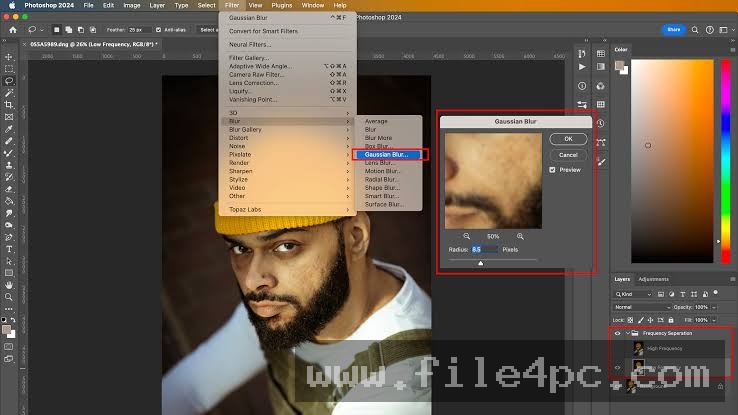
Multi-Frequency Separation Modules The panel automates frequency separation procedures, splitting images into distinct texture and tone layers. Users can select standard Gaussian separation methods or advanced 3-frequency separation (Gauss 3) to manipulate fine skin pores, medium tonal shifts, and broad color gradients independently without introducing blur artifacts.
Dodge & Burn Automation Systems To add depth and contour to facial features, the software provides one-click setups for Dodge & Burn workflows. It creates dedicated curve-based (DBC) or overlay-based (DBO) layers complete with visual check layers, allowing editors to smooth out skin blotchiness and highlight bone structure precisely.
Targeted Feature Retouching Tools Dedicated buttons isolate specific portrait elements for fast correction. The panel includes specialized routines for eye whitening and iris color enhancement, eyelash lining, natural teeth whitening, hair light reflection boosting, and redness/pink skin tone neutralization.
Digital Makeup and Color PalettesThe software includes a multi-tool digital makeup module. Editors can apply digital blusher, eyeshadow, lip color, and skin tanning effects using pre-configured color palettes and soft-blend masking layers.
Guided Interactive WorkflowsFor users learning portrait post-production, the panel features structured step-by-step modes. Interactive workflows—such as Pro Retouch, Fast Retouch, Auto Retouch, and Make Up Workflow—walk the editor through sequential steps, automatically selecting the appropriate tools and displaying contextual instructions at each phase.
Your May Also Like :: TinyNvidiaUpdateChecker PC Software
How Top Retouch PC Software Works
The operational process transitions smoothly from Photoshop integration to structured image refinement.
To begin, you open Adobe Photoshop on your PC and launch the panel from the Window > Extensions (or Plugins) top navigation menu. Opening an image inside Photoshop makes the panel's control buttons active.
Next, select your desired editing approach. If you prefer automated guidance, launch one of the built-in Workflows (such as Fast Retouch). The panel executes underlying scripts to build necessary layer groups, prompting you to paint over target areas like skin, eyes, or lips using standard Photoshop brush tools.
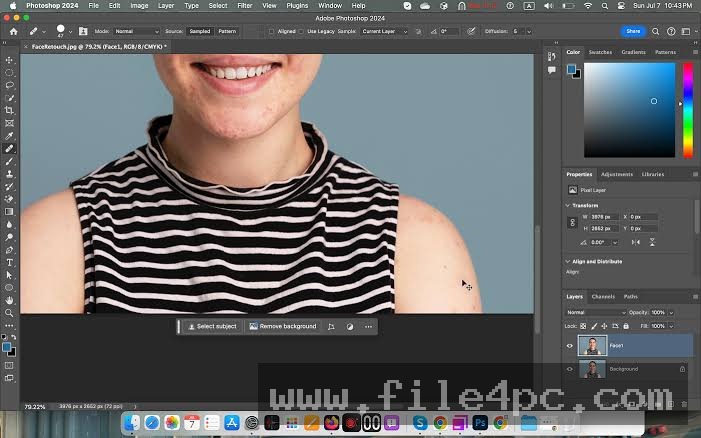
If you prefer manual control, click specific utility buttons as needed. For instance, clicking Gauss 3 generates a 3-frequency layer stack instantly. You can then use the Healing Brush or Stamp tools on the high-frequency texture layer while using soft blur tools on the low-frequency color layer. Once adjustments are complete, flattening or exporting the document returns standard high-resolution image files.
Benefits and Limitations
Evaluating the utility requires balancing its rapid action generation against its operational reliance on a host program.
Benefits
The primary advantage is massive time savings during high-volume photo editing. Generating complex curve setups, frequency separation stacks, and visual helper layers manually can take several minutes per photo, whereas the panel completes these structural setups in seconds. The guided workflows make advanced dodge-and-burn techniques accessible to novice editors without requiring years of script-building experience. Additionally, because edits are rendered on standard Photoshop layers, users retain 100% non-destructive control over layer opacity and masks.
Limitations
The primary restriction is that Top Retouch is an extension panel, not a standalone image editor. It requires a licensed installation of Adobe Photoshop to run. Furthermore, while automated buttons build the layer architecture instantly, achieving natural-looking portrait results still requires skill with standard mouse or drawing tablet brush strokes; overusing automated skin smoothing functions without fine brush control can lead to an artificially plastic appearance.
What's New
The developers update panel scripts periodically to maintain compatibility with modern host architectures and Adobe execution APIs.
Verified aspects of its operational lifecycle include:
-
UXP/HTML5 Panel Engine Optimizations: Refined script execution for fast layer generation on modern multi-core PC processors.
-
High-DPI Display Scaling: UI adjustments ensuring button panels and text instructions render clearly across 4K desktop setups.
-
Photoshop CC Compatibility Verification: Continuous script updates ensuring stable operation across recent Adobe Photoshop releases on 64-bit Windows 10 and Windows 11 systems.
Installation and Setup
Setting up the panel inside Adobe Photoshop on a Windows PC involves a standard extension installation procedure.
-
Download the official panel package file (typically provided as a
.zxpextension or zip archive) from a verified vendor. -
Close Adobe Photoshop before initiating setup.
-
Use an extension utility installer (such as Anastasiy’s Extension Manager or ZXP Installer) to deploy the
.zxpfile into Photoshop’s panels directory. Alternatively, manually copy the unzipped panel folder intoC:\Program Files\Common Files\Adobe\CEP\extensions\. -
Open Adobe Photoshop, navigate to Window > Extensions (or Plugins), and select Top Retouch to open the panel workspace.
-
If prompted, load any included Photoshop actions (
.atn) or brush presets bundled with the package to ensure full script functionality.
Download Safety Warning: Obtain extension panels only from legitimate design marketplaces or official developer outlets. Avoid downloading modified or "cracked" ZIP archives from unverified file-sharing portals, as unauthorized installer scripts can compromise host system security.
Tips for Using Top Retouch PC Software
Use a graphics drawing tablet (such as a Wacom or Huion tablet) when working with Dodge & Burn layers. Pressure sensitivity allows for far smoother brush opacity transitions when contouring skin tones compared to standard computer mice.
Always zoom in to 100% when fine-tuning frequency separation parameters. Evaluating skin pore detail at actual pixel size ensures you set appropriate blur radius values, preventing halo artifacts around high-contrast edges.
Lower the opacity of generated effect groups. If an automated skin retouching or glowing highlight effect appears too strong, reducing the parent layer group opacity to 40%–60% creates a more natural, subtle result.
Modern Alternatives
Depending on whether you prefer script panels inside Photoshop, standalone AI software, or alternative extension interfaces, several choices exist.
Beauty Retouch Panel (by Retouching Academy) is an established Photoshop extension panel. It focuses heavily on high-end beauty and fashion retouching, providing clean scripts for frequency separation, skin smoothing, and batch processing alongside extensive educational documentation.
Retouch4me is a suite of AI-driven retouching plugins that operate both inside Photoshop and as standalone desktop applications. Instead of requiring manual brushwork over generated layers, Retouch4me uses neural networks to automatically detect and heal skin blemishes, dodge and burn, and clean up fabric creases.
Imagenomic Portraiture is a popular standalone plugin for Photoshop and Lightroom. It specializes in automatic skin smoothing and skin tone masking, allowing photographers to apply consistent batch smoothing across large wedding shoots using slider controls.
Who Should Use Top Retouch PC Software?
This utility is ideal for portrait photographers, wedding photo editors, studio retouching technicians, and digital artists who already utilize Adobe Photoshop in their daily editing pipeline. If you want to streamline layer setup times, automate frequency separation, and access guided workflows for skin and feature retouching without leaving your main image editor, it provides a practical workspace.
However, photographers looking for standalone batch editors without subscription-based host apps, or those who want fully automatic zero-brushwork AI processing, will be better served by standalone tools like Retouch4me or Imagenomic Portraiture.
FAQ
Is Top Retouch PC Software a standalone program?
No. The software is an extension panel designed specifically to run inside Adobe Photoshop. It requires an active installation of Photoshop to function.
Which versions of Adobe Photoshop are supported?
The panel supports Adobe Photoshop CS6 and modern Adobe Photoshop Creative Cloud (CC) releases operating on 32-bit and 64-bit Windows operating systems.
Does the panel modify original image files permanently?
No. All operations generated by the panel create non-destructive adjustment layers, frequency separation stacks, and masked groups inside your active Photoshop document, leaving the original background layer intact.
Can I use the panel for commercial client work?
Yes. Commercial purchases of the panel include full usage rights for editing personal photos as well as commercial client assignments.
Conclusion
Top Retouch PC Software offers an efficient, structured solution for streamlining portrait post-production inside Adobe Photoshop. By automating technical setups for frequency separation, Dodge & Burn, and feature-specific color corrections, it eliminates tedious manual layer creation while preserving complete creative control over final brushwork.
While editors must possess a host installation of Photoshop and basic brush skills to achieve optimal results, the panel’s guided workflows and extensive feature set make it a valuable asset. For portrait photographers seeking to speed up editing turnarounds while maintaining professional quality standards, it delivers a dependable, time-saving tool.

💬 0 Comments
✍ Leave a Comment