SimplySync Backup PC Software is a lightweight file synchronization and folder backup utility designed by Visual Synchronizer for Microsoft Windows operating systems. Created specifically to simplify routine file duplication, it provides a straightforward interface for copying data between local hard drives, external USB storage media, network shares, and mapped drives. Unlike heavy system-imaging suites that lock data inside proprietary archive files, it focuses on direct, file-for-file synchronization to ensure target folders mirror source directories in native formats.
Operating locally on Windows desktops and laptops, the software targets users who need a dependable, uncomplicated backup tool without navigating overwhelming configuration panels. It serves home users backing up personal photo libraries, office workers mirroring document folders onto external drives, and technicians looking for portable backup options.
Visual Synchronizer distributes the application as freeware for personal use, alongside a paid Home/Pro tier that unlocks advanced features like scheduled background synchronization, job command-line execution, and multi-folder job profiles across Windows 10 and older desktop builds.
Key Features
The application incorporates a focused collection of folder matching, file filtering, and synchronization options.
Direct File-to-File Mirroring The core processing engine duplicates source files directly into target destinations in their native format. Because files are not compressed into proprietary container archives, users can access, open, and read backed-up files on any computer without installing the software.
Two-Way Synchronization and One-Way Backup Modes The application supports multiple synchronization behaviors. Users can configure one-way backup jobs (copying new and modified files from source to destination) or two-way sync jobs (reconciling changes across both locations so both folders remain identical).
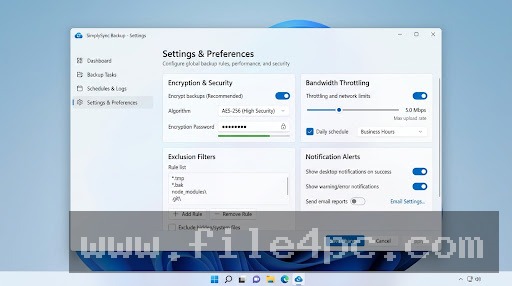
Flexible File Exclusion and Inclusion Filters To keep backups clean and fast, the tool includes file filtering controls. Users can create rule lists to skip hidden system files, temporary browser caches, specific file extensions (such as .tmp or .log), or designated subdirectories.
Strict Criteria Matching (Date, Time, and Size) Before transferring files, the software compares source and target items based on file size, modification timestamps, and attribute flags. Skipping unchanged files dramatically speeds up subsequent incremental backup passes.
Your May Also Like :: Snippai PC Software
Portable Execution Option The software can be run directly from an external USB flash drive or portable disk without requiring a full system registry installation. This allows technicians to perform quick backup routines on client PCs without installing host software.
How SimplySync Backup PC Software Works
The operational workflow flows logically from directory selection to file execution.
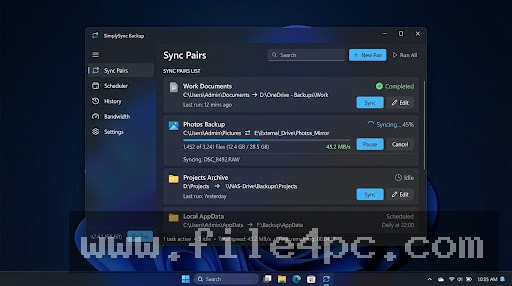
To begin, open the application workspace. Select your Source Folder (the directory containing your active files) and your Target Folder (the destination backup location, such as an external USB hard drive or secondary internal partition).
Next, select your desired synchronization mode. Choose between a standard One-Way Backup (which only writes updates from source to target) or a Two-Way Sync (which merges updates in both directions). Configure any optional file filtering rules if you wish to bypass temporary files or specific subfolders.
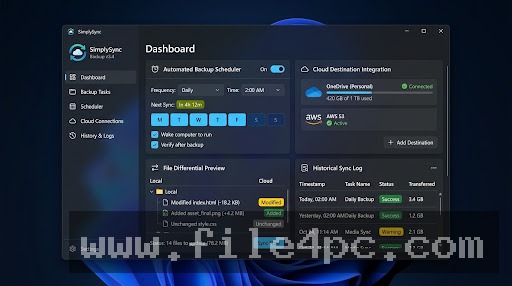
Click the Preview or Analyze button. The software performs a dry-run comparison, presenting a summary table of files marked for creation, modification, or deletion. Once you verify the list, click Start Sync to execute the file transfer.
Important Data Warning: When selecting strict two-way synchronization or enabling options to delete target files missing from the source directory, double-check your folder paths before clicking Start. Misconfiguring target directories can lead to unintended file overwriting.
Benefits and Limitations
Understanding both the functional benefits and technical limits of the software helps determine its place in your backup strategy.
Benefits
The most prominent advantage is simplicity and native file availability. Because backed-up files are stored in open, uncompressed Windows folder structures, retrieving a misplaced file requires no special extraction tools. Its small installation footprint and low RAM usage ensure that background file transfers run smoothly without dragging down system performance. Furthermore, the availability of a portable edition makes field usage on multiple workstations convenient.
Limitations
The primary restriction is that it is strictly a file and folder synchronization tool rather than a full system backup solution. It cannot create bare-metal system drive images, back up active operating system boot sectors, or perform VSS-based live open file locks required for active SQL databases. Additionally, because the original interface was designed for classic Windows builds, it lacks native cloud integration features (such as direct web transfers to Google Drive or AWS S3) found in modern enterprise tools.
What's New
Visual Synchronizer maintains the utility as a stable legacy file synchronization tool across software distribution platforms.
Verified factual aspects of its development status include:
-
Stable Legacy Release Series: Maintained as a lightweight, zero-bloat file sync utility for 32-bit and 64-bit Windows architectures.
-
Refined File Attribute Engine: Verified handling of long file path parameters and Windows NTFS attribute flags.
-
Portable Package Availability: Continued distribution of zero-installation executable packages for portable USB drive deployment.
Installation and Setup
Setting up the software on a Windows computer involves a simple process.
Download the setup executable or portable ZIP archive from a verified software repository. If using the installer, run the setup wizard, review the software agreement, and select your target installation directory.
If using the portable version, extract the archive contents to your external backup drive or USB stick. Running SimplySync.exe directly launches the interface without registering background services or altering system files.
Tips for Using SimplySync Backup PC Software
Always run an Analysis / Preview Pass before performing your first major synchronization job. Inspecting the file action list beforehand prevents accidental overwrites if folder paths were inverted.
Keep the Delete Unmatched Files option disabled unless you explicitly intend to maintain an absolute 1:1 mirror image. Keeping this setting off ensures that files manually saved to your external backup drive are not deleted during subsequent incremental runs.
Save your frequently used backup jobs as saved profile configurations. Creating dedicated profiles for "Photo Backup," "Work Documents," and "Project Archives" allows you to execute routine backup passes with a single click.
Modern Alternatives
Depending on whether your workflow requires real-time background syncing, block-level deduplication, or cloud uploads, several alternative utilities exist.
FreeFileSync is a powerful, open-source file synchronization tool. It features visual file comparison tables, real-time directory monitoring via RealTimeSync, and cross-platform support for Windows, macOS, and Linux.
FastCopy is an exceptionally fast open-source file copy and synchronization tool for Windows. Optimized for high-throughput data transfers, it excels at moving millions of small files across local drives and network shares using optimized buffer memory.
Syncthing is a free, open-source continuous file synchronization system. It synchronizes files securely between multiple devices over local networks or the internet using encrypted peer-to-peer connections without relying on central cloud servers.
Who Should Use SimplySync Backup PC Software?
This software is ideal for home users, office staff, and IT technicians who need a clean, lightweight, and uncompressed folder synchronization tool for Windows. If you want a straightforward program to copy documents, photos, and project folders to external USB drives without dealing with complex cloud accounts or proprietary backup archives, it offers a reliable workflow.
However, users needing full system image backups, bare-metal recovery tools, real-time cloud server sync, or cross-platform macOS support will be better served by comprehensive backup platforms like FreeFileSync, Macrium Reflect, or Syncthing.
FAQ
Is SimplySync Backup PC Software free or paid?
The developer provides a basic free edition for personal desktop use, alongside commercial Home and Pro license tiers that unlock automated background scheduling, command-line flags, and multi-profile capabilities.
Are backed-up files compressed into a single archive file?
No. The application performs direct file-to-file mirroring, preserving native file formats and directory folder structures on the target drive.
Can I run the software without installing it on Windows?
Yes. The portable version can be placed on a USB flash drive or external hard drive and executed directly on any compatible Windows PC without installation.
Does the software support cloud storage drives?
While it does not contain built-in cloud API protocols (such as WebDAV or S3), it can synchronize files to cloud storage folders (like OneDrive, Dropbox, or Google Drive) as long as those services are mapped as local directories on your PC.
Conclusion
SimplySync Backup PC Software offers a clean, dependable solution for local file synchronization and folder mirroring on Windows PCs. By focusing on direct file-to-file transfers without proprietary compression, it ensures that your critical documents and media remain accessible on any computer.
While users requiring system drive imaging or native cloud server sync will need broader backup suites, its small memory footprint, portable options, and straightforward operation make it a practical utility for routine file safety. For anyone seeking a fast, no-nonsense tool to keep external backup drives updated, it provides a solid desktop solution.
💬 0 Comments
✍ Leave a Comment