
DxO FilmPack PC Software is a specialized digital photo-editing application created to replicate the distinctive look, color tones, and textures of traditional silver halide photographic film. In contemporary digital photography, images often capture sharp detail and clean clarity, but they can sometimes lack the organic warmth and character associated with classic analog film stocks. This desktop program provides photographers with tools to emulate legendary film types, add authentic grain structures, and apply vintage creative effects to their digital images.
Overview
Digital sensors record light with mathematical precision, producing clean files that many photographers choose to style with historical artistic choices. While basic editing programs offer generic preset filters, capturing the exact chemistry and response curve of specific films requires dedicated rendering technology. This software addresses that demand by studying the physical characteristics of classic films in specialized laboratories to recreate their exact visual traits on computer screens.
The application is built for professional photographers, advanced hobbyists, and digital artists who want precise control over the aesthetic qualities of their work on Windows workstations. Operating either as a standalone application or as a plugin for other editing suites, it integrates smoothly into existing photography workflows. Its core purpose is to bridge the gap between modern digital capture and traditional darkroom aesthetics without requiring actual chemical processing.
Key Features
The software incorporates a comprehensive set of tools designed to simulate analog photography down to the microscopic level.
-
Authentic Film Emulations: The application includes dozens of verified color and black-and-white film profiles modeled after real-world stocks from manufacturers like Kodak, Fujifilm, and Ilford.
-
Advanced Grain Engine: A specialized simulation algorithm reproduces the actual physical structure of silver halide crystals, applying realistic grain patterns tailored to ISO sensitivity levels.
-
Micro-Contrast and Tone Tools: Fine-tuning controls allow creators to manipulate local contrast, highlights, and shadows to match the tonal response of traditional photographic paper.
-
Creative Vignettes and Textures: Users can add subtle light leaks, scratches, and edge darkening effects to give digital files an aged, vintage appearance.
-
Original Darkroom Effects: Specialized rendering options simulate historic toning processes, such as sepia, cyanotype, and split-toning.
How DxO FilmPack PC Software Works
Operating the utility follows a straightforward workflow tailored to image processing.
First, the user obtains the installation package from the official DxO website and completes the setup wizard on a compatible Windows computer. Upon launching the program, users can either open individual images directly in the standalone interface or load the software as a plugin from within a host photo editor.
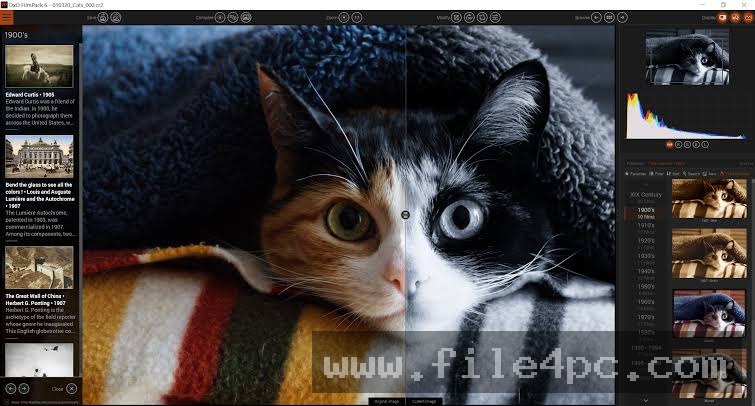
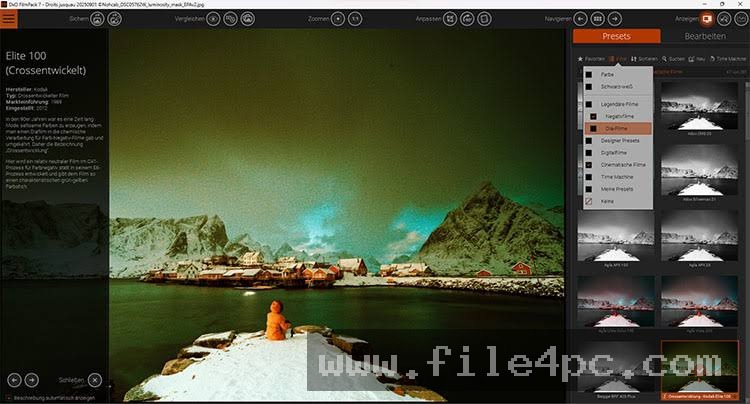
Once an image is open on the workspace, the right-hand panel displays a categorized list of film presets and adjustment sliders. Selecting a film profile immediately transforms the image tones. The user can then modify parameters such as grain intensity, contrast curves, and border styles. After achieving the desired look, the file is exported in standard formats like JPEG or TIFF, delivering a finished image that mimics the physical characteristics of analog film.
Benefits and Limitations
Benefits
The primary advantage of the software is its scientific approach to film emulation. Unlike random digital filters, its profiles are built on measured data from physical film tests, resulting in authentic color responses and highlight roll-offs. Its dual nature as both a standalone program and a plugin provides flexibility for different editing styles. Additionally, the ability to control grain size and distribution independently gives creators precise artistic command over their final outputs.
Your May Also Like :: Duplicate Finder Professional PC Software
Limitations
Despite its advanced capabilities, the application has specific technical boundaries. It operates on a commercial licensing model that requires a paid purchase for full access after the evaluation period. Processing very large, high-resolution raw files can also demand significant system resources, impacting computer performance on older hardware configurations. Furthermore, it is designed exclusively for image styling and does not replace comprehensive raw editing or asset management suites.
What's New
Development updates for the software typically focus on expanding the catalog of available film renderings, improving processing speed for high-resolution cameras, and refining compatibility with modern Windows operating system updates. Recent revisions concentrate on optimizing multi-threaded performance to ensure smooth rendering when applying complex grain structures to large batches of images.
Developers also continue to update camera profile support to match contemporary digital sensor characteristics. These ongoing maintenance adjustments help maintain consistent performance across updated Windows environments.
Installation and Setup
Installing the software requires administrative privileges on your Windows workstation to ensure proper file placement and system registration. Users should always obtain installation packages directly from the official developer portal to guarantee authenticity.
Run the downloaded setup executable and follow the prompts provided by the installation wizard. Choose your preferred storage directory and complete the installation steps. Upon first launch, enter your license activation code to unlock the full toolset. Configure your plugin preferences if you intend to use the software alongside other photo editing applications installed on your system.
Tips for Using DxO FilmPack PC Software
To achieve natural results when working with film emulations, keep several practical guidelines in mind:
-
Apply Grain Sparingly: Keep grain intensity balanced relative to your image resolution to avoid an artificial, noisy appearance.
-
Match Film to Subject: Pair high-contrast black-and-white film profiles with street photography or portraits for a classic documentary look.
-
Use Virtual Copies: Create multiple virtual copies of an image within the workspace to experiment with different film stocks side by side.
-
Combine with Optics Modules: Apply lens correction profiles first to remove geometric distortion before adding vintage film characteristics.
Modern Alternatives
Several alternative applications exist for photographers seeking different methods for film simulation and stylistic grading. Adobe Lightroom and Camera Raw provide extensive preset libraries and basic grain sliders built directly into their standard editing suites. Capture One offers robust color grading tools and custom style packages tailored for professional studio workflows.
Nik Collection includes specialized plugins like Silver Efex for black-and-white conversion and Analog Efex for vintage camera effects. Choosing between these alternatives depends on whether you prefer an all-in-one cataloging suite or a dedicated simulation specialist.
Who Should Use DxO FilmPack PC Software?
This software is well-suited for portrait, landscape, and fine-art photographers who appreciate the aesthetic qualities of traditional film and want to bring those characteristics into a digital workflow. It benefits creators who want scientific accuracy in their film simulations rather than trendy digital filters.
Conversely, commercial product photographers or technical architects who require absolute color accuracy and clinical sharpness will find film emulation workflows unnecessary for their projects. Similarly, casual hobbyists who only edit snapshots occasionally may find dedicated simulation suites more advanced than required.
FAQ
Can I use the software as a plugin for other photo editors?
Yes, the application can be installed as a plugin for compatible host programs like Adobe Photoshop and Lightroom, or used as a standalone editor.
Are the film presets based on real analog film stocks?
Yes, the presets are modeled scientifically using measurements taken from physical chemical film stocks under controlled laboratory conditions.
Does the program support RAW image files?
Yes, the software can open and process RAW files directly, preserving wide dynamic ranges during the film rendering process.
Is an internet connection required to run the software?
An internet connection is required during initial installation and license activation, but the core editing features function offline once registered.
Conclusion
DxO FilmPack PC Software provides a precise, scientifically grounded toolset for photographers seeking to infuse digital images with the character of analog film. By combining measured film profiles with customizable grain and tone controls, it bridges the gap between historical photography and modern digital workflows.
Evaluating your personal artistic style will help determine whether this simulation suite fits your editing routine. For creators looking to add authentic analog textures and classic color science to their digital photographs, this application delivers dependable performance.

💬 0 Comments
✍ Leave a Comment