

DxO ViewPoint PC Software is a specialized desktop application designed to correct geometric distortions, perspective angles, and wide-angle stretch in digital photographs. When photographers capture buildings, interiors, or expansive landscapes, camera angles and lens limitations frequently introduce skewed lines or warped proportions. This Windows utility provides precision control tools to straighten crooked structures and restore natural visual balance to images.
Overview
Digital photography offers incredible creative freedom, but physical shooting angles often create optical distortion. When a camera is tilted upward to photograph a tall building, the vertical lines converge, making the structure look like it is leaning backward. Similarly, ultra-wide lenses stretch objects positioned near the edges of the frame, distorting human subjects and architectural features.
This application addresses these specific geometric flaws with mathematical precision. It is built for professional photographers, real estate agents, architectural creators, and advanced hobbyists who require geometrically accurate images. Operating either as a standalone program or as an integrated plugin inside popular photo editors, it provides dedicated geometry correction tools without requiring complex multi-step manual transformations.
Your May Also Like :: DxO PhotoLab PC Software
Key Features
The software incorporates a specialized toolset designed to fix complex lens geometry and spatial distortion.
-
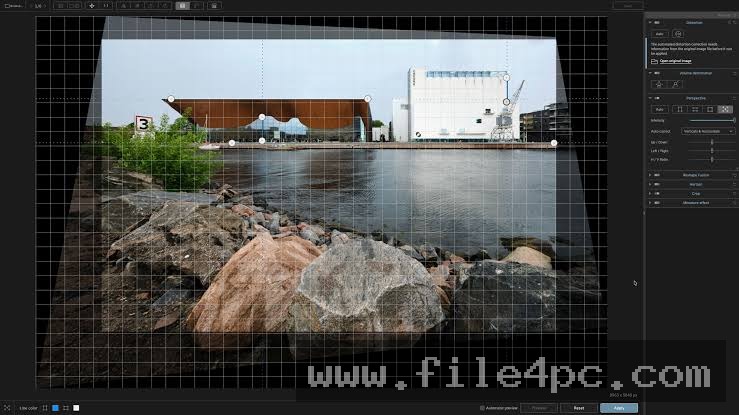
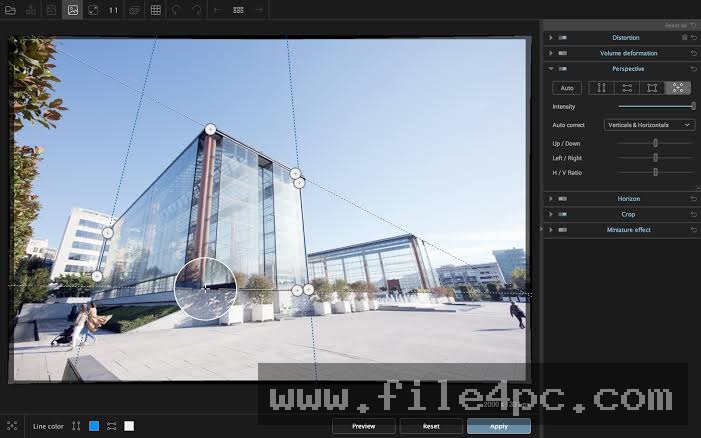
Advanced Perspective Correction: The application features intuitive anchor points that allow users to straighten both horizontal and vertical converging lines with a few clicks, restoring natural alignment to buildings and interiors.
-
Volume Deformation Correction: Specialized algorithms fix the stretched appearance of objects and people located near the edges of ultra-wide-angle photographs, restoring natural proportions.
-
Miniature Effect Simulation: Users can apply selective blur gradients to simulate the aesthetic of a tilt-shift lens, turning real-world scenes into miniature model effects.
-
Automatic Horizon Leveling: The software detects crooked horizons within images and automatically levels them while cropping out empty border spaces efficiently.
-
Detailed Grid Overlays: Customizable alignment grids help creators ensure precise symmetry and alignment during complex perspective adjustments.
How DxO ViewPoint PC Software Works
Operating the utility follows a straightforward workflow tailored to geometric correction and spatial touch-ups.
First, the user obtains the official installation setup package from the developer website and completes the installation wizard on a compatible Windows PC. Upon launching the program, users can either open individual raw or JPEG images directly in the standalone interface or load the software as a plugin from within a host photo editing suite.
Once an image is open on the workspace, the user selects the perspective tool and drags alignment lines along the distorted architectural elements or horizons in the picture. The software instantly calculates the required geometric transformation and realigns the pixels. The user can then fine-tune adjustments using side panel sliders for volume deformation or miniature blur before exporting the finalized image file in standard formats like JPEG or TIFF.
Benefits and Limitations
Benefits
The primary advantage is the exceptional precision of its perspective and volume correction algorithms. Unlike generic transform tools in basic editors, this application specifically targets wide-angle edge stretching while maintaining natural subject proportions. Its dual functionality as both a standalone utility and a plugin ensures it fits smoothly into established photo editing routines.
Limitations
The software operates on a commercial licensing model requiring a paid purchase or upgrade fee for major releases. It also focuses strictly on geometry and perspective correction, meaning it does not include features for color grading, retouching, or comprehensive file management. Furthermore, correcting extreme perspective angles requires cropping away outer image boundaries, which reduces the final pixel dimensions of the photo.
What's New
Recent software updates focus on refining performance speed and expanding camera database compatibility for modern ultra-wide lenses. Developers continue to optimize the application for seamless integration with updated Windows operating system builds and high-resolution display monitors.
Routine maintenance updates also improve the responsiveness of the interactive control lines, making manual perspective adjustments smoother and more intuitive during high-volume batch editing sessions.
Installation and Setup
Installing the utility requires standard administrator privileges on a compatible Windows desktop environment to ensure proper system file placement and plugin registration. Users must always download the official setup executable directly from the developer platform to guarantee software safety and file integrity.
Run the downloaded installer and follow the on-screen prompts to place application files on your primary system drive. During the initial launch phase, input a valid license key to unlock full processing capabilities and configure your plugin preferences if you intend to use the software alongside other photo editing applications installed on your workstation.
Tips for Using DxO ViewPoint PC Software
Maximizing the effectiveness of the utility involves applying a few strategic workflow practices:
-
Use Reference Lines Carefully: Place perspective anchor points along long, distinct architectural lines to achieve the most accurate vertical and horizontal straightening.
-
Check Edge Proportions: When applying volume correction to wide-angle landscape or group photos, monitor the outer edges of the frame to ensure human subjects look natural.
-
Leverage Grid Overlays: Turn on the alignment grid overlay to verify that straight lines match up perfectly with structural elements before exporting your final image.
-
Crop Conservatively: Keep in mind that aggressive perspective straightening requires cropping, so leave a little extra space around your primary subjects when shooting in the field.
Modern Alternatives
Alternative photo editing suites include built-in geometry panels and upright correction tools that handle basic perspective fixing directly inside their main interfaces. Specialized stitching and panorama software often incorporate automated perspective alignment features for architectural and real estate photography. Open-source raw processors also provide manual grid-based transformation tools for users seeking non-commercial solutions. Choosing between these alternatives depends on whether you require dedicated geometric precision or general-purpose editing capabilities.
Who Should Use DxO ViewPoint PC Software?
This application serves architectural, real estate, interior design, and travel photographers who frequently work with wide-angle lenses and encounter distorted perspectives. It benefits creators who demand scientific precision when straightening converging lines and fixing edge stretching in professional portfolios.
Conversely, casual smartphone photographers or hobbyists who rarely shoot with wide-angle lenses will find dedicated geometry correction software unnecessary for their casual requirements. Similarly, users focused entirely on digital illustration or graphic design will find perspective tools outside their standard workflow needs.
FAQ
Can the software be used as a plugin for other editors?
Yes, the application can be installed as a plugin for compatible host programs like Adobe Photoshop and Lightroom, or used as a standalone utility.
Does correcting perspective reduce the overall image size?
Yes, straightening converging lines and rotating crooked horizons shifts the image boundaries, requiring the software to crop the outer edges to fill the rectangular frame.
Can I fix stretched faces in wide-angle group photos?
Yes, the volume deformation tool specifically targets and corrects the unnatural stretching of subjects positioned near the edges of wide-angle shots.
Is an internet connection required to run the software?
An internet connection is only required during initial software activation, while core geometric correction tasks operate entirely offline.
Conclusion
DxO ViewPoint PC Software provides a focused, mathematically rigorous solution for photographers seeking to correct perspective distortion and wide-angle stretch on Windows systems. By combining intuitive alignment tools with advanced volume deformation control, it simplifies challenging architectural and landscape editing tasks.
Evaluating your specific photographic subjects and lens choices will help clarify whether this dedicated geometry utility belongs in your digital toolbox. For creators who refuse to compromise on architectural accuracy and visual proportion, it delivers dependable performance.
💬 0 Comments
✍ Leave a Comment