
Mozilla Thunderbird PC Software is a free, open-source cross-platform desktop email client, personal information manager, and communication suite developed by MZLA Technologies Corporation (a subsidiary of the Mozilla Foundation). Built to give users complete sovereignty over their data, it consolidates multiple email accounts, calendars, contact address books, task lists, and messaging feeds into a single unified workspace. Unlike webmail interfaces that lock user messages inside third-party cloud portals, Thunderbird stores messages, attachments, and encryption keys locally on host storage drives.
Operating natively on 64-bit and 32-bit Windows, macOS, and Linux desktop architectures, the client provides an alternative to proprietary tools like Microsoft Outlook or Apple Mail. It serves privacy-focused individuals, business professionals, system administrators, and organizations that demand offline email access, customized folder organization, and end-to-end PGP message encryption.
MZLA Technologies actively maintains the application across two release channels: monthly rapid releases and an Extended Support Release (ESR) track. Development focuses on modernization under major interface updates, native Exchange protocol integration, improved account setup workflows, and cross-platform synchronization with its Android and iOS mobile applications.
Key Features
The application incorporates a flexible suite of communications, privacy tools, data management, and calendar scheduling features.
Unified Multi-Account Management The software aggregates unlimited email accounts using standard protocols, including IMAP, POP3, and SMTP. Users can view incoming mail through a unified inbox folder or manage accounts separately within custom tree hierarchies. Modern OAuth2 authentication pipelines enable seamless sign-ins for services like Gmail, Microsoft 365, and Yahoo Mail.
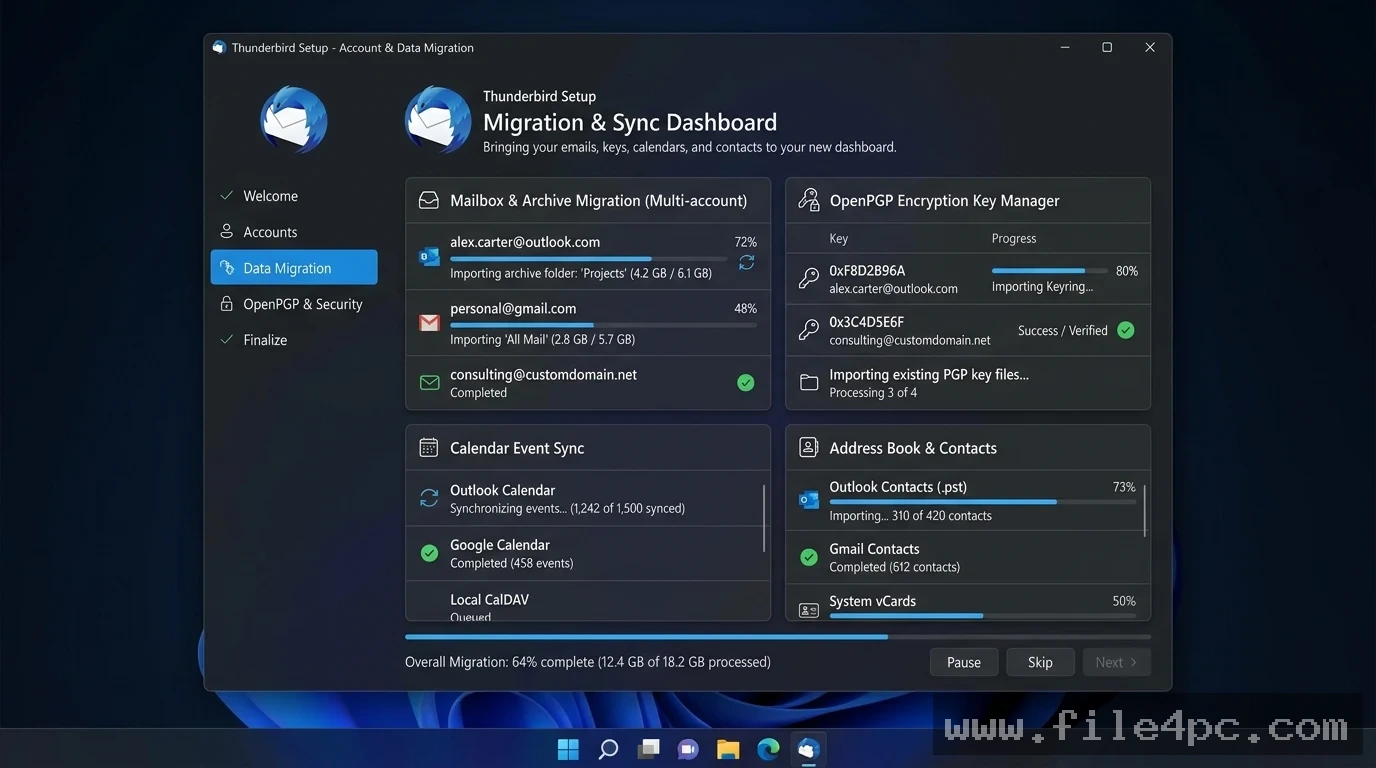
Integrated OpenPGP and Security Controls Data privacy is built directly into the client's architecture. It includes native OpenPGP digital signature and end-to-end message encryption capabilities without requiring secondary plugins. Built-in phishing detection, remote image blocking, and customizable junk mail filters protect users from malicious tracking scripts and unsolicited spam.
Built-In Lightning Calendar and Task Manager Beyond email handling, the software includes a full-featured scheduling system. Users can manage daily agendas, schedule multi-attendee event invitations, configure custom reminders, and sync external calendars using CalDAV or Google Calendar protocols.
Supernova Visual Interface and CustomizationThe modernized user interface features a customizable "Supernova" card view, dynamic density controls, multi-tab navigation, and custom folder colors. An extensive add-on ecosystem allows users to extend client capabilities with third-party extensions, custom visual themes, and layout tweaks.
Your May Also Like :: Superluminal Stardust PC Software
FileLink Large Attachment Handling Sending large files over standard email servers often triggers file size quota rejections. The built-in FileLink feature automatically uploads large attachments to secure online storage providers (such as WebDAV servers or cloud drives), inserting a clean download link directly into the message body instead.
How Mozilla Thunderbird PC Software Works
The operational workflow transitions sequentially from automated account connection to local message management.
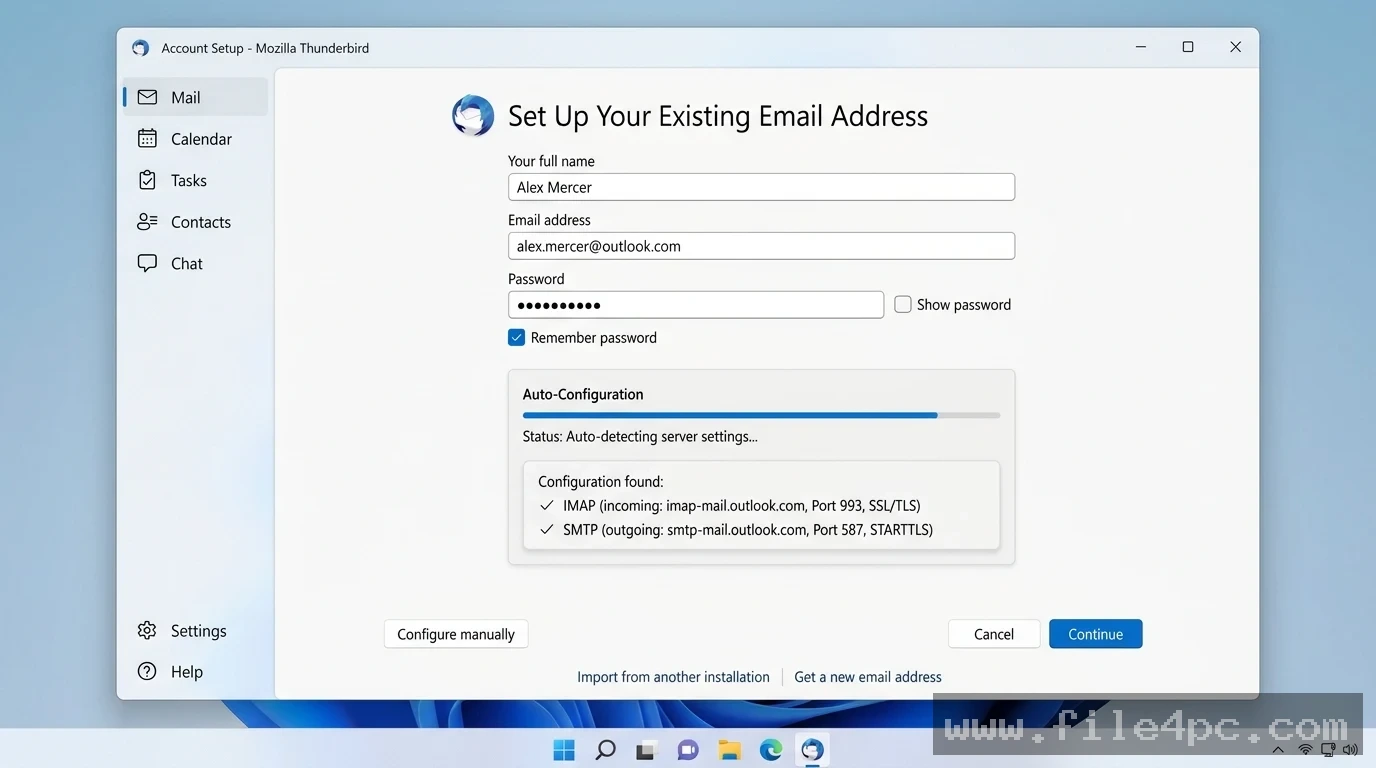
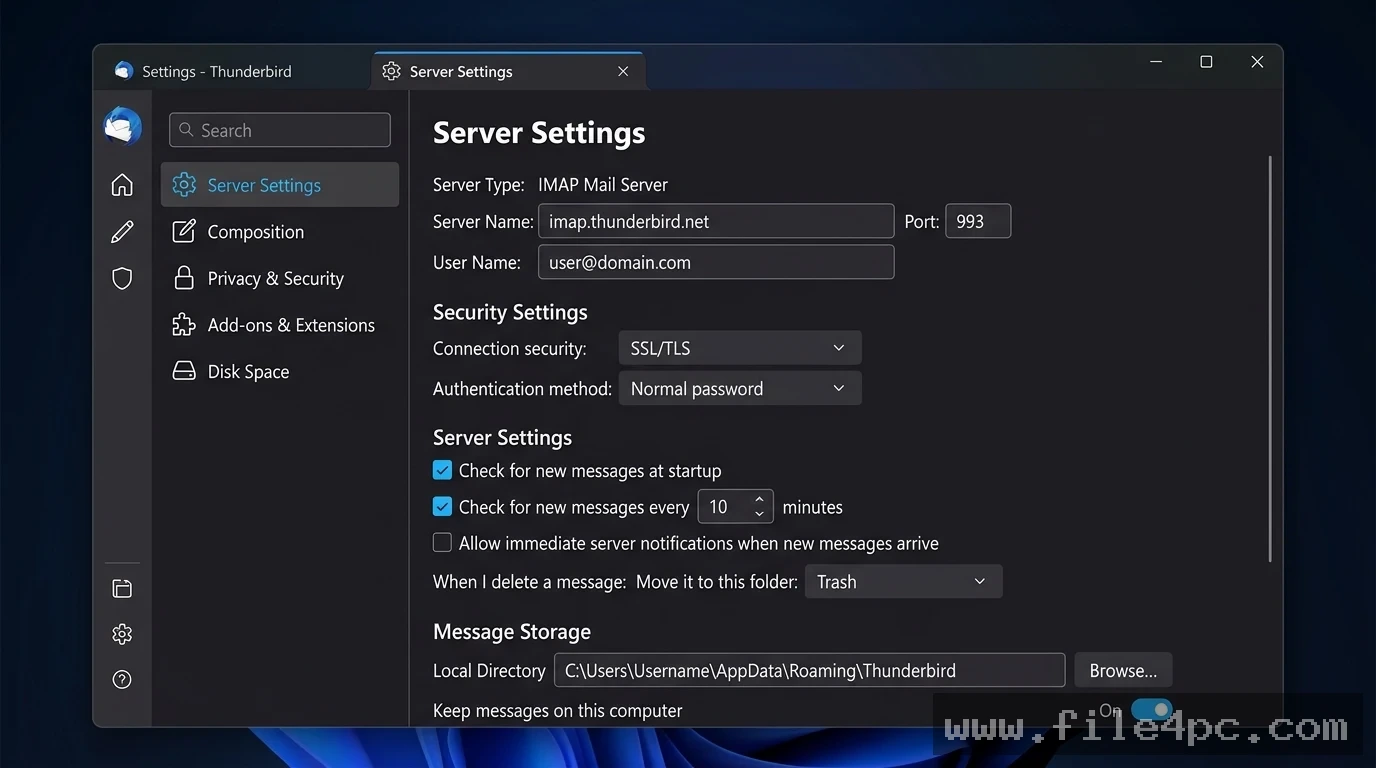
To begin, download and run the setup installer. Upon launching the application for the first time, the Account Setup wizard prompts you to enter your name, email address, and account password. The software queries a global ISP database to discover server settings, automatically configuring ports, SSL/TLS encryption parameters, and authentication methods.
Next, the synchronization engine initializes. The software downloads message headers and folder trees locally using IMAP or POP3. You can read, organize, filter, and archive messages instantly. Typing keywords into the Quick Filter bar isolates specific messages by sender, date, attachment status, or tag tags in real time.
Finally, when composing new messages, the editor provides rich HTML and plain text formatting tools. If sending sensitive information, you can enable OpenPGP encryption with a single click before hitting Send. Sent messages are saved locally and synced back to your mail server automatically.
Benefits and Limitations
Weighing the client's operational strengths against its platform limits helps clarify its fit for your communication workflow.
Benefits
The primary advantage is complete data ownership and local privacy. Storing messages and attachments on your own drive ensures offline access and keeps personal data out of web-advertising profiling pipelines. The software is 100% free, open-source, and supported entirely by user donations, guaranteeing an ad-free user experience. Furthermore, its multi-tab layout and vast add-on library make handling multiple business and personal accounts efficient.
Limitations
The primary technical limitation is that native Microsoft Exchange calendar and contact syncing can still require add-ons or specialized configuration setups in complex corporate environments, though email support continues to advance. Additionally, accumulating decades of email archives into massive local database files (such as MBOX or Maildir formats) can require periodic folder compaction maintenance to maintain fast search indexing.
What's New
MZLA Technologies maintains a rapid development release schedule, deploying monthly updates alongside an annual Extended Support Release (ESR) for enterprise stability.
Verified developments across recent release series include:
-
Monthly Release Cadence: Rapid rollout of features and security patches on a monthly schedule, keeping desktop environments updated.
-
Native Exchange Protocol Integration: Expanded built-in support for Microsoft Exchange accounts, lowering reliance on third-party middleware.
-
Mobile Ecosystem Synchronization: Enhanced sync pipelines connecting desktop databases with the official Thunderbird for Android application and the iOS client.
-
Modernized Core Codebase: Under-the-hood performance updates that accelerate local search indexing, reduce RAM overhead, and refine thread handling.
Installation and Setup
Getting the software configured on a Windows computer involves a straightforward installation process.
-
Download the official installer package directly from the official website (
thunderbird.net). -
Run the executable installer (
Thunderbird Setup.exe) and choose between Standard setup (recommended for most users) or Custom setup. -
Complete the installation wizard and launch the application.
-
Enter your email credentials in the Account Setup Hub to allow automatic server configuration.
-
Optional: Import existing mail archives, contacts, or browser settings using the built-in Import Wizard.
Download Safety Warning: Always obtain setup installers directly from thunderbird.net or official operating system software repositories. Avoid third-party executable mirrors that may bundle unwanted adware or toolbars.
Tips for Using Mozilla Thunderbird PC Software
Run Compact Folders regularly to maintain peak database performance. When you delete messages in an IMAP or POP3 client, the software marks the space for deletion without immediately shrinking local database files; running Compact Folders purges deleted data markers and reclaims disk space.
Master the Quick Filter Bar keyboard shortcut. Pressing Ctrl + Shift + K instantly opens the message filter bar, allowing you to search through thousands of inbox emails by keyword, sender, or attachment type in seconds.
Set up Saved Search Folders (Virtual Folders) for recurring projects. Creating a virtual folder that aggregates unread messages from specific clients across five different email accounts keeps high-priority work accessible without manually moving files.
Modern Alternatives
Depending on whether you require proprietary corporate integration, minimalistic design, or webmail convenience, several alternative tools exist.
Microsoft Outlook is an enterprise email client bundled with Microsoft 365. It offers deep integration with corporate Exchange servers, SharePoint, and Teams. However, it requires a paid subscription and uses a proprietary database architecture.
eM Client is a commercial desktop email application featuring a polished modern interface, built-in PGP encryption, live chat integration, and automatic translation services. It offers a free basic edition alongside commercial licenses.
Mailbird is a Windows-focused email client built around a minimalist design. It integrates popular web apps like WhatsApp, Asana, and Google Calendar directly into its interface, though full multi-account access requires a paid subscription.
Who Should Use Mozilla Thunderbird PC Software?
This software is ideal for privacy-conscious users, freelancers, IT professionals, small business owners, and digital archivists who manage multiple email accounts across desktop systems. If you want an ad-free, open-source communication platform that stores your data locally and supports OpenPGP encryption, it provides a feature-rich workspace.
However, users who prefer lightweight webmail interfaces (like Gmail or Outlook.com) without managing local disk storage or desktop applications may find web browsers sufficient for their needs.
FAQ
Is Mozilla Thunderbird PC Software completely free?
Yes. The software is 100% free, open-source software supported entirely by voluntary community donations, with no feature paywalls or advertisements.
Where does the application store my emails and contacts?
All account profiles, cached messages, address books, and encryption keys are stored locally on your hard drive in your OS user profile directory (%APPDATA%\Thunderbird\Profiles\ on Windows).
Can I use the client without an active internet connection?
Yes. Because the client downloads and caches message bodies and attachments locally, you can view, search, and draft emails offline. Outgoing messages will send automatically once your internet connection is restored.
Does the desktop app sync with Thunderbird for Android?
Yes. With the release of Thunderbird Mobile for Android, users can sync account settings, calendars, and contacts across desktop and mobile devices.
Conclusion
Mozilla Thunderbird PC Software remains a pillar of open-source communication software, delivering reliable, private, and customizable desktop email management. By pairing OpenPGP encryption and local data storage with unified multi-account controls and built-in scheduling, it keeps users in full control of their digital lives.
While managing large local archives requires occasional maintenance, its regular update releases, active open-source community, and zero-cost model make it an outstanding desktop client. For anyone seeking a fast, secure, and independent desktop workspace for managing emails and calendars, it provides a reliable solution.
💬 0 Comments
✍ Leave a Comment