

Topaz Gigapixel Pro PC Software is an enterprise-grade artificial intelligence image upscaling, enlargement, and detail recovery desktop application developed by Topaz Labs. Tailored specifically for professional photography studios, print labs, VFX production houses, and commercial design agencies, it enlarges digital images up to 16x (or up to 600% resolution) without losing sharpness, introducing harsh bicubic artifacts, or smudging fine textures. The Pro edition builds upon the core Gigapixel engine by unlocking studio-focused capabilities, including unlimited local and cloud rendering, high-resolution 100MP cloud exports, seat management controls, multi-GPU hardware acceleration, and full commercial licensing rights.
Operating on local 64-bit Windows systems while offering optional cloud processing infrastructure, the software provides a self-contained environment for preparing display-ready assets, large-format prints, and archived digital photography. Rather than relying on simple pixel interpolation—which stretches existing pixels and creates blurry edges—the application uses deep neural network models trained on millions of high-resolution images to synthesize missing micro-details. It synthesizes realistic hair, skin texture, fabric weaves, foliage, and text shapes, bridging the gap between low-resolution digital files and ultra-high-definition output.
Topaz Labs maintains an active engineering pipeline across its software catalog, frequently delivering updates to the core neural networks (such as the Wonder, Recover, and High Fidelity model series) to maximize GPU execution speeds and visual accuracy.
Key Features
The Pro edition incorporates an extensive suite of specialized AI models, cloud rendering modes, and commercial management tools designed to streamline professional production workflows.
Specialized Neural Model Engine
Rather than applying a single algorithm to all files, the platform includes over ten specialized AI models tailored for distinct image types:
-
Standard & Standard Max: Balanced models built for general photography that improve detail without over-processing.
-
High Fidelity: Optimized for images that are already high resolution, preserving existing fine details while scaling up cleanly.
-
Low Res: Specifically engineered for heavily compressed, tiny, or low-bitrate digital files, recovering visible structure and clarity.
-
Text & Shapes: Designed for scanned documents, logos, vector-style artwork, and typography, keeping lines crisp and free of ringing artifacts.
-
Art & CG: Tailored for computer-generated graphics, 3D renders, digital paintings, and anime assets.
-
Wonder 2 & 3 (and Pro-exclusive models): Generative refinement models designed to reconstruct complex textures and extreme magnifications.
Face Recovery 3 Technology
Portraits present unique challenges during extreme enlargements because human eyes, skin, and lips quickly look unnatural when artificially sharpened. The integrated Face Recovery engine automatically detects human faces within a photo and reconstructs missing facial features using generative neural networks, ensuring smooth skin tones and sharp, lifelike eye detail.
Unlimited Local and Cloud Rendering
The Pro subscription removes local hardware bottlenecks by providing both unlimited offline rendering on local desktop hardware and unlimited cloud image rendering. When working on large batch jobs or utilizing lower-spec mobile workstations, studio technicians can offload heavy processing to Topaz's cloud servers, exporting up to 100MP files directly from cloud nodes.
Enterprise Seat Management and Licensing
While the standard Gigapixel edition is restricted to individual creators and smaller revenue tiers, the Pro edition grants full commercial usage rights for studios generating significant annual revenue. It includes centralized seat management controls, allowing IT leads to deploy, manage, and assign software floating licenses easily across multi-seat studio networks.
Multi-GPU Hardware Acceleration
To handle high-volume commercial batch processing, the software fully utilizes modern multi-GPU setups. It distributes image processing tasks across multiple dedicated graphics cards simultaneously, reducing batch processing times for large commercial archives.
Your May Also Like :: S-IT SSD-Check PC Software
How Topaz Gigapixel Pro PC Software Works
The operational workflow moves logically from source file ingestion and AI model selection to export rendering.
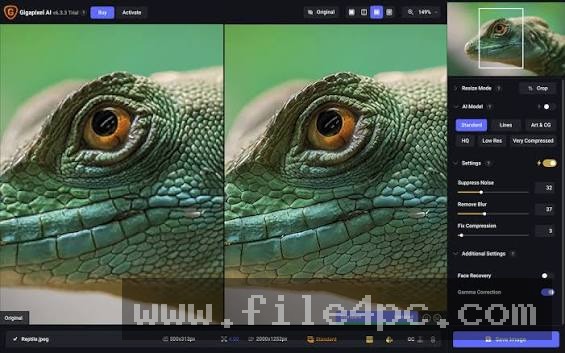
To begin, you launch the desktop application and import your source images via drag-and-drop or the built-in file browser. The software supports standard formats including RAW camera files, TIFF, PNG, JPEG, and WebP. Once loaded, the primary workspace presents a flexible multi-view preview panel, offering split-screen, side-by-side, or single-view comparisons.
Next, you define your scaling parameters in the right-hand panel. You can select fixed magnification factors (such as 2x, 4x, or 6x) or input exact output dimensions measured in pixels, inches, or centimeters alongside your target DPI resolution.
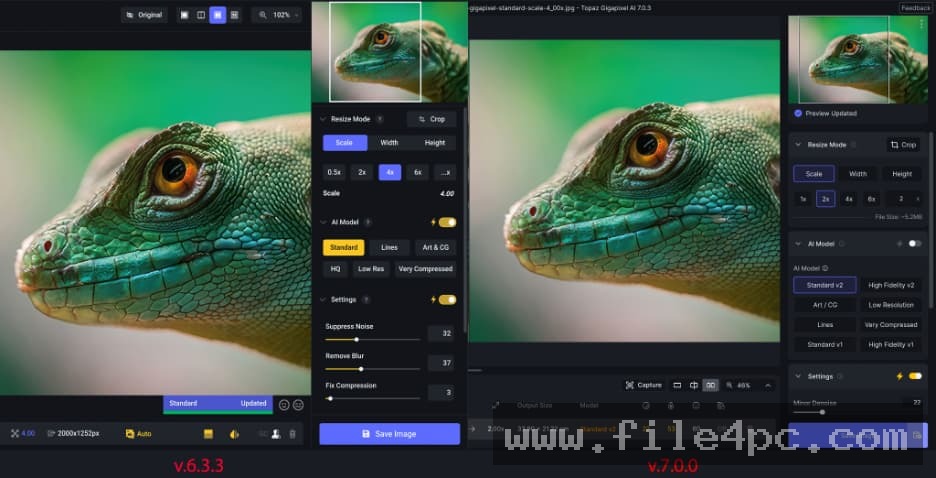
After setting the target size, you select the optimal AI model for your image type. You can allow the auto-detection engine to analyze the image noise, blur, and compression levels automatically, or manually choose a specific model (such as High Fidelity or Text & Shapes). You can adjust fine-tuning sliders for Suppress Noise, Remove Blur, and Fix Compression to balance detail enhancement with smoothing.
Finally, you switch between local GPU rendering or cloud processing. Clicking Save Images processes the file queue in the background, outputting color-managed, high-resolution TIFF, PNG, or JPEG files directly to your specified storage directory.
Benefits and Limitations
Understanding both hardware-accelerated advantages and operational boundaries helps determine whether this software fits your production pipeline.
Benefits
The primary advantage is visual output quality. By synthesizing plausible micro-details rather than stretching existing pixels, it allows photographers and print shops to convert old low-resolution camera files or cropped images into massive, billboard-ready physical prints. The inclusion of both local offline GPU rendering and unlimited cloud processing ensures high-speed production flexibility. Furthermore, centralized seat management and commercial EULA compliance simplify enterprise software administration for larger agencies.
Limitations
The primary restriction is its hardware demand during local rendering. Processing massive multi-gigapixel files locally using deep neural network models requires a modern processor, ample system RAM, and a high-end dedicated GPU with significant VRAM. On older desktop hardware, local processing times per image can slow down noticeably unless tasks are offloaded to cloud servers. Additionally, the Pro edition operates strictly on an annual studio subscription model rather than a perpetual license.
What's New
Topaz Labs continuously updates the application, with recent releases in the v1.2 and v1.3 series introducing major model optimizations, face recovery enhancements, and cloud pipeline upgrades.
Key recent updates include:
-
Recover Faces 3 Integration: Significant upgrades to facial feature reconstruction speeds and skin texture realism on complex group shots.
-
300% NeuroServer Speed Up: Substantial rendering speed optimizations for local neural models executing on modern NVIDIA Tensor Core and AMD ROCm GPU architectures.
-
Wonder 2 & Wonder 3 AI Models: Advanced generative upscaling models designed for extreme magnification levels and complex texture synthesis.
-
High Fidelity v3 Release: Refined edge retention algorithms that prevent haloing artifacts when upscaling images that are already high resolution.
Installation and Setup
Setting up the software on a Windows workstation follows a standard enterprise deployment path.
You download the official 64-bit installer executable directly from the Topaz Labs customer portal or download center. Run the installer wizard, accept the commercial software license agreement, and choose your installation directory. The setup wizard automatically downloads the core neural model files required for initial local processing.
Upon launching the application for the first time, log in using your Topaz Labs enterprise account credentials to validate your Pro subscription and unlock seat management options. Network administrators deploying the software across studio workstations can run silent installer commands and configure floating license parameters via local network preferences.
Tips for Using Topaz Gigapixel Pro PC Software
When upscaling heavily compressed web images or old digital camera shots, start with the Low Res or Standard model before trying generative models. Fixing heavy JPEG compression artifacts during the initial scaling pass prevents the AI from mistaking compression noise for real detail.
Take full advantage of the split-screen preview window. Move the zoom box over critical image areas—such as human eyes, text logos, or background foliage—to verify that the active AI model is not over-sharpening or distorting key textures before initiating a large batch render.
If you are batch processing hundreds of files on a laptop or lower-tier desktop PC, toggle the processing mode from Local to Cloud Rendering. Offloading the neural math to Topaz cloud servers frees up your local system resources for other heavy editing software.
Modern Alternatives
Depending on whether your workflow requires isolated enlargement, comprehensive photo restoration, or embedded creative suite filters, several alternatives exist.
Topaz Photo AI is a sister application developed by Topaz Labs. While Gigapixel focuses specifically on high-ratio enlargement and specialized upscaling models, Topaz Photo AI functions as an all-in-one photo rescue utility that combines noise reduction, sharpening, and basic upscaling into an automated "Autopilot" workflow.
Adobe Photoshop Super Resolution is a built-in feature within Adobe Camera Raw and Photoshop. It provides convenient 2x linear (4x area) upscaling directly within the Adobe creative ecosystem. However, it lacks the multi-model selection, generative detail recovery, cloud offloading, and extreme 16x enlargement options available in Gigapixel Pro.
ON1 NoNoise & Resize AI is a desktop image resizing tool that uses machine learning to enlarge photos while applying noise reduction. It integrates well as a plugin for Lightroom and Photoshop, but lacks the enterprise seat management controls and multi-GPU optimization features found in Topaz's Pro tier.
Who Should Use Topaz Gigapixel Pro PC Software?
This software is designed for professional photographers, fine art print studios, commercial printing facilities, VFX artists, and marketing agencies that regularly handle high-resolution asset generation and physical print production. If your studio needs to enlarge cropped images, digitize legacy photo archives, scale CG renders for billboards, or manage multi-seat commercial licenses across a team, this utility delivers an enterprise workspace.
However, casual home photographers or hobbyists who only need to enlarge an occasional photo for social media will likely find the lower-cost standard Gigapixel tier or built-in editor upscalers sufficient for their needs.
FAQ
What is the difference between Gigapixel and Gigapixel Pro?
Gigapixel Pro includes enterprise features such as seat management controls for teams, commercial licensing rights for high-revenue studios, multi-GPU hardware scaling, unlimited cloud rendering access, and 100MP cloud export limits.
Can the software run completely offline without an internet connection?
Yes. The software includes full local rendering capabilities. Once the core application and model files are installed on your Windows PC, you can upscale images locally without sending data to external servers. An internet connection is only required for initial subscription activation, cloud rendering, and optional model updates.
What are the maximum enlargement dimensions supported?
The software supports upscaling images up to 16x their original pixel dimensions (up to 600% scale), allowing low-resolution digital files to be converted into gigapixel-level assets suitable for large-format physical printing.
Can I run the software as a plugin inside Adobe Photoshop or Lightroom?
Yes. In addition to operating as a standalone Windows desktop application, the installation includes plugin modules that allow you to launch Gigapixel directly from Adobe Photoshop and Lightroom Classic workflows.
Conclusion
Topaz Gigapixel Pro PC Software represents a premier solution for AI-driven image upscaling, detail synthesis, and print preparation in commercial production environments. By replacing traditional pixel interpolation with specialized neural networks trained to reconstruct realistic textures, typography, and facial features, it enables creators to scale visual assets beyond traditional hardware resolution limits.
While local rendering demands a modern dedicated GPU and the Pro edition requires a commercial studio subscription, its combination of offline multi-GPU execution, unlimited cloud offloading, and multi-seat management makes it a vital investment for professional studios. For any creative production team seeking uncompromising image enlargement and crisp visual fidelity, it provides an authoritative software platform.

💬 0 Comments
✍ Leave a Comment