

Zoner Studio PC Software (traditionally known as Zoner Photo Studio X or ZPS X) is a comprehensive, all-in-one digital photo management, non-destructive RAW processing, bitmap graphic editing, and video creation application developed by Czech software house Zoner Software. Designed as a budget-friendly alternative to high-subscription software ecosystems like Adobe Lightroom and Photoshop, it operates as a unified workstation environment on Windows PCs. It targets enthusiast photographers, commercial shooters, content creators, and digital archivists who require a seamless pipeline to organize thousands of high-resolution images, perform precise color grading, retouch portraits, and produce printed products or video slideshows without juggling multiple standalone tools.
Operating as a desktop application with built-in cloud synchronization capabilities, the software utilizes your local PC hardware resources—including graphics card GPU acceleration—to accelerate image rendering and batch operations. It bridges the gap between catalog management and creative production, giving creators total ownership over their local folder structures while offering advanced AI selection masks, layer-based manipulation tools, and direct physical product ordering features.
Key Features
The application incorporates a multi-module architecture that divides post-production into specialized workspaces while keeping the underlying interface clean and accessible.
Your May Also Like :: Snippai PC Software
Manager Module and Cataloging
The Manager module handles file organization, metadata indexing, and archive navigation. Unlike tools that force you to import files into a rigid database structure, it can browse local or network drives directly. The integrated Catalog indexes folder paths in the background, allowing you to search by EXIF camera data, GPS map locations, star ratings, color flags, keywords, and audio notes in seconds. It also features robust batch processing utilities to rename, re-date, or convert hundreds of files simultaneously.
Develop Module for Non-Destructive RAW Processing
The Develop module provides a lossless environment for adjusting camera RAW files, JPEGs, and TIFFs. It features full tonal controls, high-dynamic-range (HDR) tone mapping, HSL color wheels, tone curves, and automatic lens defect corrections using Lens Correction Profiles (LCP). Non-destructive editing ensures that your original source files remain completely untouched while sidecar instruction parameters are applied dynamically.
AI Masking and Portrait Retouching
Modern iterations of the software include artificial intelligence masking capabilities. The AI engine can automatically detect and isolate human subjects, backgrounds, skies, or specific objects within a scene with a single click. For portrait photography, specialized retouching tools enable facial attribute adjustment, skin smoothing, eye whitening, and stray hair removal without complex manual selection paths.
Editor Module with Layer Support
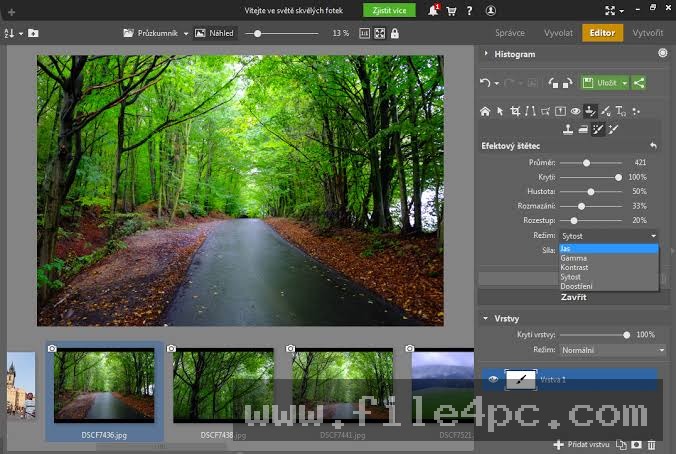
When destructive adjustments or complex composite graphics are required, the Editor module acts as a full-featured raster graphics workspace. It supports full layer-based editing, layer masks, blend modes, transparency layers, and text overlays. It also includes specialized brushes such as the Healing Brush and Selection Brush for object removal and seamless cloning.
Print and Video Modules
The built-in Print and Video modules turn finished photo collections into physical media or dynamic motion content. Users can design custom photo books, wall canvas prints, calendars, and postcards directly within the program interface. The non-linear video editor allows you to arrange video clips and photos onto a timeline, apply transitions, add soundtrack audio, and render high-definition videos.
How Zoner Studio PC Software Works
The workflow moves logically across module tabs located at the top right of the workstation screen, guiding your images from initial camera import to final export.
To begin, you insert your camera's SD card or connect an external drive. The Import tool automatically detects new photos, creates designated target folders on your hard drive, renames files based on your custom naming rules, and applies pre-set EXIF metadata during copy operations.
Once imported, you open the Manager module to cull your shot list. You can flag rejected shots, assign star ratings, or use the side-by-side comparison view to find the sharpest image in a burst sequence.
Next, you switch to the Develop module to adjust exposure, white balance, and contrast. You can select AI Subject or AI Sky to apply targeted local adjustments—such as darkening an overexposed sky or brightening a backlit model—without affecting the rest of the image.
If your image requires composite graphics, text overlays, or advanced cloning, you switch to the Editor module, where layers and raster tools become available. Finally, you export your completed image to disk, upload it directly to online galleries like Zonerama, or open the Print module to format it for physical production.
Benefits and Limitations
Understanding both procedural advantages and functional boundaries helps determine if this software fits your creative routine.
Benefits
The primary advantage is cost efficiency paired with workspace consolidation. By combining photo cataloging, non-destructive RAW editing, layer-based graphics, video timeline editing, and cloud storage into a single subscription, it replaces three or four separate software subscriptions. The user interface is responsive, and its capability to browse local computer directory structures directly without mandatory database importing makes file management flexible. Additionally, every user receives 20 GB of free Zoner Photo Cloud storage out of the box.
Limitations
The most notable restriction is platform availability. The software is built exclusively for Microsoft Windows, offering no native desktop versions for macOS or Linux operating systems. Furthermore, while its video module handles basic cuts and slideshow transitions effectively, it lacks advanced color grading wheels, multi-cam editing, and motion tracking features found in dedicated professional video editing suites.
What's New
Zoner Software updates the application continuously using a bi-annual major update model complemented by regular maintenance builds.
Key updates in recent releases include:
-
Expanded AI Masking engines capable of auto-isolating Subjects, Backgrounds, Skies, and isolated Objects.
-
Optimized RAW processing algorithms that yield faster initial file preview rendering and improved noise reduction output.
-
Refined video timeline tools supporting keyframe animation parameters for smooth pan-and-zoom motion effects.
-
High-DPI display scaling improvements alongside user interface performance enhancements on multi-core AMD and Intel processors.
Installation and Setup
Setting up the software on a PC requires a standard installation process on modern Windows environments.
You download the lightweight official setup installer directly from the Zoner website. Run the installer wizard, create or log into your Zoner account, and accept the software licensing agreement. The installer sets up the required module drivers and shortcuts on your primary storage drive.
Upon launching the application for the first time, you are prompted to configure your default Catalog folders. Point the Catalog toward your primary picture directories (such as an external hard drive or local Pictures folder) so the software can index file metadata in the background. You can also test all features fully during a 7-day trial period without entering payment card details.
Tips for Using Zoner Studio PC Software
Connect the Adobe DNG Converter utility in your preferences menu. Pairing the software with the official free DNG converter expands native camera RAW profile support for brand-new camera models.
Utilize Batch Operations (Ctrl+Min or Batch Filter panel) when handling large event photography shoots. You can apply a custom color preset, adjust exposure curves, resize output dimensions, and embed copyright watermarks across thousands of photos simultaneously.
If you work with two reflex cameras during an event, use the Batch Edit EXIF Data tool to synchronize time offsets. Adjusting time stamps across multiple camera bodies ensures that your chronological sorting in the Manager module aligns perfectly.
Modern Alternatives
Depending on whether your workflow prioritizes perpetual licensing, complex graphic manipulation, or multi-platform compatibility, several alternatives exist.
Adobe Lightroom Classic remains the industry standard for commercial photographers. It offers extensive camera profile support, cloud ecosystem synchronization, and a wide ecosystem of third-party plugins. However, it requires a higher ongoing subscription cost and lacks native layer-based bitmap editing within the same application.
Capture One Pro is a high-end RAW converter praised for its color grading tools and tethered camera shooting capabilities. It is favored by commercial studio and fashion photographers, but commands a significantly higher purchase or subscription price tag.
ACDSee Photo Studio Ultimate is an alternative Windows-based photo manager and editor that combines non-destructive RAW processing with layer editing. It offers perpetual license options, making it appealing to users who wish to avoid recurring subscription fees.
Who Should Use Zoner Studio PC Software?
This software is ideal for Windows-based photographers, content creators, advanced hobbyists, and small studio owners who want a complete, low-cost post-production workstation. If you need to organize large image archives, process camera RAW files, make portrait adjustments, and occasionally edit short video clips without paying high monthly software bills, this utility offers exceptional value.
However, professional videographers requiring high-end video editing, or photographers working entirely within the macOS ecosystem, should consider platform-native tools like Apple Final Cut Pro, DaVinci Resolve, or Adobe Creative Cloud instead.
FAQ
Is Zoner Studio PC Software available for Mac?
No. The desktop software is built specifically for Microsoft Windows operating systems (Windows 10 and Windows 11). There is no native version for macOS or iOS devices.
Is there a free trial available?
Yes. The developer provides a fully functional 7-day free trial that allows you to test all features across all modules without requiring payment card information upfront.
Can I edit video files inside the software?
Yes. The application includes a dedicated non-linear Video module that allows users to trim clips, arrange video timelines, add transitions, overlay text titles, and export high-definition video files.
Does the software require an internet connection to run?
No. Core editing, photo organization, RAW processing, and layer editing function offline on your computer. An internet connection is only required for initial account sign-in, software updates, ordering physical print products, and syncing with Zoner Photo Cloud.
Conclusion
Zoner Studio PC Software delivers a complete, cost-effective post-production environment for Windows desktop users. By bringing together cataloging, non-destructive RAW development, layer-based graphic editing, and video processing into a cohesive multi-module interface, it streamlines the digital asset lifecycle without forcing creators into high subscription tiers.
While its Windows-only limitation excludes Mac users, its low system overhead, intuitive AI masking tools, and versatile batch processing utilities make it an outstanding choice for photographers. For anyone seeking a dependable, unified, and affordable desktop workstation to manage and enhance their digital media, it provides an exceptional solution.

💬 0 Comments
✍ Leave a Comment