
S-IT SSD-Check PC Software is a specialized, open-source storage diagnostic and drive health monitoring utility developed by Sattler IT-Service (Hans Udo Sattler). Created explicitly for Windows, its primary purpose is to translate complex, raw S.M.A.R.T. (Self-Monitoring, Analysis, and Reporting Technology) diagnostic attributes into plain, clear language verdicts accompanied by practical advice. Instead of requiring users to decipher dense hexadecimal tables, the software analyzes underlying hardware data and delivers unambiguous assessments ranging from "Very good" to "DEFECTIVE – REPLACE IMMEDIATELY!".
The application runs as a portable desktop executable, requiring no installation or background service setup. It serves home users, PC technicians, hardware refurbishers, and IT administrators who need to inspect solid-state drives (SSDs) and mechanical hard disk drives (HDDs) across internal and external interfaces. By pairing automated drive health grading with built-in speed benchmarks and authenticity verification checks, the tool provides an accessible workspace for evaluating storage drive reliability, especially when testing second-hand drives before purchase.
Your May Also Like :: gSyncit for Microsoft Outlook PC Software
Key Features
The application incorporates a structured set of diagnostic, auditing, and reporting tools designed to evaluate storage health transparently.
Traffic-Light Health Verdicts with Plain Explanations
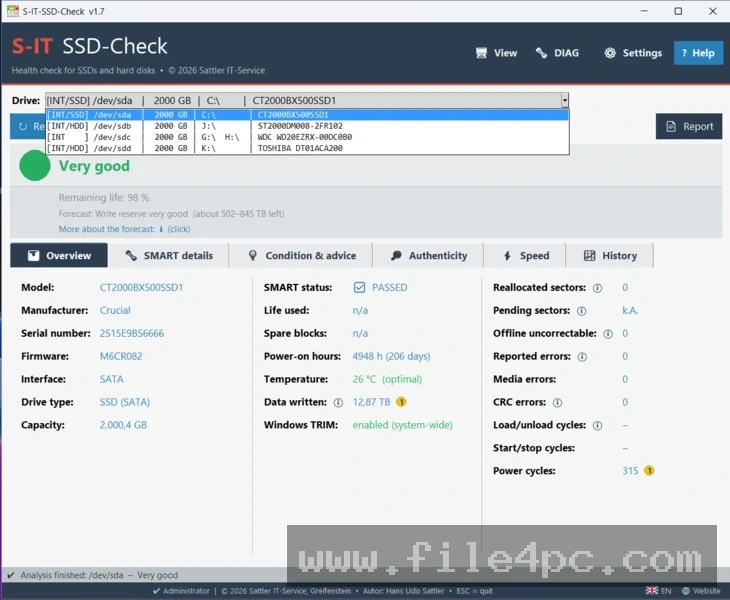
The core feature of the software is its plain-language rating system. It evaluates drive telemetry against clear diagnostic rules and presents a color-coded traffic-light status. Along with the rating, the software explicitly explains the technical reasoning behind its verdict—such as flagging uncorrectable sector errors or active read failures—so users understand why a drive received a specific grade.
Authenticity and Counter Reset Detection
A common issue in the used hardware market involves sellers manipulating drive SMART logs or resetting usage counters to conceal heavy wear. The software includes an authenticity verification engine that scans for conflicting metrics, modified logs, or manipulated vendor parameters, warning users if a drive's reported wear data appears untrustworthy.
Historical Data Tracking and Measurement Logging
Every time a drive inspection is run, the application records key performance and health indicators into a local history log. Users can import previous reports to track health degradation over time, monitoring whether attributes like bad sector counts, temperature spikes, or read errors are stable or actively deteriorating.
Integrated Storage Speed Testing
Beyond passive SMART checks, the application features an integrated speed test tailored to specific media types. It evaluates read and write performance based on whether the drive is an NVMe SSD, SATA SSD, or traditional mechanical hard drive, providing a performance context alongside physical health data.
Printable A4 HTML and PDF Reports
For hardware sellers, repair shops, or administrative documentation, the utility generates structured HTML reports formatted for A4 printing and PDF export. These reports contain complete diagnostic metrics, health justifications, and performance charts, providing verifiable proof of drive condition.
How S-IT SSD-Check PC Software Works
The software operates as a standalone portable application that leverages integrated low-level disk tools like smartctl (from the open-source smartmontools project) to read hardware telemetry directly.
When you launch the portable executable, the utility scans your system topology to identify all attached storage devices. It detects internal M.2 NVMe SSDs, 2.5-inch SATA SSDs, 3.5-inch SATA/IDE hard drives, as well as external drives connected via USB-to-SATA adapters, docking stations, or external enclosures.
Once a drive is selected, the application queries its internal controller. It evaluates total bytes written (TBW), power-on hours, operational temperature, reallocated sectors, pending sector counts, and internal controller error logs. The software separates wear metrics from active defect metrics—ensuring a drive with low remaining flash endurance is not marked as defective unless actual data loss or sector corruption errors are present.
After processing the data, the interface updates to show the traffic-light rating, detailed SMART breakdown, historical comparisons, and speed test options. Users can choose to export a full HTML report or save the log file locally for future comparison.
Benefits and Limitations
Evaluating the utility requires balancing its accessible diagnostic presentation against its operating system dependencies.
Benefits
The most significant benefit is clarity. By explaining diagnostic findings in plain language rather than raw hexadecimal code, it removes guesswork for everyday users. Its ability to detect tampered S.M.A.R.T. counters makes it a vital tool for evaluating used storage devices. Furthermore, because it is open-source (released under the GPL v2 license for third-party components) and portable, it can be run instantly from a USB flash drive without modifying system registries or installing background services.
Limitations
The main limitation is that the software is designed exclusively for Microsoft Windows operating systems (Windows 10 and Windows 11), with no native builds for macOS or Linux platforms. Additionally, while it can read drives connected via USB-to-SATA/NVMe adapters, certain low-quality external USB bridge chipsets may obscure or fail to pass S.M.A.R.T. telemetry commands to the software.
What's New
Sattler IT-Service actively maintains the utility on GitHub. Recent releases in the Version 1.7.0 series focus on refining diagnostic accuracy, expanding language localizations, and updating core backend dependencies.
Key recent updates include:
-
Expanded multilingual interface support, offering complete native translations in English, German, and Dutch.
-
Updated embedded
smartctl.exebinaries from the smartmontools project to support newly released NVMe and SATA SSD controllers. -
Refined authenticity checks for high-capacity NVMe drives and USB enclosure bridge controllers.
-
Improved HTML print styling for exportable PDF diagnostic reports.
Installation and Setup
Using the utility involves no complex installation wizards or system registry modifications.
You download the compressed distribution package directly from the official GitHub repository releases page or Sattler IT-Service project site. Extract the ZIP file to your preferred folder on your local storage drive or a portable USB flash drive.
To launch the software, open the extracted folder and run the primary executable (S-IT-SSD-Check.exe). Because reading low-level S.M.A.R.T. data from storage controllers requires system administrative privileges, right-click the executable and select Run as Administrator to ensure all connected SATA and NVMe drives are detected properly.
Tips for Using S-IT SSD-Check PC Software
Always execute a full speed test alongside a SMART inspection when evaluating a used drive. While SMART attributes show historical health, live speed tests can uncover thermal throttling or failing controller channels under active workload strain.
Keep the application stored on a dedicated technician USB flash drive alongside other portable diagnostic utilities. This allows you to evaluate storage health on unbootable or freshly built PCs using Windows PE or recovery environments.
Export and archive an HTML report whenever you install a new or second-hand storage drive. Comparing future reports against your initial baseline makes it simple to prove wear trends if warranty claims or returns become necessary.
Modern Alternatives
Depending on whether you prefer raw technical metrics, continuous background monitoring, or cross-platform usage, several alternatives exist.
CrystalDiskInfo is a widely used open-source drive health utility. It provides real-time S.M.A.R.T. reading, temperature tracking, and health status indicators. While CrystalDiskInfo displays raw S.M.A.R.T. attribute tables effectively, it offers less plain-language contextual explanation and counter-tampering verification compared to S-IT SSD-Check.
Hard Disk Sentinel is an enterprise-grade commercial disk monitoring suite. It offers real-time background monitoring, automatic problem alerts, scheduled backups, and deep surface repair tests. However, Hard Disk Sentinel requires a paid commercial license for full features, whereas S-IT SSD-Check is free and open-source.
Smartmontools (CLI) is the command-line utility suite upon which many storage checkers rely. It provides raw, unformatted S.M.A.R.T. logs across Windows, Linux, and macOS environments, making it ideal for advanced terminal power users but less accessible for everyday users seeking visual reports.
Who Should Use S-IT SSD-Check PC Software?
This utility is ideal for computer repair technicians, IT hardware auditors, system builders, and everyday users buying or selling used storage drives. If you need an easy-to-understand health verdict that clearly explains why a drive is healthy or failing, this tool delivers clear results without technical clutter.
However, enterprise administrators requiring automated network-wide drive monitoring, continuous background alerts, or Linux server support should look toward full monitoring suites like Hard Disk Sentinel or command-line smartmontools scripts instead.
FAQ
Is S-IT SSD-Check PC Software completely free?
Yes, the application is distributed as free open-source software by Sattler IT-Service under standard freeware terms, incorporating GPL v2 components for its underlying driver query tools.
Can the software repair a damaged or failing SSD?
No. S-IT SSD-Check is a diagnostic and health evaluation utility, not a drive repair tool. If the software flags a drive as defective due to physical hardware corruption or failing flash sectors, you should immediately back up your data and replace the drive.
Does the software support external USB hard drives and SSDs?
Yes. The utility automatically detects external 2.5-inch SATA drives, 3.5-inch desktop hard drives, and M.2 NVMe SSDs connected through USB adapters, docking stations, or external enclosures, provided the USB bridge chipset supports pass-through S.M.A.R.T. commands.
How does the tool differentiate between wear and actual drive defects?
The software separates endurance consumption from hardware failure. A drive that has used 90% of its rated Flash Total Bytes Written (TBW) will reflect wear, but it will not be flagged as defective unless active read errors, uncorrectable sectors, or hardware self-test failures are detected.
Conclusion
S-IT SSD-Check PC Software provides an accessible, transparent solution for evaluating storage drive reliability on Windows desktop systems. By converting complex S.M.A.R.T. telemetry into clear, plain-language health verdicts—backed up by authenticity verification and integrated speed benchmarks—it removes the uncertainty associated with drive diagnostics.
While it operates strictly as a portable diagnostic utility rather than a real-time background monitor, its open-source transparency, zero-installation setup, and printable HTML reporting make it an invaluable addition to any technician's USB toolkit. For anyone needing to verify the health, authenticity, and performance of an SSD or hard drive, it delivers a practical workspace.

💬 0 Comments
✍ Leave a Comment