

Stardock Start11 PC Software is an essential desktop customization utility built to restore, enhance, and personalize the Windows Start menu and taskbar. Developed by Stardock Corporation, it serves as a bridge for users frustrated by the design compromises or missing functional tools in modern operating systems. Rather than forcing a static interface layout, the software allows desktop users, business technicians, and power users to transform their desktop experience, combining classic navigation structures with modern productivity controls.
The software operates locally on desktop PCs without requiring active cloud connections or compromising system responsiveness. Users can revive classic layouts like Windows 7 or Windows 10, or adopt modernized custom app canvas arrangements. Because it runs smoothly with virtually zero CPU and memory overhead, it provides a stable operational framework for organizing desktop software, shortcuts, and personal files.
Stardock actively maintains the application across its Start11 v2 update series, delivering compatibility with the latest Windows 11 updates, high-DPI scaling fixes, and enterprise deployment options.
Key Features
The application incorporates a rich toolkit designed to overhaul Start menu mechanics, streamline local searches, and maximize taskbar efficiency.
Multiple Start Menu Layout Engine
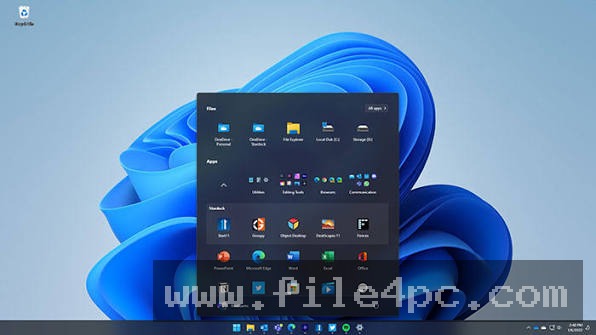
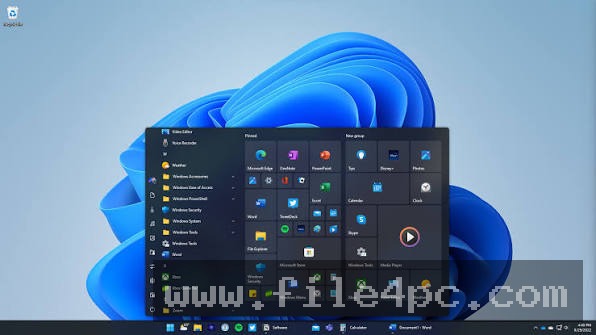
Users can choose between several distinct Start menu architectures. Options include faithful recreations of the Windows 7 menu, clean interpretations of the Windows 10 tile-based layout, modern Windows 11 arrangements, and specialized Windows Pro/App canvas views.
Application Groups, Tabs, and Folder Menus
Organization inside the Start menu goes far beyond basic shortcuts. Start11 v2 introduces tabbed application groups, customizable page canvases, and collapsible folder menus. This allows users to group applications by workflow, project type, or category (such as creative tools, gaming, or office suites).
Pin Files, Folders, and Drives directly to Taskbar
A major limitation in default desktop setups is the inability to quickly pin arbitrary items to the taskbar. Start11 lets you pin individual files, working folders, local drive partitions, or mapped network drives directly onto the taskbar or into popup taskbar menus for immediate access.
Ad-Free, Deep Local Search Engine
The software replaces web-cluttered search feeds with a fast local search experience. It removes unwanted online web advertisements and sponsored content, prioritizing installed programs, recent documents, system settings, and local files. It also integrates directly with third-party indexing tools like Everything and can index open Microsoft Edge tabs.
Visual Styling and Uniform Icon Tinting
Customization options extend across every visual element. Users can adjust menu transparency, modify taskbar blur levels, round taskbar corners, apply custom background textures, and utilize uniform icon tinting to match custom color themes across all installed app icons.
Your May Also Like :: HSX PromptKinetics PC Software
How Stardock Start11 PC Software Works
The application integrates into the native Windows Explorer shell API, intercepting Start button clicks and taskbar rendering calls without replacing core system binary files.
When you launch the configuration panel, you are presented with a clean sidebar split into Start Menu, Taskbar, Search, Control, and About sections. You select your primary Start menu layout from the visual picker and customize its visual style.
To organize your workspace, you open the application canvas inside the Start menu view. Here, you can create custom tabbed sections, drag shortcuts into app groups, or set up dynamic folder links.
When you press the Windows key or click the Start button, the software displays your custom menu seamlessly. If you ever need to access the native, un-themed Windows Start menu, you can configure hotkey rules (such as holding Ctrl while clicking Start) to bypass the software interface temporarily.
Benefits and Limitations
Weighing the desktop customization advantages against operating environment boundaries clarifies its value for daily use.
Benefits
The most significant benefit is total productivity recovery. By eliminating forced centered taskbars, unorganized app grids, and web-search advertisements, users gain instant access to critical software and data. The software has virtually no impact on system hardware, taking up less than 1 MB of background RAM during normal desktop use. Furthermore, configuration settings can be exported to backup files, making it easy to replicate a custom desktop setup across multiple PCs.
Limitations
The primary restriction is that it is a commercial, paid utility rather than a free open-source patch. Additionally, because Microsoft frequently updates the Windows 11 shell architecture through major feature updates, major OS releases can occasionally cause temporary visual quirks until Stardock releases an updated build.
What's New
Stardock maintains a rapid engineering schedule for the Start11 v2 release branch. Recent releases in the Version 2.8 series focus on expanding compatibility with modern Windows 11 builds.
Key recent updates include:
-
Full compatibility support for modern Windows 11 taskbar builds.
-
Experimental vertical taskbar positioning support for Windows 11.
-
Enhanced multi-monitor taskbar alignment fixes for centered multi-display configurations.
-
Expanded icon loading speeds and improved dark mode contrast adjustments.
-
Settings reload configuration command-line arguments for automated enterprise scripts.
Installation and Setup
Installing the software involves a lightweight, standard installation procedure.
You download the official installer (Start11v2_Setup.exe) from the developer's portal or authorized software distributors. Run the setup executable, accept the software agreement, and complete the installation wizard.
Upon first launch, the software configuration window opens automatically. You can enter your purchased product key or activate a 30-day trial period. Once activated, you select your desired Start menu layout and taskbar preferences, which take effect immediately without requiring a full computer reboot.
Tips for Using Stardock Start11 PC Software
Create dedicated tabs for active project assets inside the Start menu canvas. Placing project shortcuts, spreadsheets, and folder paths into a dedicated tab keeps your active desktop free from scattered icons.
Utilize the backup and restore configuration tool. Once you have tuned your menu styling, tab layouts, and taskbar colors, export your configuration to a JSON/backup file. This allows you to restore your setup instantly after a clean Windows reinstallation.
If you work with mapped network shares, use the Advanced Option panel to pin network drives directly to your Start menu or taskbar, saving you from navigating through File Explorer repeatedly.
Modern Alternatives
Depending on whether your objective is light taskbar tweaking or complete desktop shell modification, several alternatives exist.
StartAllBack is a lightweight Start menu and taskbar restoration utility focused specifically on Windows 11. It provides fast, low-level shell tweaks to restore classic taskbar context menus and File Explorer layouts, but offers less app-canvas tab organization than Start11 v2.
Open-Shell (formerly Classic Shell) is a free, open-source Start menu replacement utility. It provides reliable classic Windows 7-style Start menu restoration. However, it lacks modern Windows 11 aesthetics, tabbed app groups, and modern taskbar rounding adjustments.
Windhawk is a modular desktop tweaking framework that uses community-created code mods to tweak specific Windows shell behaviors. While highly flexible for technical users, it requires configuring individual scripts rather than providing a unified visual configuration dashboard.
Who Should Use Stardock Start11 PC Software?
This application is ideal for Windows 10 and 11 users who are dissatisfied with native Start menu restrictions, web-advertisement search results, or centered taskbar limitations. It is particularly valuable for power users, creative professionals, and IT administrators who require clean app organization, pinned drive access, and desktop configuration across multiple workstations.
However, users who are completely content with the default Windows 11 Start layout or prefer not to spend money on interface customization tools will not need this software.
FAQ
Is Stardock Start11 PC Software a subscription or a permanent license?
Stardock offers both perpetual standalone licenses (where a single key unlocks permanent usage for that major version) as well as inclusion within their annual Object Desktop software suite subscription.
Does using this software slow down computer boot times?
No. The software is heavily optimized, using less than 1 MB of system RAM and 0% active CPU when idle in the background.
Can I make Windows 11 look like Windows 10 or Windows 7?
Yes. The layout engine includes options to adopt Windows 7, Windows 10, or modern hybrid Start menu styles with a single click.
Can I transfer my configuration settings to a new PC?
Yes. The software includes a built-in Backup and Restore feature that lets you export your entire Start menu layout, visual themes, and tab settings to a file and load it onto another machine.
Conclusion
Stardock Start11 PC Software provides a complete solution for taking back control of the Windows desktop experience. By replacing restrictive default layouts with flexible app canvases, tabbed groups, ad-free local search, and direct drive pinning, it transforms the Start menu into a useful productivity hub.
While it requires a small license purchase, its negligible hardware footprint, deep feature set, and active update support make it a worthwhile investment for any Windows user. For anyone seeking a personalized, efficient, and distraction-free desktop environment, it offers an outstanding software solution.

💬 0 Comments
✍ Leave a Comment