

Wondershare Recoverit PC Software is a dedicated data recovery and file restoration application developed by Wondershare for desktop operating systems. Built to handle scenarios ranging from accidental file deletion and emptied Recycle Bins to formatted hard drives, corrupted partitions, and system crashes, it scans storage media to locate and rebuild lost digital files. The software supports a wide variety of storage devices, including internal hard drives, solid-state drives (SSDs), USB flash drives, SD memory cards, digital camera storage, and external backup disks.
Operating on local PC hardware, the utility processes file systems such as NTFS, FAT32, exFAT, and ReFS without sending personal file contents to external cloud servers. It serves home users recovering deleted family photos, videographers attempting to repair corrupted camera footage, and office workers restoring misplaced documents. Beyond standard file scanning, higher-tier editions incorporate specialized algorithms for stitching fragmented video clips and creating bootable USB media to retrieve files from unbootable Windows systems.
Wondershare actively maintains the application across its Version 12.x and 13.x release branches, delivering regular updates to improve scanning speeds, refine raw file signature detection, expand deep video recovery algorithms, and maintain stability across Windows 10 and Windows 11 environments.
Key Features
The platform provides a comprehensive set of recovery tools, media repair features, and file preview functions designed to handle diverse data loss situations.
Comprehensive File System and Format Support The scanning engine identifies over 1,000 file formats across photos, documents, video containers, audio tracks, archives, and email databases. It works across traditional spinning hard drives, flash memory chips, RAID configurations, and encrypted storage volumes.
Enhanced Video Recovery and Fragment Stitching Large high-definition video files (such as 4K or 8K MP4, MOV, and AVCHD clips) are frequently stored in fragmented pieces across a storage drive. Standard recovery utilities often restore these pieces separately, resulting in unplayable files. The Enhanced Recovery engine automatically scans, matches, and stitches video fragments back into unified, playable files.
Your May Also Like :: Duplicate Finder Professional PC Software
Integrated File Preview Before Export To ensure that target files are intact before initiating a lengthy restore operation, the software includes a file preview window. Users can inspect recovered documents, view full-resolution photos, and play audio or video clips directly inside the program interface before writing them to disk.
Crash Computer System Recovery When a Windows operating system suffers a critical Stop Error (BSOD) or fails to boot into the desktop environment, the software enables users to create a bootable USB drive on a secondary working PC. Booting the damaged computer from this USB media allows users to access local drives and extract critical files safely.
Corrupted Video and Photo Repair Engine Beyond basic file recovery, higher software tiers incorporate specialized repair tools for damaged media files. If an extracted photo or video exhibits missing headers, pixelation, or broken color data, the repair module analyzes the file structure and attempts to restore visual playback integrity.
How Wondershare Recoverit PC Software Works
The recovery workflow follows a clear, three-step process: Select, Scan, and Recover.
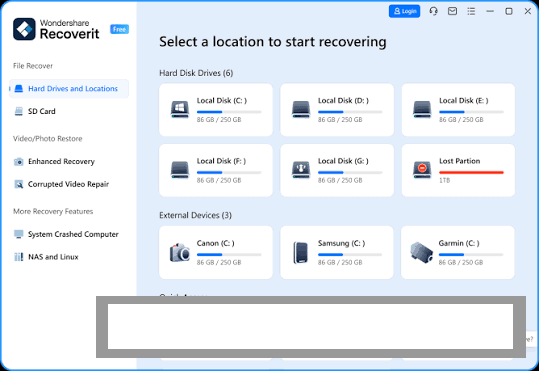
To begin, launch the application desktop window. The main interface categorizes available storage locations into Logical Drives, External Devices, Quick Access folders (such as Desktop or Recycle Bin), and Advanced Recovery options. Click on the specific partition or connected USB drive where your files were stored before deletion.
Once a target location is selected, the application automatically initiates a deep drive scan. The scanning panel displays real-time progress, showing found files organized by File Type or File Path tree structures. You can pause or stop the scan at any point if your required file appears in the results list, or use search filters to narrow down targets by file extension, size, or modification date.
After the scan finishes, double-click files to open the live preview window and verify their visual or structural integrity. Select the checkboxes next to your target files and click the Recover button.
Crucial Data Safety Warning: Always choose a destination drive different from the partition you are recovering files from. Saving recovered files back onto the same drive can overwrite remaining deleted data sectors, causing permanent file loss.
Benefits and Limitations
Weighing the software's functional strengths against its operational boundaries helps clarify its place in data recovery workflows.
Benefits
The most prominent advantage is its accessible user interface, which guides non-technical users through complex file system scans without requiring command-line syntax. Its specialized video fragment stitching offers a clear edge over generic file undelete utilities when recovering camera memory cards. The inclusion of live file previews prevents wasting time saving corrupted or incomplete files, while local processing keeps private personal photos and financial documents strictly offline.
Limitations
The primary operational constraint is scan duration when working with high-capacity hard drives or damaged storage media. Deep scanning a multi-terabyte drive can take several hours depending on connection interface speeds (such as USB 2.0 versus internal NVMe slots). Additionally, while the free trial version allows users to scan drives and preview lost files, full file saving capabilities require purchasing a commercial license key.
What's New
Wondershare maintains a consistent update schedule across its software portfolio, focusing on scanning efficiency, file header recognition, and media reconstruction.
Key developments in recent software updates include:
-
Enhanced Video Recovery Optimizations: Improved matching algorithms for professional camera formats from brands like Canon, Sony, GoPro, and DJI.
-
Expanded RAW File Support: Updated raw photo signature definitions for professional DSLR and mirrorless camera models.
-
System Stability Enhancements: Native optimizations for modern 64-bit Windows 11 architectures and storage controllers.
-
User Interface Refinements: Streamlined side navigation menus and faster search filter rendering during live drive scanning.
Installation and Setup
Getting the software ready on a Windows computer involves a simple setup process.
Download the official setup package directly from the Wondershare website. Run the installer wizard, accept the end-user license agreement, and select your installation directory.
Installation Warning: If you are attempting to recover deleted files from your primary system drive (typically C:), do not download or install the software onto that same drive. Installing new software writes new data sectors to your hard drive, which can overwrite the exact deleted files you are trying to retrieve. Download and install the application onto a secondary partition or external USB drive instead.
Upon opening the program, you can immediately begin scanning drives in free preview mode. Registering your purchased license key unlocks full file saving functionality.
Tips for Using Wondershare Recoverit PC Software
Stop using the affected storage drive immediately after discovering data loss. Refrain from downloading new files, saving documents, or running system defragmentation tools, as writing new data to the drive is the primary cause of unrecoverable file overwriting.
Utilize file search filters during deep scans to find specific documents faster. Filtering results by file format (such as .pdf or .docx) or inputting known file name fragments helps you locate critical data without sifting through thousands of system files.
Connect external memory cards using high-speed card readers plugged into USB 3.0 or Type-C ports. Fast interface connections significantly reduce the total time required for deep sector scans on large camera cards.
Modern Alternatives
Depending on whether you require open-source command-line utilities, lightweight free tools, or specialized partition repair suites, several alternative data recovery applications exist.
Recuva (by CCleaner) is a widely recognized lightweight file recovery utility for Windows. It provides quick scanning for recently deleted files and offers a free basic version. However, it lacks the deep video fragment reconstruction and bootable environment tools found in Recoverit.
EaseUS Data Recovery Wizard is a direct commercial competitor offering drive scanning, partition recovery, and preview capabilities across Windows and Mac systems. Its feature set and subscription pricing models closely mirror Wondershare's offering.
TestDisk and PhotoRec are powerful, free, and open-source command-line recovery utilities. TestDisk excels at repairing lost partition tables, while PhotoRec performs deep file carving across raw storage blocks. While highly effective and completely free, their command-line interface presents a steeper learning curve for average users.
Who Should Use Wondershare Recoverit PC Software?
This software is ideal for home users, photographers, video creators, office professionals, and IT support technicians who need a user-friendly graphical tool to recover lost files from drives or camera media. Its specialized video stitching features make it particularly valuable for videographers recovering fragmented camera files.
However, advanced system engineers comfortable with command-line tools who prefer free open-source solutions may find utility combinations like TestDisk and PhotoRec sufficient for their data recovery needs.
FAQ
Is Wondershare Recoverit PC Software completely free?
The software is distributed as a free-to-try demo. The free version allows users to scan drives and preview recoverable files, but saving recovered data beyond a small trial limit requires purchasing a commercial subscription or perpetual license.
Can the software recover files from a formatted hard drive?
Yes. The deep scan engine analyzes raw data sectors to locate file signatures even if the drive's file allocation table or partition file system has been formatted or cleared.
Is it safe to save recovered files back to the same drive?
No. Saving recovered files onto the same drive you are scanning can overwrite other deleted files that have not yet been retrieved. Always select a secondary hard drive, external disk, or USB flash drive as your destination location.
Does the software work on corrupted SD memory cards?
Yes. As long as your Windows computer recognizes the SD card as an attached hardware device (even if it prompts you to format the card), the application can scan the memory blocks directly to extract lost photos and videos.
Conclusion
Wondershare Recoverit PC Software provides a dependable, accessible workspace for retrieving lost data across diverse storage drives and file formats. By pairing deep sector scanning with visual file previews, video fragment stitching, and bootable crash recovery options, it addresses common data loss scenarios through a clear step-by-step interface.
While large drive scans require patience and saving recovered files requires a commercial license, its local processing privacy and specialized media reconstruction tools make it a practical asset for digital file recovery. For anyone facing accidental file deletion or drive corruption, it offers a functional recovery platform.


💬 0 Comments
✍ Leave a Comment