

Cisdem VideoPaw PC Software is a multimedia conversion and processing utility designed for Windows computers, created to help users transform video and audio files into various formats. For individuals who frequently handle different media formats for playback on mobile devices, editing suites, or web sharing, managing compatibility issues can often become frustrating. This software provides a centralized workspace for converting media files, extracting audio tracks, and performing basic file adjustments without requiring deep technical knowledge of codecs and bitrates.
Overview
Handling multimedia files across multiple platforms often presents compatibility challenges because different devices and operating systems rely on specific video and audio formats. While built-in media players can open standard file types, editing software, mobile phones, and web platforms frequently demand precise encodings. Cisdem VideoPaw PC Software addresses this requirement by offering a comprehensive format conversion environment tailored for Windows users.
The application is designed for content creators, students, and everyday multimedia users who need a straightforward way to make their video and audio collections playable across various hardware. Operating as a desktop application installed locally on Windows systems, it processes files directly on the user machine. Its interface is structured to guide users through file selection, format selection, and output generation without unnecessary clutter.
Key Features
The core functionality of the software centers around format flexibility and processing speed, offering several practical tools for media management.
-
Extensive Format Support: The program handles a wide range of video and audio containers, allowing users to convert files between common formats like MP4, AVI, MKV, MP3, and many others.
-
Batch Processing Capability: Users can queue multiple files simultaneously, enabling the software to convert entire folders of media without requiring manual intervention for each individual item.
-
Device-Specific Presets: Pre-configured output profiles match the technical specifications of popular smartphones, tablets, and gaming consoles, removing guesswork from configuration settings.
-
Basic Editing Tools: Built-in editing options allow users to trim video clips, crop unwanted frames, add text overlays, or adjust volume levels before exporting the final file.
-
Hardware Acceleration Support: The application utilizes available GPU hardware resources to speed up rendering times during heavy conversion tasks.
How Cisdem VideoPaw PC Software Works
Operating the utility follows a logical progression designed to minimize user friction.
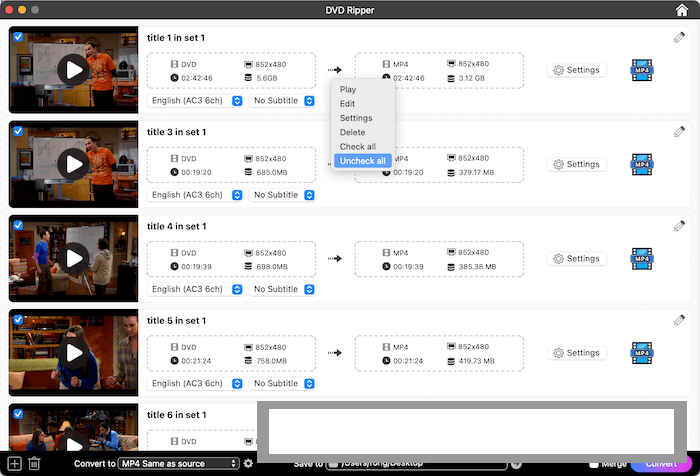
To begin, a user downloads the installer package from the official publisher website and completes the standard installation wizard on their Windows computer. Once launched, the main dashboard provides a clean drag-and-drop area where users can drop their target video or audio files. Alternatively, a dedicated file browser button allows users to locate items manually on their local storage drives.
After importing the media, the user selects the desired output format or target device preset from an organized drop-down menu. Advanced users can click into specific parameter settings to manually adjust resolution, frame rate, encoder type, and audio bitrate if precise control is required. Before starting the batch, users designate a destination folder for the processed output. Clicking the conversion button initiates the queue, and a progress bar displays the status of each file until completion. Users should ensure they have sufficient free disk space on their target drive before starting large batch conversions to prevent storage errors.
Your May Also Like :: Aescripts Glaze 2026 For PC Download
Benefits and Limitations
Benefits
The primary advantage of the software is its combination of wide format support and user-friendly design. It eliminates the need to memorize complex technical parameters by providing pre-configured profiles for standard devices. Furthermore, the inclusion of batch processing saves considerable time when managing large media libraries, while hardware acceleration helps reduce waiting times during rendering operations.
Limitations
While the application handles standard conversion and minor editing tasks effectively, it has distinct boundaries. It operates on a commercial licensing model, meaning full functionality requires a paid purchase after an initial trial period. It is not designed to replace professional video editing suites or advanced post-production workstations. Additionally, hardware acceleration performance depends heavily on the specific graphics card installed in the host computer, meaning older systems may experience slower processing speeds.
What's New
Development updates for media conversion utilities generally focus on expanding codec support, improving stability, and ensuring smooth operation on updated Windows operating system builds. Recent software revisions have concentrated on refining encoding algorithms to maintain output quality while optimizing processing speed.
Developers regularly update format profiles to match newer mobile devices and emerging web video standards. These ongoing refinements help ensure that the application remains reliable when processing modern high-resolution media files.
Installation and Setup
Setting up the utility on a Windows computer involves a straightforward installation procedure. Users should always download the setup package directly from the official Cisdem developer website to ensure file authenticity and safety.
Double-click the downloaded executable file to start the installation wizard. Follow the on-screen prompts, accept the user agreement, and select your preferred installation directory. Review your system firewall settings during the initial launch to ensure the application can perform necessary version checks if required. Ensure your storage drive has adequate free space for both the application files and temporary conversion caches before beginning intensive media projects.
Tips for Using Cisdem VideoPaw PC Software
Getting the most efficient results from your media conversion workflow involves several practical steps:
-
Utilize Presets for Speed: Use the built-in device presets rather than manual configuration if you are unsure about specific codec requirements for mobile playback.
-
Organize Batch Queues: Group similar files together in a single conversion queue to apply uniform output settings efficiently.
-
Check Target Storage: Always verify that your destination drive has ample free capacity, as uncompressed converted video files can require substantial storage space.
-
Leverage GPU Acceleration: Enable hardware acceleration in the settings menu if your computer features a compatible graphics card to shorten rendering times.
Modern Alternatives
Several alternative tools exist for users seeking different approaches to video conversion and media management. HandBrake provides an open-source, highly customizable conversion environment favored by advanced users who want granular control over encoding parameters. Freemake Video Converter offers a user-friendly interface with support for a broad range of formats, though its installer may bundle extra software offers that require careful attention during setup.
Other users rely on online conversion tools for quick, single-file tasks without requiring local software installations, though web tools often impose file size limits and depend entirely on internet speed. Choosing between these alternatives depends on whether you prefer open-source customization, a dedicated desktop utility, or a quick browser-based solution.
Who Should Use Cisdem VideoPaw PC Software?
This software is well-suited for regular computer users, students, and content creators who frequently need to convert video and audio files for different devices or sharing platforms. It benefits individuals who want a reliable, graphical interface without needing to master command-line encoding tools or complex parameter settings.
Conversely, advanced video engineers who require deep scripting capabilities, professional broadcast formats, or complex timeline editing will find dedicated video production suites more appropriate for their workflows. Similarly, users seeking entirely free open-source solutions may prefer tools like HandBrake.
FAQ
Is Cisdem VideoPaw compatible with Windows 11?
Yes, the application is designed to run smoothly on modern Windows environments, including both Windows 10 and Windows 11 operating systems.
Can I convert multiple files at the same time?
Yes, the software supports batch processing, allowing you to queue multiple video or audio files for simultaneous or sequential conversion.
Does the software support 4K video files?
Yes, the application can handle high-resolution media, including 4K and 1080p video files, depending on your system hardware capabilities.
Is there a free version available?
The software typically offers a trial version with restricted features or file conversion limits, requiring a license purchase to unlock full capabilities.
Conclusion
Cisdem VideoPaw PC Software provides a practical, user-friendly environment for managing multimedia conversion and basic file adjustments on Windows systems. By combining wide format support with batch processing and device presets, it simplifies tasks that traditionally require specialized technical knowledge.
Evaluating your daily media management needs will help determine if this utility fits your workflow. For anyone seeking a straightforward desktop tool to handle regular video and audio transformations, this application offers dependable performance.


💬 0 Comments
✍ Leave a Comment