

HD Tune Pro PC Software provides Windows users with a straightforward way to monitor, test, and diagnose connected storage devices. Storage drive failures often happen without obvious warnings, leading to sudden data loss or performance slowdowns. By running low-level hardware benchmarks, reading S.M.A.R.T. health attributes, and scanning disk surfaces for damaged sectors, this diagnostic utility gives system builders, IT technicians, and general users clear insights into the physical health and speed of their hard drives and solid-state drives.
Overview
HD Tune Pro PC Software is a comprehensive storage utility developed by EFD Software for Microsoft Windows operating systems. The software is designed to measure drive performance, detect physical or logical errors, check S.M.A.R.T. (Self-Monitoring, Analysis, and Reporting Technology) attributes, and securely erase drive contents. Unlike basic file transfer benchmarks that depend on operating system caching, this tool interacts directly with the storage controller to deliver accurate performance statistics across internal and external storage media.
EFD Software maintains the application as a lightweight, low-overhead desktop utility. The Pro version expands significantly upon the limited freeware release by adding low-level file benchmark tests, detailed drive usage logs, folder size analysis, multi-drive monitoring, and AAM (Automatic Acoustic Management) adjustments. It supports a wide array of storage interfaces, including internal SATA, NVMe SSDs, external USB enclosures, and memory cards.
Key Features
The application incorporates several specialized diagnostic modules aimed at evaluating storage speed, stability, and integrity.
Your May Also Like :: Firetrust MailWasher Pro PC Software
Low-Level Read and Write Benchmarking
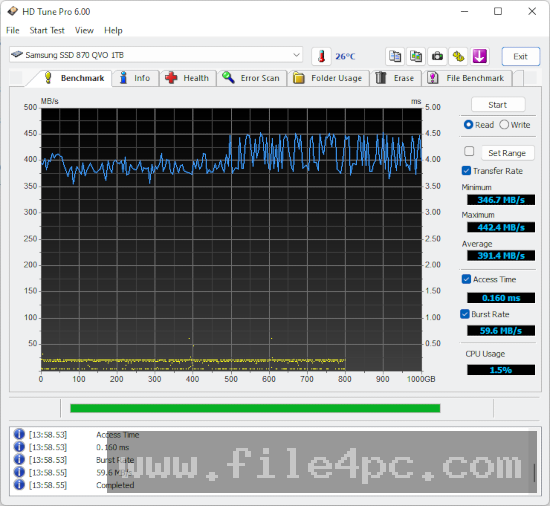
This module measures transfer speeds across the entire surface of a storage device. It displays minimum, maximum, and average transfer rates alongside access times and CPU usage percentages. Visual performance graphs show how transfer speeds change from the outer tracks to the inner tracks of traditional mechanical hard drives.
S.M.A.R.T. Health Status Monitoring
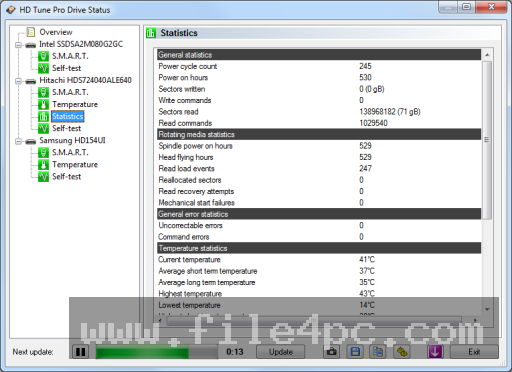
Storage drives internally record operational metrics such as reallocated sector counts, power-on hours, spin-up times, and temperature histories. The software reads these health parameters and displays an overall health assessment, highlighting attributes that exceed safe operational thresholds to warn users of potential impending hardware failure.
Surface Error Scan
Physical damage on drive platters or memory cells can cause file corruption. The built-in error scan checks every block of the storage device for read errors. It provides a visual grid of healthy green blocks and damaged red blocks, allowing users to identify bad sectors before putting critical data on the drive.
File Benchmark and Folder Usage Analysis
Beyond raw block-level tests, the file benchmark measures real-world transfer speeds for varying file sizes and queue depths. Additionally, the folder usage tool scans selected directories to show which files or folders consume the most disk space, acting as a quick disk cleanup assistant.
Secure Data Erasure
When retiring or selling a storage device, simple formatting is often insufficient to prevent data recovery. The software provides overwrite capabilities using standard patterns (such as zero fills or multi-pass wiping standards) to erase drive contents securely.
How HD Tune Pro PC Software Works
The software operates as a standalone Windows program with a tabbed interface, where each tab corresponds to a specific testing or monitoring function.
First, you launch the application and select the target drive from the top dropdown menu. The software lists all detected internal and external drives alongside their hardware model names and total capacities.
Second, you choose the desired task tab, such as Benchmark, Health, Error Scan, or Extra Tests. For performance benchmarking, you click the Start button to initiate the transfer tests. The utility sequentially reads blocks from the beginning of the drive to the end, drawing a real-time line graph of transfer speeds.
Third, you review the resulting data and graphs. If testing for errors, running a full surface scan checks every sector sequentially. Once finished, the tool generates a diagnostic log that can be copied to the clipboard or saved as a text report for future hardware comparison.
Extreme caution should be exercised when using the write benchmark or disk erasure features. Performing a write test or running an erase function overwrites data on the target drive, which will result in permanent data loss if executed on a drive containing active files or operating system partitions.
Benefits and Limitations
Evaluating the utility's advantages alongside its system limitations helps clarify its role in modern PC maintenance.
Benefits
-
Low Resource Usage: The executable runs with minimal system overhead, allowing it to perform background temperature monitoring without impacting system responsiveness.
-
Detailed Graphical Data: Detailed transfer rate graphs make it easy to spot sudden speed drops or irregular access latency across a drive's surface.
-
Broad Interface Compatibility: It works across internal SATA drives, NVMe SSDs, external USB hard drives, flash drives, and memory cards.
-
Comprehensive S.M.A.R.T. Reporting: Clear color-coded indicators highlight critical warnings like reallocated sectors or uncorrectable read errors.
Limitations
-
Dated Graphical Interface: The user interface retains a classic desktop layout that may feel outdated compared to modern Windows apps.
-
Limited SSD-Specific Health Metrics: While basic S.M.A.R.T. attributes work across NVMe and SATA SSDs, some proprietary vendor-specific endurance metrics may not display detailed descriptions compared to dedicated first-party SSD toolkits.
-
Destructive Write Benchmark: Write benchmarking cannot be executed on partitions containing active drive volumes; the partition must be deleted or left unallocated before running write tests.
What's New
EFD Software maintains the application through periodic updates to address hardware compatibility and driver detection improvements.
Recent updates in the version 5.7x release line focus on improving NVMe SSD detection and compatibility with modern storage controllers. Enhancements include updated temperature reading protocols for NVMe drives, refined S.M.A.R.T. attribute reporting for modern high-capacity mechanical drives, and bug fixes related to drive size reporting on storage arrays exceeding several terabytes.
Installation and Setup
Acquire the installer package directly from official developer distribution channels. The application is distributed as a lightweight setup file or trial package that requires minimal installation time.
Run the installer, accept the end-user license agreement, and complete the wizard steps. The setup routine places no heavy dependencies on the system and installs within seconds.
Upon opening the program, run it with administrator privileges to ensure the utility receives unrestricted low-level access to storage hardware and S.M.A.R.T. bus controllers.
Tips for Using HD Tune Pro PC Software
-
Run Administrator Privileges: Always launch the application as an administrator in Windows so that low-level hardware communication protocols function without restriction.
-
Use Unquick Surface Scans: When evaluating a suspicious or second-hand hard drive, uncheck the "Quick Scan" box under the Error Scan tab. A full scan takes longer but examines every individual block thoroughly.
-
Monitor Drive Temperatures: Enable the system tray temperature monitor in options to keep track of thermal conditions for internal NVMe SSDs and high-speed mechanical drives during heavy workloads.
-
Safely Prepare Drives for Write Testing: To perform a write benchmark, backup all critical files first, remove active volume letters in Windows Disk Management, and ensure the target drive contains no active operating system files.
Modern Alternatives
-
CrystalDiskInfo and CrystalDiskMark: A popular free software combination. CrystalDiskInfo provides detailed S.M.A.R.T. health monitoring, while CrystalDiskMark delivers quick sequential and random read/write speed benchmarks.
-
Hard Disk Sentinel: A comprehensive storage monitoring tool that focuses heavily on health prediction, failure estimation, and automated alerts for enterprise storage and local workstations.
-
Samsung Magician / Western Digital Dashboard: Official manufacturer utilities designed specifically for their respective SSD product lines, offering firmware updates and optimized vendor-specific diagnostic tests.
Who Should Use HD Tune Pro PC Software?
This utility is ideally suited for computer repair technicians, system builders, and hardware enthusiasts who frequently test, benchmark, and evaluate physical storage drives. Its ability to combine error scanning, speed graphing, and S.M.A.R.T. attribute reporting in a single interface makes it a practical diagnostic tool for bench testing.
Casual computer users who only want to check basic drive health or test a single SSD may find free alternatives or official drive manufacturer tools simpler for basic health checks.
FAQ
Is HD Tune Pro PC Software compatible with NVMe SSDs?
Yes. Modern versions of the software support NVMe solid-state drives for basic reading, benchmarking, and S.M.A.R.T. health checks, although vendor-specific SSD management tools may offer deeper firmware-level options.
Why is the Write Benchmark option disabled?
The write benchmark is disabled by default to protect user data. It can only be performed on drives that do not contain active partitions or allocated file systems.
What is the difference between the Free and Pro versions?
The free version offers basic read benchmarking, S.M.A.R.T. reading, and error scanning. The Pro version adds file benchmarking, folder usage analysis, write benchmarking, low-level disk wiping, and automatic acoustic management.
Does running an Error Scan delete my files?
No. A standard Error Scan performs read-only operations on the storage surface to detect bad sectors and does not alter or delete existing data.
Can I run the software on external USB drives?
Yes. The utility detects external USB enclosures, flash drives, and memory cards, allowing you to run speed tests and health checks on portable media.
Conclusion
Regular hardware monitoring remains essential for maintaining storage reliability and preventing unexpected data loss. HD Tune Pro PC Software delivers a dependable set of diagnostic tools that allow users to evaluate drive speeds, detect bad sectors, and review critical health attributes across internal and external storage devices.
While modern SSDs and operating systems handle many background tasks automatically, having direct access to low-level benchmark graphs and surface scans gives technicians and power users clear visibility into drive health. Utilizing these diagnostic tests before storing critical data ensures your storage media remains stable and performing as expected.
💬 0 Comments
✍ Leave a Comment