

Stereo Tool PC Software is a specialized, enterprise-grade audio processing utility created by Hans van Zutphen and developed by Thimeo Audio Technology. Built explicitly for FM radio broadcasters, internet stream operators, podcast production studios, and mastering engineers, it shapes, cleans, and optimizes audio in real time. Operating on local Windows systems as a standalone program or host plugin, it translates the dense processing chains of multi-thousand-dollar physical broadcast hardware racks into a flexible, software-driven workstation environment.
The software tackles common digital audio defects—such as peak clipping, compression artifacts, ground hum, and phase alignment errors—while applying multi-band dynamic control. Whether driving a commercial FM transmitter with an integrated software MPX stereo/RDS encoder or delivering loudness-compliant streams for online broadcasting, it offers total control over sound signatures and transmission specs.
Thimeo maintains active development on the platform across its Version 11 series, offering installers for standalone desktop deployment, VST2, VST3, Winamp DSP, and command-line automation.
Key Features
The software incorporates a deep suite of processing, restoration, and transmission tools engineered for low-latency audio conditioning.
Your May Also Like :: Scientific Toolworks Understand PC Software
Audio Restoration Engine (Declipper & Delossifier)
The built-in Declipper restores dynamic range and eliminates harsh harmonic distortion from clipped audio tracks. Complementing this, the Delossifier module reconstructs missing high-frequency harmonics and removes encoding artifacts caused by low-bitrate MP3 or AAC compression.
Multi-Band Dynamics and Auto EQ
The platform features multi-band automatic gain control (AGC) alongside multi-band compressors supporting 2 to 9 independent bands. The Auto EQ and Bass EQ systems adjust spectral balance dynamically without squashing transient punch or creating pumping artifacts.
Stereo Image Correction and Spatial Enhancement
Phase cancellation problems are resolved using the AZIMUTH automatic phase correction tool, which repairs azimuth misalignment in stereo tracks. The engine also includes True Bass and Immersive Bass subharmonic generators to project deep, warm low-end performance even through small speaker drivers.
FM Composite Clipper and Software MPX/RDS Encoder
For broadcast engineers, the software incorporates a full software FM composite encoder. It outputs a complete multiplex (MPX) signal with pilot tone, RDS/RBDS data, and composite clipping directly through a high-frequency sound card, ensuring maximum loudness while adhering to strict ITU-R SM.1268 ("Stokkemask") broadcast compliance limits.
MicroMPX (µMPX) IP Streaming
MicroMPX technology allows stations to stream an entire composite FM MPX signal—including stereo pilot and RDS data—over IP networks to remote transmitter sites using bitrates as low as 320 kbit/s, removing the need for costly hardware STL links.
How Stereo Tool PC Software Works
The operational workflow transitions from raw audio ingestion to multi-stage dynamic processing and final signal output.
To begin, you launch the standalone executable or open the plugin within your preferred digital audio workstation (DAW) or playout automation software (such as RadioBOSS, PlayoutONE, or mAirList). In standalone mode, you assign your physical sound card or virtual audio cable as the primary input and output path.
Next, the audio stream passes sequentially through the processing chain. The signal undergoes initial cleanup via the Dehummer and Declipper modules before hitting the multi-band AGC and equalizer stages. You adjust compression thresholds, attack times, stereo widening parameters, and limiter ceilings using the graphical workspace, or select from hundreds of pre-configured broadcast presets tailored for talk radio, rock, pop, or classical formats.
Finally, the processed audio routes to your destination. For web streaming, the built-in streaming encoder routes compressed MP3/Ogg streams straight to IceCast or ShoutCast servers. For terrestrial FM transmission, the software outputs a 192 kHz composite MPX signal through a compatible sound card directly into an FM transmitter.
Benefits and Limitations
Weighing technical capabilities against system requirements highlights the software's functional value.
Benefits
The primary advantage is delivering hardware-processor audio quality at a fraction of traditional rack equipment costs. Its Declipper module is widely respected for saving brickwall-limited recordings. The flexibility of standalone operation alongside VST2, VST3, and Winamp plugin formats ensures compatibility across nearly all Windows playout automation environments. Furthermore, single-station licenses remain permanent and accessible for smaller webcasters.
Limitations
The primary restriction relates to its dense user interface and steep learning curve. Containing hundreds of interconnected sliders, processing stages, and technical parameters, navigating the setup can overwhelm beginners. Running advanced features like the Declipper, 9-band dynamic processing, and MicroMPX simultaneously demands substantial CPU processing power, which can lead to audio buffer underruns on low-end computer hardware.
What's New
Thimeo maintains an active release schedule for the Version 11 series, bringing latency improvements, updated processing algorithms, and modernized platform builds.
Key recent updates in the 11.x series include:
-
Overhauled input/output sub-systems designed for enhanced driver stability across Windows audio interfaces.
-
Refined MicroMPX encoder optimizations to reduce IP packet jitter over low-bandwidth transmission paths.
-
Expanded preset libraries tailored for streaming loudness standards (LUFS) and modern FM receiver acoustics.
-
Enhanced Auto EQ and Bass EQ dynamics, providing smoother spectrum correction without phase distortion.
Installation and Setup
Setting up the application on Windows involves selecting the appropriate binary format for your workflow.
You download the official installer directly from Thimeo Audio Technology. During setup, you choose whether to install the standalone desktop application, the VST2/VST3 plugins for DAWs, or the Winamp DSP plugin for automated radio playout software.
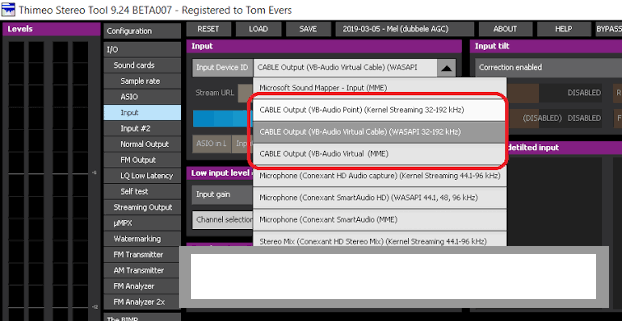
After installation, launch the software and configure your audio devices. If you intend to pass audio from a media player on the same PC, install a virtual audio cable driver (like VB-Cable) to route playback output into the software's input channel. For FM MPX transmission, configure your sound card sample rate to 192 kHz to ensure full 57 kHz RDS subcarrier transmission.
Tips for Using Stereo Tool PC Software
Start with a factory preset close to your desired sound before tweaking individual sliders. Modifying existing presets like "Radio Smooth" or "Loud & Punchy" saves hours compared to building a multi-band compression curve from scratch.
If you experience audio stuttering, adjust your buffer size in the I/O settings menu. Increasing ASIO or WASAPI buffer sizes provides the CPU with the headroom required to compute heavy Declipper and MicroMPX algorithms smoothly.
When setting up for streaming rather than FM broadcast, disable the FM Pre-emphasis, Composite Clipper, and RDS modules. Keeping these active on a digital web stream adds unnecessary subcarrier filtering that degrades digital AAC/MP3 stream quality.
Modern Alternatives
Choosing an audio processor depends on whether your output is online web streaming or high-power FM broadcasting.
Breakaway ONE is a popular software audio processor designed for radio and web streaming. It offers a polished multi-station dashboard and low latency, but lacks the advanced Declipper and MicroMPX feature set provided by Thimeo.
Omnia.9pt / Omnia Enterprise Software delivers broadcast audio processing derived from Telos Alliance hardware processors. It excels in enterprise broadcast infrastructure, but requires significantly higher licensing costs compared to independent software tools.
iZotope Ozone is an industry-standard mastering plugin suite. While exceptional for offline music production, track mastering, and surgical EQ, it is not engineered for 24/7 real-time broadcast transmission, FM RDS encoding, or live stream clipping.
Who Should Use Stereo Tool PC Software?
This utility is ideal for FM radio station engineers, internet radio operators, live streamers, and audio repair technicians. If you need to fix distorted tracks, maximize broadcast volume legally, or generate an all-in-one FM MPX signal with RDS data directly from a PC, it delivers an exceptional operational framework.
However, bedroom podcasters or casual listeners who simply want basic volume equalization without diving into deep multi-band compression settings will likely find the detailed broadcast parameters overly complex.
FAQ
Is Stereo Tool PC Software free or paid?
The software can be downloaded and used as a free version with basic features. However, enabling advanced modules like the Declipper, Delossifier, MicroMPX, or FM Composite Clipper requires purchasing specific license upgrades, as unregistered advanced features play periodic voice watermarks.
Can I use this software with VST host applications?
Yes. The developer provides both 32-bit and 64-bit VST2 and VST3 plugin files compatible with DAWs and playout hosts such as Adobe Audition, Reaper, FL Studio, and Ableton Live.
What is the Declipper feature?
The Declipper is an audio restoration algorithm that analyzes flattened, distorted audio waveforms caused by excessive recording levels. It mathematically reconstructs missing peak dynamics, removing harsh distortion artifacts.
Does the software require a special sound card for FM transmission?
For basic audio processing or web streaming, any standard sound card works. However, if you use the built-in software MPX encoder to drive an FM transmitter directly, you must use a sound card that supports 192 kHz sample rates and DC coupling.
Conclusion
Stereo Tool PC Software stands as an authoritative solution for software-based audio processing, dynamic restoration, and broadcast signal generation. By combining advanced declipping algorithms with multi-band compression, stereo widening, and complete software MPX/RDS encoding, it brings high-end radio processing capabilities within reach of any station operator.
While mastering its technical settings demands patience and audio engineering knowledge, its low resource overhead and flexible licensing make it a practical long-term investment. For broadcasters and audio professionals who demand clean, loud, and compliant audio output, it offers a world-class production pipeline.

💬 0 Comments
✍ Leave a Comment