

Imaginando BAM PC Software gives electronic music producers, beatmakers, and live performers a streamlined environment to compose, sketch, and perform track ideas without getting bogged down in complex digital audio workstation menus. Setting up full song arrangements in traditional production software can sometimes feel overly technical, slowing down the creative spark. By focusing on a groovebox-style workflow with 16 track slots, built-in sound engines, and flexible step sequencing, this software allows artists to quickly turn rhythmic clips and melodies into complete musical arrangements.
Overview
Imaginando BAM PC Software (officially known as BAM Beat Maker & Music Maker) is a groovebox-style music production application developed by the Portuguese audio technology company Imaginando. Designed as both a standalone desktop application and a VST/VST3/AU audio plugin, it provides a self-contained ecosystem for drum sequencing, synthesizer programming, sample editing, and clip matrix arranging.
Imaginando actively maintains the software as part of its cross-platform product lineup, which includes companion mobile apps for iPad and Android. The desktop version functions as an intuitive music creation station that combines elements of hardware drum machines, vintage samplers, and modern clip-launching workstations. It targets beatmakers, electronic music creators, synth enthusiasts, and live performers who want an immediate, hands-on environment for drafting tracks or expanding their studio setup.
Key Features
The application combines multiple sound creation modules and sequencing tools into a unified interface designed for fast song creation.
Your May Also Like :: Clip Studio Paint EX PC Software
16-Track Matrix Architecture
The core engine centers around 16 individual track channels. Each channel can host a unique sound source, such as a built-in synth engine, a sample player, or an external MIDI instrument. This grid layout allows producers to construct complex polyrhythms, layered drum kits, and melodic basslines side-by-side within a single unified workspace.
Integrated Sound Engines and Sampler
BAM comes equipped with a variety of built-in synthesis modules, including analog-style subtractive synthesis, FM synthesis, and physical modeling engines. Alongside synth generators, the built-in sampler allows users to import audio files, slice drum loops, adjust pitch parameters, and apply envelope controls directly to custom sample libraries.
Advanced Step Sequencer and Parameter Automation
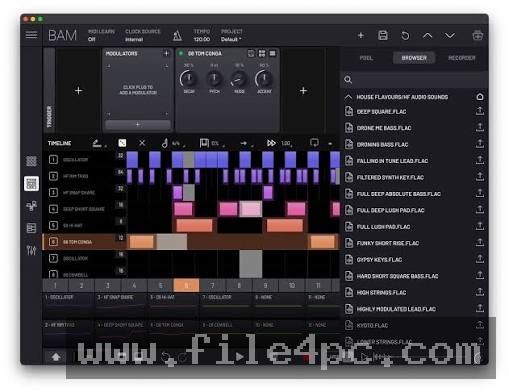
Pattern creation relies on an intuitive step sequencer supporting up to 256 steps per pattern. Producers can dial in per-step parameter automation, adjust note probabilities, set ratchets, and alter step lengths per track. These generative sequencing parameters make it easy to transform basic four-bar loops into evolving musical phrases.
Built-In Audio FX Suite
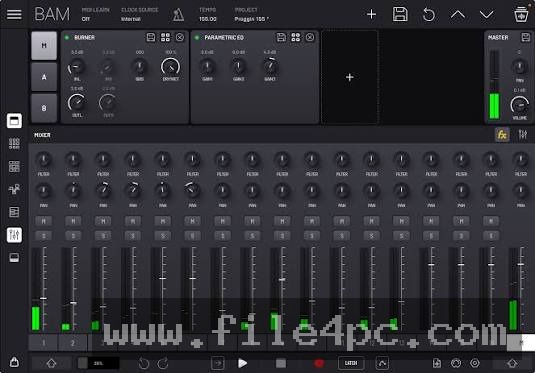
Each of the 16 tracks features dedicated audio effect slots, including dynamic filters, delays, reverbs, bitcrushers, choruses, and parametric equalizers. Additionally, master and send channels allow global space and compression processing, giving users the tools needed to mix complete tracks internally.
Cross-Platform Project Compatibility
One of the distinct features of Imaginando's ecosystem is seamless project exchange across desktop and mobile devices. Projects created on the PC version can be opened on tablet versions without layout distortion, making it convenient to sketch ideas on mobile hardware and finish mixing on a desktop PC.
How Imaginando BAM PC Software Works
The application operates through a central visual environment composed of three main views: Track View, Sequencer View, and Mixer View.
First, you open the software as a standalone desktop application or load it as a plugin inside your primary host DAW. You choose your preferred audio drivers (ASIO on Windows) and configure connected USB MIDI controllers or grid hardware.
Second, you select any of the 16 track slots to load a sound source. You can pick a synthesizer preset, browse built-in drum samples, or load your own audio files into the sampler module. Once a sound is assigned, you use the step sequencer grid or play a connected keyboard controller to input notes and trigger clips.
Third, as you build multiple patterns across different tracks, you organize them into Scene rows. Triggering different Scenes creates transitions between song sections, such as intros, verse breakdowns, and main drops. Finally, you adjust individual channel faders and master effects in the Mixer View, then export the project as uncompressed audio stems or stereo mix files.
Always check audio latency and driver settings inside the standalone preferences window before recording live controller inputs. Selecting low buffer sizes on ASIO drivers ensures immediate response times when tapping out drum patterns on hardware pads.
Benefits and Limitations
Understanding the practical strengths and functional limits of the software helps determine if it fits your production workflow.
Benefits
-
Focused, Distraction-Free Workflow: The groovebox layout eliminates overwhelming menu trees, helping producers sketch full song structures rapidly.
-
Standalone and Plugin Flexibility: You can run it independently as a standalone desktop program or embed it directly within DAWs like Ableton Live, FL Studio, or Bitwig Studio.
-
Cross-Platform Synchronization: Easy project file transfer between Windows, macOS, iOS, and Android systems enables flexible mobile and desktop creation.
-
Rich Parameter Modulation: Step-by-step automation locks, probability parameters, and per-track length controls provide deep sequencing depth for electronic genres.
Limitations
-
Fixed 16-Track Ceiling: Projects are strictly capped at 16 concurrent audio/synth tracks per instance, which may feel restrictive for complex orchestral or pop productions.
-
Simplified Wave Editing: While the built-in sampler handles basic trimming and pitching well, it lacks advanced spectral editing features found in dedicated sample editing software.
-
Learning Curve for Non-Grid Users: Musicians accustomed strictly to linear, timeline-based recording software may require time to adapt to clip-launching and step-sequencing mechanics.
What's New
Imaginando maintains a regular update schedule for its audio software suite, focusing on performance optimizations and user interface enhancements.
Recent maintenance releases across the BAM build line focus on expanding sound library content, improving plugin hosting stability, and refining multi-touch touch-screen integration for Windows tablet users. Updates have also introduced smoother parameter automation drawing, optimized CPU efficiency when running multiple instances of internal FM synthesis engines, and fixed minor MIDI routing quirks when sync-locked to external DAW clocks.
Installation and Setup
Acquire the setup package directly from official Imaginando software distribution channels to ensure an authentic, unmodified installer file.
Run the installer wizard on your PC. The setup routine gives you the option to install the standalone desktop application alongside VST, VST3, and AAX plugin formats. Select the plugin formats compatible with your installed digital audio workstations.
Launch the software after installation. Upon first launch, log in with your Imaginando account credentials or enter your license key to authorize the program from evaluation mode into a full registered product license.
Tips for Using Imaginando BAM PC Software
-
Utilize Per-Step Ratcheting: Apply ratcheting (sub-division fills) to specific hi-hat steps inside the sequencer to quickly create modern trap and electronic drum rolls without manually editing fine grid divisions.
-
Experiment with Variable Track Lengths: Set different step lengths for individual tracks (such as 15 steps on a synth lead against 16 steps on a kick drum) to generate constantly shifting, non-repeating polyrhythmic patterns.
-
Map Physical Hardware Controllers: Assign incoming MIDI CC commands from your physical pad controllers to BAM knobs and track faders for a tactile, hardware-like drum machine experience.
-
Use as a Sub-Mixer in Host DAWs: When running BAM as a plugin inside a larger DAW, route its 16 internal tracks to separate DAW audio buses to process individual drum stems with specialized third-party effect chains.
Modern Alternatives
-
Native Instruments Maschine: A comprehensive hardware and software hybrid ecosystem featuring deep sampling, expansive sound libraries, and dedicated physical pad controllers for groove production.
-
Ableton Live (Session View): A industry-standard DAW featuring non-linear clip launching and scene arrangement, providing unlimited track counts alongside traditional linear recording tools.
-
Akai MPC Software: A classic sampling and beatmaking platform designed for pad-based composition, offering traditional chop-and-swing workflows favored in hip-hop production.
Who Should Use Imaginando BAM PC Software?
This application is best suited for beatmakers, electronic music composers, synth wave producers, and live performers who value a fast, tactile groovebox approach to making music. If you find traditional DAWs too complex for initial brainstorming sessions, BAM offers an encouraging, immediate environment for generating creative momentum.
Producers who focus primarily on multi-track vocal recording, live acoustic band mixing, or scoring long-form video content will likely prefer traditional linear digital audio workstations with unlimited track counts and advanced audio editing suites.
FAQ
Is Imaginando BAM PC Software a standalone program or a plugin?
It functions as both. The installer includes a standalone desktop application for independent use, as well as VST, VST3, AU, and AAX plugin formats to run inside other host workstations.
Can I load my own audio samples into the software?
Yes. The built-in sampler module allows you to drag and drop custom WAV, AIFF, or MP3 files directly into track slots to build personalized drum kits and instrument patches.
Does the software support external MIDI controllers?
Yes. The software features built-in MIDI mapping, allowing you to connect physical USB keyboards, grid controllers, and knob boxes to trigger steps, play notes, and adjust parameters.
Can I share project files between my PC and an iPad?
Yes. Project files created in BAM use a unified file format across PC, Mac, iOS, and Android platforms, making cross-device project sharing straightforward.
How many tracks can I use in a single project?
Each BAM project instance supports up to 16 concurrent sound tracks, with each track hosting its own synth engine, sampler, or MIDI channel.
Conclusion
Creating engaging electronic music requires tools that encourage speed, experimentation, and fluid song structure development. Imaginando BAM PC Software delivers a solid groovebox workflow by combining 16-track sequencing, flexible sound engines, and deep parameter automation in a portable, modern package.
Whether used as a standalone sketching station on a laptop or embedded as a virtual drum machine inside a primary host DAW, its hands-on approach helps overcome creative blocks. Setting up custom sample kits and exploring generative step parameters ensures a dynamic production environment tailored to modern beatmaking.

💬 0 Comments
✍ Leave a Comment