

Scientific Toolworks Understand PC Software is a static code analysis, visualization, and metrics platform engineered to help software developers, systems engineers, and security auditors comprehend and maintain massive codebases. Originally created by Scientific Toolworks, Inc. (SciTools), it parses source code written across dozens of programming languages, creating a detailed relational database of every class, function, variable, dependency, and execution path. Rather than operating as a conventional code editor, the application serves as a multi-language reverse-engineering utility that visualizes code architecture, measures software complexity, and verifies compliance with strict industry coding standards.
The desktop application operates entirely on your local Windows PC, processing source code directly on your local storage drive without sending sensitive intellectual property to external cloud servers. It is widely used in mission-critical industries, including aerospace, defense, automotive systems, embedded electronics, medical devices, and enterprise software engineering. Whether teams are onboarding engineers to legacy systems, refactoring monolithic software, or conducting safety compliance audits, the utility provides the analytical framework needed to navigate complex software architectures.
SciTools maintains active development on the application, issuing updates that expand language parsing, modernize graphics rendering, and integrate seamlessly with continuous integration pipelines and modern desktop environments.
Key Features
The platform includes a deep suite of static analysis, graphical visualization, and code quality measurement tools designed to simplify complex software environments.
Multi-Language Source Code Parsing
The software parses a wide range of programming languages within a single unified workspace, including C/C++, C#, Java, Python, Ada, Fortran, Pascal/Delphi, VHDL, Assembly, and Web technologies (HTML, CSS, JavaScript, PHP). This broad language support allows developers to analyze polyglot codebases where backend low-level C++ components interface with high-level Python scripts or legacy Ada modules.
Your May Also Like :: Clip Studio Paint EX PC Software
Interactive Graphical Visualization
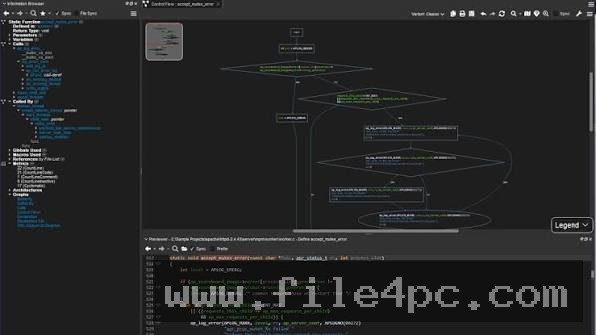
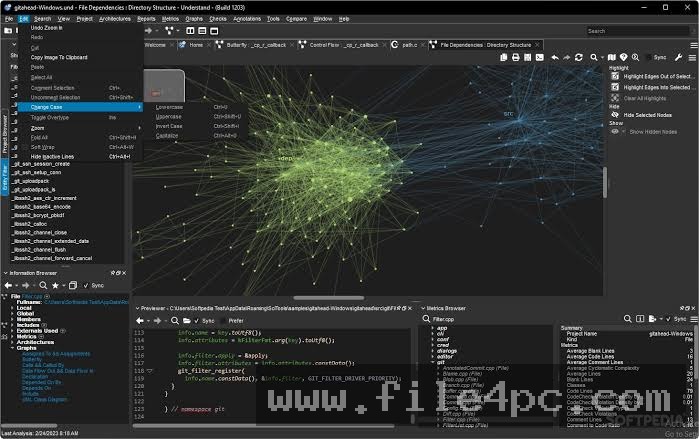
Understanding code structure through text alone can be overwhelming. The built-in graphics engine generates dynamic visual diagrams, including call graphs, butterfly charts, class inheritance trees, control flow graphs, and cluster diagrams. Clicking any node in a visual graph immediately highlights the corresponding source code lines in the editor window.
Automated Compliance and Standards Verification (CodeCheck)
For safety-critical industries, the integrated CodeCheck engine automates adherence to strict coding standards like MISRA (C and C++), AUTOSAR, and custom team guidelines. It flags potential buffer overflows, uninitialized variables, unreachable code, and style violations before code is compiled or committed.
Software Complexity and Health Metrics
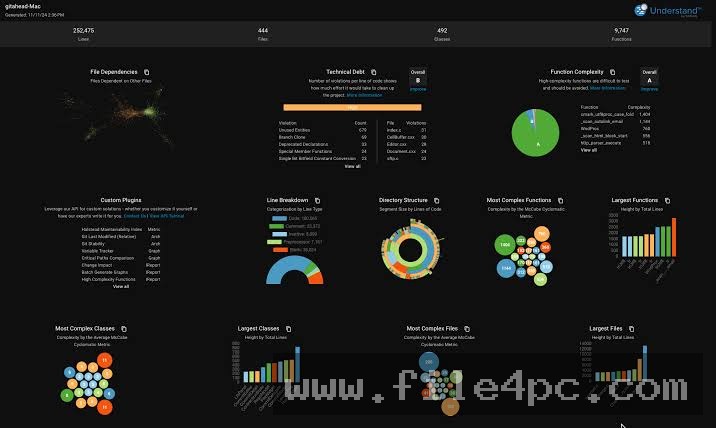
The platform calculates detailed software metrics to evaluate code quality and maintainability. It computes Cyclomatic Complexity, Halstead Volumetrics, Line Counts (LOC), Coupling and Cohesion values, and class depth. These metrics help team leads pinpoint brittle, overly complex functions that require refactoring.
Extensible Python and C++ APIs
Developers can extend the platform's core capabilities by writing custom scripts using its native Python and C++ APIs. This allows engineering teams to extract custom metrics, automate report generation, create proprietary compliance checks, or feed structured analysis data directly into CI/CD pipelines like Jenkins.
How Scientific Toolworks Understand PC Software Works
The operational model relies on an initial static parsing phase that converts raw text files into an indexed relational database.
To begin, you create a new project and point the software toward your source code directories. You select the target primary languages and configure compiler-specific settings, such as macro definitions and include file paths. The parsing engine then processes every source file, extracting every symbol, type declaration, function call, and variable assignment into a fast local database.
Once parsing completes, you interact with your project through a multi-pane workstation layout. The Entity Locator allows you to search for any function or variable instantaneously across millions of lines of code. Selecting an entity opens its Information Browser pane, which displays a comprehensive dictionary of where the item is defined, every place it is called, which global variables it modifies, and its associated complexity scores.
To inspect architectural flows, you right-click any class or function and request a specific diagram, such as a Control Flow or Call Graph. You can run the CodeCheck rule engine across the entire codebase or specific subdirectories to generate compliance reports, which can be exported as interactive HTML dashboards, CSV spreadsheets, or text logs for team review.
Benefits and Limitations
A balanced assessment of the software requires evaluating its analytical power alongside its operational requirements.
Benefits
The most significant advantage is total architectural transparency across massive, multi-million-line codebases. It cuts onboarding time for new developers by providing visual maps and dependency graphs of legacy systems that lack documentation. Because processing occurs locally on desktop hardware, sensitive proprietary source code remains secure. Furthermore, its ability to parse legacy languages like Ada, Fortran, and JOVIAL alongside modern languages like C++20 and Python makes it uniquely valuable for enterprise software preservation.
Limitations
The primary restriction is the initial configuration requirement. For complex C and C++ projects that rely on heavy macro definitions, custom build scripts, or specific compiler flags, setting up include paths properly is necessary to prevent parsing errors. Additionally, the user interface presents a high volume of technical data, metrics windows, and visual graphs, which creates a steep learning curve for casual developers who only need a simple text editor. Commercial licensing also represents a significant financial investment targeted at enterprise and institutional budgets rather than hobbyist developers.
What's New
SciTools maintains a continuous release cycle for the software, constantly refining language parsers to keep pace with modern language specifications. Recent releases in the Version 6.x and 8.x series introduce major performance optimizations, updated user interface elements, and expanded language features.
Key updates in recent releases include:
-
Upgraded strict parsers supporting C++20, C# 11, Java 18, and modern Python 3 constructs.
-
Enhanced graph rendering engines that handle large-scale architectural diagrams smoothly without UI lag.
-
Expanded CodeCheck rule libraries for MISRA C:2012 and AUTOSAR compliance standards.
-
Modernized high-DPI display support and user interface dark theme refinements.
-
Performance optimizations reducing database file size and speeding up multi-threaded project parsing on multi-core processors.
Installation and Setup
Installing the application on a Windows desktop follows a standard enterprise setup process.
You download the 64-bit installer executable directly from the official SciTools customer portal. Run the installer wizard, accept the software agreement, and select your destination installation directory. The installer places the desktop application, command-line interface utilities (und.exe), and Python API bindings onto your local storage drive.
Upon launching the software for the first time, you enter your commercial license key or point the application toward a network floating license server. Administrators deploying the application across corporate development workstations can run the installer silently via command-line arguments.
Tips for Using Scientific Toolworks Understand PC Software
To get accurate parsing results for C and C++ projects, import your project using a compilation database file (compile_commands.json) generated by build tools like CMake or Bear. This automatically supplies the exact compiler flags, include directories, and macro definitions used during real builds.
Utilize the und command-line utility for automated continuous integration tasks. You can configure nightly build servers to re-parse the codebase, execute CodeCheck standards, and fail automated builds if new critical compliance errors or complexity spikes are introduced.
When analyzing massive legacy projects, create custom Architectural Views. Grouping source files into logical subsystems (e.g., "Database Layer," "UI Components," "Hardware Drivers") allows you to generate high-level dependency graphs between entire modules rather than getting lost in thousands of individual functions.
Modern Alternatives
Depending on whether your team requires deep static analysis, simple code editing, or continuous security scanning, several alternatives exist.
SonarQube is a popular enterprise code quality and security static analysis platform. While SonarQube focuses primarily on continuous integration web dashboards and automated pull-request gatekeeping, it lacks the deep desktop-based interactive visual graphing, manual call-tree exploration, and legacy defense language support provided by SciTools.
Doxygen is an open-source documentation generator that extracts structural diagrams and call graphs from annotated source code. While free and widely used for basic API documentation, it does not offer interactive compliance verification, deep metrics tracking, or real-time desktop architecture navigation.
Lattix Systems Architect is an enterprise software architecture management tool that uses Dependency Structure Matrices (DSM) to analyze software coupling. It excels at high-level structural refactoring but lacks the built-in multi-language code editor, CodeCheck engine, and entity-level debugging features found in SciTools' offering.
Who Should Use Scientific Toolworks Understand PC Software?
This application is ideal for software engineers, systems architects, and technical project managers who work with complex, long-lifespan codebases. It is particularly valuable for teams in aerospace, defense, automotive, medical device manufacturing, and financial services that must enforce strict coding standards like MISRA and AUTOSAR.
However, web developers building smaller applications or hobbyists working on short-term scripts will find the software overly complex and expensive for their daily needs, as lightweight IDEs or standard static linters are sufficient for those workflows.
FAQ
Does the software require an internet connection to analyze code?
No. The application performs all code parsing, database indexing, metrics generation, and diagram rendering locally on your desktop computer. An internet connection is only needed for initial software activation or connecting to a remote floating license server.
What programming languages are supported?
The software supports a wide range of languages, including C/C++, C#, Java, Python, Ada, Fortran, Pascal/Delphi, JOVIAL, VHDL, Assembly, HTML, CSS, JavaScript, PHP, and XML.
Can I integrate this application with Visual Studio or VS Code?
Yes. SciTools provides extensions and integrations for popular development environments, allowing developers to jump directly between their primary code editor and the detailed visualization windows of the analysis engine.
How does the CodeCheck feature help with safety compliance?
CodeCheck acts as an automated static audit engine that scans your code against pre-configured rulesets like MISRA or custom team rules. It identifies non-compliant code patterns, safety hazards, and unhandled conditions, exporting detailed compliance verification logs for regulatory certification.
Conclusion
Scientific Toolworks Understand PC Software remains a premier solution for static code analysis, structural visualization, and software metrics management. By converting complex source code into searchable relational databases and interactive visual diagrams, it empowers developers to comprehend, refactor, and maintain massive software systems with confidence.
While its enterprise pricing and initial project configuration requirements demand a committed technical investment, its ability to handle polyglot architectures and enforce strict compliance standards makes it indispensable for mission-critical software engineering. For teams tasked with managing complex, high-stakes codebases, it provides an authoritative operational platform.
💬 0 Comments
✍ Leave a Comment