
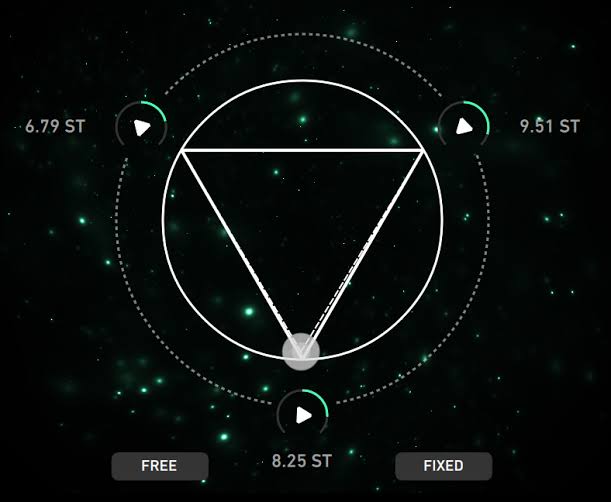
Imaginando GRFX PC Software offers electronic musicians, sound designers, and audio engineers a specialized granular processing engine designed to transform static audio tracks into evolving textures, ambient pads, and complex rhythmic soundscapes. Standard time-stretching and delay plugins often struggle to create intricate atmospheric tails without introducing harsh digital artifacts or unnatural phase issues. By breaking incoming audio streams into tiny micro-fragments known as grains and manipulating their playback speed, pitch, position, and spatial orientation in real time, this multi-effects processor gives producers fine-grained control over textural sound design.
Overview
Imaginando GRFX PC Software is a creative granular delay and multi-effects plugin developed by Portuguese audio software company Imaginando. Designed as a real-time signal processor for modern digital audio workstations, it splits audio signals into customizable micro-grains, re-synthesizing them with independent pitch shifting, spatial positioning, feedback loops, and filter parameters.
Imaginando maintains active support for the plugin across desktop environments, distributing it in VST, VST3, AU, and AAX formats. The software functions as both a subtle spatial enhancer and an extreme sound transformation tool. It targets ambient music composers, film scoring artists, electronic producers, and sound designers who require precise control over texture, pitch manipulation, and rhythmic granular delays.
Key Features
The plugin integrates a focused suite of granular controls and modulation tools aimed at deep sonic manipulation.
Your May Also Like :: Duplicate Finder Professional PC Software
Granular Engine and Grain Density Control
At the core of the processor is a flexible granular engine capable of generating multiple overlapping grains from incoming or sampled audio. Users can adjust grain size from crisp, micro-second bursts to long, overlapping clouds, as well as control grain density and randomization parameters to build everything from pointillist rhythmic stuttering to smooth, continuous soundscapes.
Independent Pitch Shifting and Harmonic Transposition
Each generated grain can be pitch-shifted independently from playback speed. The built-in pitch engine allows producers to transpose grains by semitones or fine cents, create shimmering octave-up shimmer effects, or introduce random pitch variations across the stereo field to turn single-note vocal takes or synth chords into dense, multi-layered harmonies.
Flexible Modulation and LFO Routing
To prevent static textures, the software features low-frequency oscillators (LFOs) and envelope generators that modulate key parameters. You can route modulation sources to grain position, pitch spray, pan position, and filter cutoff frequencies, creating constantly shifting atmospheres that evolve naturally over time.
Integrated Filter and Feedback Matrix
A dedicated filter section provides high-pass and low-pass filtering to sculpt the tonal brightness of the grain clouds. The feedback loop re-injects processed grains back into the granular buffer, generating infinite ambient tails, cascading pitch swells, and evolving delay lines.
Scalable High-Resolution Vector Interface
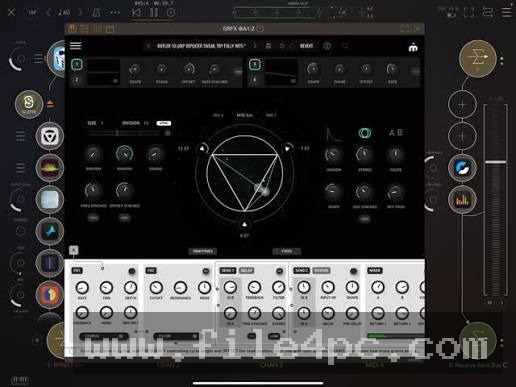
The graphical user interface utilizes vector graphics that scale smoothly across high-resolution displays. Visual feedback displays give real-time representation of grain generation, active buffer positions, and output amplitude levels, making parameter adjustments intuitive during complex mixing sessions.
How Imaginando GRFX PC Software Works
The plugin operates as an insert or send effect inside compatible host digital audio workstations on Windows PC.
First, you install the setup package and load the plugin onto an instrument, vocal, or return track in your DAW.
Second, you configure the grain parameters. Setting smaller grain sizes creates percussive, glitchy textures, while larger grain sizes with high density build smooth, continuous ambient pads. You can set the buffer playback position to freeze audio moments or sync grain timing to your project tempo.
Third, adjust the pitch transpose and spray parameters to introduce harmonic thickness, then apply the high-pass or low-pass filter to frame the effect within your mix. Finally, adjust the Dry/Wet mix slider to balance the original clean signal against the processed granular cloud.
When using high grain counts alongside heavy feedback routing, monitor output levels carefully. Dense granular clouds can accumulate volume rapidly and cause digital clipping if gain staging is not managed properly.
Benefits and Limitations
Understanding both the functional advantages and operational constraints helps evaluate how the processor fits into your production setup.
Benefits
-
Deep Textural Transformation: Capable of turning simple dry audio samples into massive ambient soundscapes, lush pads, and complex rhythmic stutters.
-
Low-Latency Real-Time Processing: Works efficiently on live incoming audio streams, making it suitable for live performance setups as well as studio mixing.
-
Cross-Format Support: Full compatibility with VST, VST3, and AAX host environments ensures seamless integration across major digital audio workstations.
-
Clean Vector UI: Resizable graphics render clearly on high-density 4K displays without blurring or pixelation.
Limitations
-
Niche Application Focus: Built specifically for granular delay and textural synthesis, it is not intended for standard utility equalization or dynamic mixing tasks.
-
CPU Overhead on Max Settings: Running extremely high grain densities with multiple active LFO modulations across several track instances can increase processing loads on older hardware.
What's New
Imaginando maintains the plugin with routine service updates to support modern operating systems, host DAW environments, and processor architectures.
Recent build releases focus on engine stability optimizations, improved parameter automation response, updated 64-bit architecture compatibility for modern Windows environments, and refined visual rendering for high-resolution displays.
Installation and Setup
Acquire the setup file directly from official Imaginando distribution channels to ensure an authentic installation package.
Run the installer wizard on your PC, selecting the VST, VST3, or AAX plugin formats required by your installed digital audio workstation. The setup places the required binary files into standard system plugin folders automatically.
Open your DAW, execute a plugin rescan, and drag the effect onto your chosen track. Enter your license details or authorization credentials upon first launch to unlock the full version.
Tips for Using Imaginando GRFX PC Software
-
Build Ambient Shimmer Reverbs: Set the pitch transposition to +12 semitones (one octave up), increase grain size with moderate density, and blend the wet mix into a return reverb track to generate shimmering vocal or guitar tails.
-
Create Rhythmic Glitch FX: Sync grain timing to 1/16th or 1/32nd musical notes while modulating grain position with a square-wave LFO to generate stuttering, glitchy drum edits.
-
Keep Sub Frequencies Clear: Apply the internal high-pass filter around 100-150 Hz so lower bass frequencies remain solid and unmodulated while upper mid-range harmonics bloom into wide stereo clouds.
-
Automate Buffer Freezing: Automate the buffer hold or position parameter right before a song transition to create frozen, atmospheric build-ups.
Modern Alternatives
-
Output Portal: A popular commercial granular synthesis plugin featuring advanced grain controls, interactive XY pad modulation, and an extensive factory preset library.
-
Arturia Efx FRAGMENTS: A modern granular processing plugin offering rhythmic grain quantization, pitch modulation, and built-in spatial spatializer effects.
-
Unfiltered Audio Silo: A specialized granular reverb and spatial processor designed for multi-channel panning, pitch manipulation, and atmospheric sound design.
Who Should Use Imaginando GRFX PC Software?
This software is best suited for electronic music producers, ambient artists, media composers, and sound designers looking for a flexible granular tool to turn basic recordings into unique textures. Its balance of real-time performance and deep parameter control makes it valuable for both creative composition and experimental audio processing.
Mixing engineers looking solely for standard vocal tuning, basic stereo widening, or traditional acoustic mixing utilities may find specialized single-purpose plugins more suited to those routine tasks.
FAQ
Is Imaginando GRFX PC Software a standalone application or a plugin?
It functions as an audio effect plugin that loads inside compatible host digital audio workstations supporting VST, VST3, or AAX formats on Windows PC.
Can I process live incoming audio in real time?
Yes. The plugin processes live audio streams in real time, capturing incoming signals into a temporary buffer and generating grains on the fly.
Does the software support tempo synchronization?
Yes. Grain timing, LFO modulation rates, and buffer playback intervals can be synced to your host DAW tempo.
How does pitch shifting work in granular processing?
The pitch engine alters the playback speed and frequency of individual micro-grains independently of the main audio track speed, allowing pitch changes without altering total sample duration.
Does it require an active internet connection to operate?
An internet connection is only needed during initial software download and license authorization. Once activated, it operates completely offline.
Conclusion
Transforming dry audio recordings into rich, evolving soundscapes is a core technique in modern music production and sound design. Imaginando GRFX PC Software offers a versatile solution by pairing real-time granular synthesis with pitch manipulation, flexible modulation, and clean filtering controls.
Whether you need to create subtle vocal textures, shimmering guitar pads, or aggressive glitch effects, this granular processor provides the depth needed for creative experimentation. Setting up smart modulation routings and managing gain staging ensures lush, atmospheric results that integrate cleanly into your final audio mix.


💬 0 Comments
✍ Leave a Comment