

Image-Line FL Studio PC Software serves as one of the most widely recognized digital audio workstations available for music producers, beatmakers, and audio engineers. Designing complete musical arrangements from scratch requires robust pattern sequencing, virtual synthesis, and multi-track recording tools. By offering a pattern-based workflow paired with an expressive piano roll and flexible mixing console, this production environment enables users to transform raw musical ideas into fully mastered audio tracks entirely inside their computer.
Your May Also Like :: DxO ViewPoint PC Software download
Overview
Image-Line FL Studio PC Software is a full-featured digital audio workstation (DAW) developed by Belgian software company Image-Line. Its primary purpose is to provide an all-in-one environment for music composition, MIDI sequencing, audio recording, editing, mixing, and mastering. Originally launched as FruityLoops in 1997, the application has evolved over decades into a professional music production suite used extensively across electronic music, hip-hop, pop, and film scoring industries.
Image-Line maintains active, continuous development for the software under a distinctive business model. The application operates within its modern major version ecosystem while offering "Lifetime Free Updates," meaning registered users receive all future software upgrades without paying recurring subscription fees or paid upgrade charges. It targets bedroom producers, professional composers, mixing engineers, and live performers who require a flexible setup for creating electronic and acoustic music projects.
Key Features
The workstation includes a comprehensive suite of creative tools designed to cover every phase of the audio production process.
Pattern-Based Step Sequencer and Channel Rack
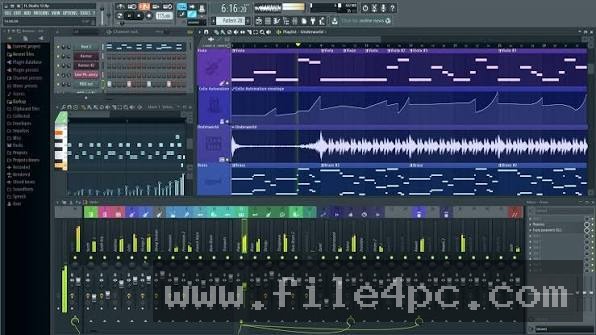
The Channel Rack acts as the core building block for rhythm and melody creation. Producers can quickly program drum patterns, trigger sample loops, and layer virtual instruments using a visual step grid. This grid-based structure makes drafting drum patterns exceptionally fast compared to traditional linear timeline tools.
Advanced Piano Roll
Widely regarded across the music industry for its flexibility, the built-in Piano Roll allows detailed MIDI note editing. Users can draw notes, adjust velocity levels, apply slide and pitch-bend parameters, slide chords, and humanize timing. It also includes helper tools like chord generators, scale highlighting, and arpeggiators to assist with melodic composition.
Multi-Track Playlist Arrangement
Once patterns, audio clips, and automation clips are generated, they are arranged on the unified Playlist canvas. Unlike traditional DAWs that lock tracks to specific instrument channels, FL Studio allows any pattern or audio clip to be placed on any Playlist track. This non-linear freedom lets artists structure complex songs with complete visual customization.
Professional Mixing Console and FX Routing
The mixer supports up to 125 Insert channels, along with dedicated Send and Master tracks. Each channel allows users to chain internal or third-party VST/AU effect plugins, perform complex signal routing, and build sidechain networks. Real-time visual feedback monitors levels, frequency spectrums, and stereo imaging.
Integrated Virtual Instruments and Native Plugins
Depending on the edition chosen, the software comes bundled with a massive collection of native synthesizers, samplers, and dynamic processors. Powerful instruments like Sytrus, Harmor, FLEX, and DirectWave provide diverse sound design options without requiring immediate investments in third-party software plugins.
How Image-Line FL Studio PC Software Works
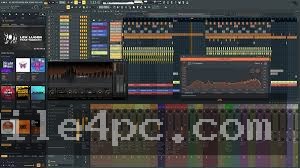
The application operates through an interconnected workspace consisting of five primary windows: Channel Rack, Piano Roll, Playlist, Mixer, and Browser.
First, you open the software and select audio interface drivers (such as ASIO4ALL or a dedicated hardware ASIO driver) in the settings menu to minimize output latency. You then use the Browser panel to audition sample libraries, drum sounds, or virtual instrument presets.
Second, you drag sounds into the Channel Rack to build basic rhythm patterns or open a virtual synthesizer in the Piano Roll to compose melodies. As you create musical ideas, each distinct loop or progression is saved as a named Pattern.
Third, you drag these created Patterns from the picker panel onto the Playlist grid to construct the full song structure. Simultaneously, you assign instruments and samples to individual Mixer tracks, adding equalizers, compressors, and reverbs to polish the final audio mix. Once finished, you export the project into standard audio formats like WAV, MP3, or FLAC.
Always monitor CPU usage meters when chaining multiple heavy virtual synthesizers or linear-phase effect plugins. If processing loads cause audio stuttering during playback, use the built-in "Freeze" or "Consolidate Clip" functions to render complex MIDI patterns into lightweight audio files.
Benefits and Limitations
Evaluating the creative advantages alongside technical constraints helps determine whether this workstation aligns with your studio production requirements.
Benefits
-
Lifetime Free Updates: Purchasing a license once entitles you to every future software release without paying annual upgrade or subscription fees.
-
Unrivaled Beatmaking Speed: The step sequencer and intuitive piano roll make composing electronic patterns and hip-hop drums exceptionally fast.
-
Extensive Plugin Support: Full compatibility with VST2, VST3, and AU plugin formats allows seamless integration of third-party virtual instruments and effects.
-
Highly Customizable Interface: Resizable vector graphics let users scale the software UI comfortably across modern high-resolution displays.
Limitations
-
Complex Audio Recording Workflow: While multi-track audio recording is supported, capturing live full-band performances requires more routing steps than traditional linear DAWs.
-
Non-Linear Workspace Learning Curve: The detached, flexible window system can feel cluttered or disorienting for beginners accustomed to rigid, single-screen layouts.
-
Edition Feature Gating: Lower tiers (such as the Fruity Edition) do not support audio clip recording on the Playlist, requiring users to purchase higher tiers for full recording functionality.
What's New
Image-Line regularly updates the software with major feature enhancements, sound library expansions, and engine optimizations.
Recent developments in current production releases focus on workflow automation, AI-assisted tools, and expanded cloud integration. Key developments include built-in AI stem separation that splits mixed audio tracks into individual drums, bass, vocals, and instruments directly on the Playlist. Additionally, Image-Line introduced chord progression generators, enhanced envelope editing, native cloud sample library access via FL Cloud, and optimized native Apple Silicon and multi-core Windows processor thread management.
Installation and Setup
Acquire the setup installer directly from official Image-Line distribution channels to ensure you receive an authentic, virus-free application package.
Run the installer wizard on your PC. Choose your preferred destination folder and select which native plugin formats (VSTi/VST3) and utility components to install. The installer handles necessary system dependencies automatically.
Upon opening the software for the first time, open the Account settings tab inside the application. Enter your Image-Line account credentials or load your offline license file to unlock the full registered version from trial mode.
Tips for Using Image-Line FL Studio PC Software
-
Utilize Keyboard Shortcuts: Memorize essential hotkeys like F5 (Playlist), F6 (Step Sequencer), F7 (Piano Roll), and F9 (Mixer) to toggle between main workspaces instantly.
-
Enable Smart Disable: Turn on "Smart Disable" for all plugins under the Audio settings menu to automatically shut off CPU processing for effect plugins when no signal is passing through them.
-
Organize Your Color System: Right-click tracks, channels, and patterns to assign distinct colors and icons. Keeping your visual workspace organized prevents confusion during complex mixing sessions.
-
Save Custom Templates: Create a default project template pre-routed with your favorite drums, mixer busses, and master limiter settings to save setup time whenever you start a new track.
Modern Alternatives
-
Ableton Live: A popular digital audio workstation favored for live electronic performance and non-linear clip-launching workflows, though it operates on traditional paid major updates.
-
Logic Pro: A feature-packed workstation developed by Apple specifically for macOS users, providing deep acoustic recording tools and extensive native instrument suites at a fixed price.
-
Cubase: A traditional linear DAW developed by Steinberg, widely recognized for advanced orchestra scoring, deep MIDI editing, and extensive multi-track band recording features.
Who Should Use Image-Line FL Studio PC Software?
This software is an outstanding choice for electronic music producers, beatmakers, hip-hop composers, and home studio enthusiasts who prioritize fast pattern sequencing and intuitive MIDI creation. Its expansive native synth collection and lifetime update model provide immense long-term value for independent artists.
Bands or recording engineers who primarily capture multi-channel acoustic drum kits, live rock bands, or full orchestral ensembles may find traditional linear-recording DAWs more straightforward for heavy audio tracking workflows.
FAQ
Is Image-Line FL Studio PC Software free or paid?
The software is a commercial paid application available in several tiers (Fruity, Producer, Signature, and All Plugins Edition). However, Image-Line provides a unlimited free trial version that allows users to test all features, with the only restriction being that saved project files cannot be reopened until a license is purchased.
What is the Lifetime Free Updates policy?
When you purchase any edition of the software, you receive free access to all future version updates for that edition forever. You never have to pay for version upgrades.
Can I run FL Studio on both Windows and macOS?
Yes. A single software license allows you to install and activate the software on both Windows and macOS computers.
Does the software support third-party VST plugins?
Yes. The software fully supports 64-bit VST2 and VST3 plugin formats on Windows, as well as Audio Units (AU) on macOS.
What is the difference between Fruity Edition and Producer Edition?
Fruity Edition focuses primarily on pattern sequencing and MIDI creation but lacks audio clip placement and audio recording capabilities. Producer Edition unlocks full audio recording, stem creation, and Playlist audio clip editing.
Conclusion
Building modern music requires flexible software tools that support rapid creative iteration without technical friction. Image-Line FL Studio PC Software remains an industry pillar by pairing an intuitive pattern sequencer and world-class piano roll with deep mixing capabilities and native virtual synthesis.
While audio tracking for large live ensembles may involve a learning curve, its unrivaled composition speed, lifetime update structure, and vibrant producer community make it a top-tier choice for modern music creation. Selecting the appropriate software tier and building custom project templates ensures an efficient production environment tailored to your artistic vision.

💬 0 Comments
✍ Leave a Comment