

PDQ Inventory PC Software is an agentless systems management and IT asset tracking tool designed for Windows network administrators who need detailed visibility into hardware, installed applications, drivers, and operating system configurations. Developed by PDQ.com, it scans Windows endpoints across local networks, aggregating comprehensive hardware specifications, software versions, Windows updates, active services, and user profiles into a central management console. It allows IT departments to monitor hardware health and maintain compliance without installing persistent background agents on every client machine.
The application serves system administrators, IT security teams, and managed service providers who oversee domain-joined corporate networks. Rather than manually inspecting individual workstations or relying on incomplete command-line scripts, this system utilizes native Windows administrative shares and management protocols to collect accurate system data.
PDQ continues active development of the utility alongside its companion distribution tool, PDQ Deploy, giving sysadmins a reliable on-premises solution for tracking and managing local Windows infrastructure.
Key Features
The platform includes auditing tools tailored for rapid querying, granular reporting, and dynamic grouping of Windows endpoints.
Dynamic and Static Computer Collections The software organizes endpoints using collections. Static collections contain fixed lists of machines, while Dynamic Collections function like smart filters that automatically update based on real-time scan data. For example, a dynamic collection can automatically gather all computers running an out-of-date web browser version or those with less than 20% remaining hard drive space.
Custom Scanning Profiles Administrators can configure tailored scan profiles based on operational needs. You can run light scans that check online status and active user logons, or trigger deep system scans that query registry entries, file attributes, environment variables, hotfixes, and product keys.
Built-In and Custom SQL Reports The built-in reporting engine includes dozens of pre-configured templates for common administrative audits, such as memory allocation, operating system builds, installed third-party software, and pending Windows updates. Users can also build custom SQL queries to generate specialized reports for software compliance audits.
Remote Execution and Tools Integration From within the console interface, technicians can trigger built-in Windows management actions directly against remote target PCs. This includes executing remote PowerShell commands, launching Remote Desktop sessions, triggering Wake-on-LAN packets, forcing system reboots, or running ping diagnostics.
Seamless PDQ Deploy Interoperability When paired with PDQ Deploy, the software forms an automated remediation system. Dynamic collections created in the inventory database can serve as target targets for automated software deployments, ensuring updates are delivered exclusively to endpoints requiring patches.
How PDQ Inventory PC Software Works
The scanning architecture operates without installing client software on managed target PCs.
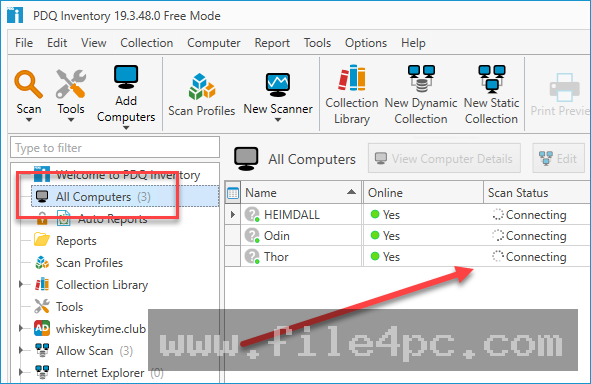
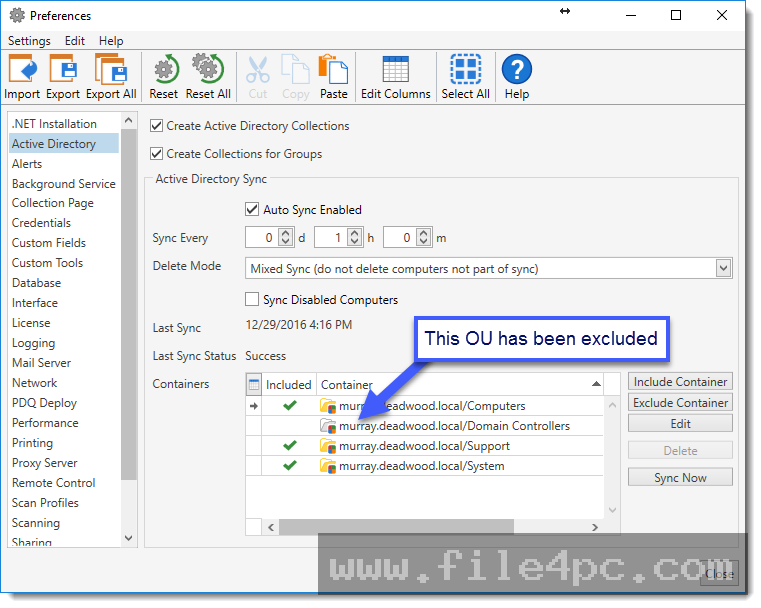
First, you install the server console on a Windows workstation or server on your network and provide administrative credentials with domain or local admin privileges across your endpoint inventory. Target computers are imported into the console manually, via IP address ranges, or directly from Active Directory organizational units.
Next, the console initiates scans over standard Windows networking protocols like SMB and WMI/WinRM. The central server connects to the target machine's administrative share (ADMIN$), creates a tiny temporary service, queries system properties, retrieves the requested data, removes the temporary service, and updates the local database.
Once the scan completes, you can double-click any target PC in the main list to view a detailed drill-down interface showing hardware specs, installed software, network interfaces, Windows services, local user groups, and historical scan logs.
Your May Also Like :: HD Tune Pro PC Software
Benefits and Limitations
A balanced overview of technical capabilities helps determine if the application fits your network architecture.
Benefits
The agentless architecture allows rapid deployment since you can start auditing thousands of domain PCs within minutes of initial setup without pushing agent software. Licensing is charged per administrator console rather than per managed endpoint, providing significant cost savings for large networks managed by small IT teams. Additionally, the ability to build flexible dynamic collections gives sysadmins instant visibility into software vulnerabilities across the entire organization.
Limitations
The primary restriction is its requirement for direct local network connectivity. Because scanning relies on SMB file sharing, RPC, and WMI connections, computers must be connected to the local network or connected through an active corporate VPN to be audited. Remote laptops working off-site without a VPN cannot be scanned. Furthermore, the software focuses exclusively on Windows operating systems, providing no native tracking for macOS, Linux, iOS, or Android devices.
What's New
PDQ maintains a regular release schedule for its core software offerings. Recent releases in the Version 19 and 20 series focus on performance optimization, modern Windows integration, and enhanced security protocols.
Key improvements include:
-
Optimized database querying speeds for handling high-volume collections across large networks.
-
Expanded scanning capabilities for modern Windows 11 builds, hardware security states, and TPM chips.
-
Enhanced SMBv3 transfer security and refined credential management within Central Server mode.
-
Upgraded user interface responsiveness and high-DPI display compatibility for 4K workstation monitors.
Installation and Setup
Setting up the server console requires simple preparation of network permissions and administrative credentials.
You download the official installer onto your designated administrator PC or dedicated Windows Server instance. During setup, you choose between Standalone mode or Central Server mode if multiple IT technicians need to access a shared database.
Before scanning client machines, you must ensure that target Windows Firewalls permit inbound File and Printer Sharing (IPC$ and ADMIN$ shares) and Remote Administration protocols. You must also supply a service account in the application settings that holds administrative rights on all target network computers.
Tips for Using PDQ Inventory PC Software
To prevent network overhead during business hours, configure scan schedules wisely. Run lightweight online/offline status scans frequently during the day, but schedule deep software and registry scans during off-peak hours or overnight.
Take full advantage of custom tools. You can add external tools and executable scripts to the console menu, allowing technicians to right-click any workstation in the inventory view and immediately run custom network diagnostics or open third-party remote control tools.
Use variables within your dynamic collections. By defining a single custom variable for a software version number (e.g., $ChromeVersion), you can update the variable once when a new version releases, automatically updating all related dynamic collections across the console.
Modern Alternatives
Choosing an IT asset management utility depends on network layout and target operating systems.
PDQ Connect is the developer's modern cloud-native solution. Unlike the traditional on-premises desktop tool, PDQ Connect utilizes a lightweight installed background agent to monitor and update remote and work-from-home laptops over the internet without requiring a VPN.
Lansweeper is a comprehensive IT asset management platform that performs deep network discovery across Windows, macOS, Linux, network switches, printers, and IoT devices. It provides broader multi-platform coverage than PDQ, but uses a per-asset pricing model that can become costly for larger networks.
ManageEngine Endpoint Central is a full-scale unified endpoint management solution providing patch management, software deployment, asset tracking, and remote control across multiple desktop and mobile operating systems via installed agents.
Who Should Use PDQ Inventory PC Software?
This software is ideal for system administrators, IT managers, and security auditors operating on-premises Windows Active Directory networks or persistent VPN environments. If you need quick, detailed visibility into Windows software builds, driver versions, and hardware specs without paying ongoing monthly per-device subscription fees, it provides an exceptional solution.
However, organizations with a multi-platform environment (macOS and Linux) or a heavily distributed hybrid workforce that rarely connects to a central corporate network should consider cloud-based or agent-driven platforms like PDQ Connect or Lansweeper.
FAQ
Does PDQ Inventory require an agent installed on managed PCs?
No, the software operates agentlessly across local networks. It queries client machines using standard Windows administrative protocols, file shares (ADMIN$), and WMI services without leaving permanent background client software on endpoints.
Can I track laptops used by remote work-from-home employees?
Remote endpoints can only be scanned when they are actively connected to the corporate network through a Virtual Private Network (VPN). For monitoring off-network devices without a VPN, the developer offers a cloud-native agent solution called PDQ Connect.
What is the difference between Free and Enterprise modes?
Free mode provides basic scanning capabilities, hardware information, and standard static collections. Enterprise mode unlocks dynamic collections, scheduled scanning, custom registry/file queries, full reporting capabilities, tools integration, and central server sharing.
How is the software licensed?
Licensing is based on the number of system administrators actively using the console, rather than the total number of managed endpoints. A single administrator license allows auditing an unlimited number of target Windows computers on the network.
Conclusion
PDQ Inventory PC Software remains an exceptionally reliable asset tracking and system auditing utility for managing local Windows networks. By delivering deep hardware and software insights through an agentless scanning architecture, it grants sysadmins total visibility over their domain endpoints without adding agent management overhead.
While its focus on Windows and reliance on direct network or VPN connections limits its use for mixed-OS or cloud-only environments, its per-admin licensing and robust dynamic collections make it an invaluable tool for domain administrators. For local network environments requiring fast, detailed IT asset reporting, it offers a proven operational platform.
💬 0 Comments
✍ Leave a Comment