

PDQ Deploy PC Software is an agentless systems management tool designed for Windows network administrators who need to automate software distribution, patch management, and system maintenance across local workstations and servers. Developed by PDQ.com, it functions on an on-premises deployment architecture, executing installation scripts and executable packages remotely without requiring continuous client agents installed on every target machine. It provides IT teams with a central console to push third-party software updates, custom scripts, and system configurations across domain-joined environments.
The application serves medium-sized enterprise IT departments, educational institutions, government organizations, and managed service providers. Instead of requiring administrators to manually remote-desktop into every workstation or rely on complex Group Policy Objects for software distribution, this system manages silent installations directly through native Windows administrative shares and command protocols.
PDQ continues active development of the software alongside its companion product, PDQ Inventory, providing perpetual network patch automation for on-premises Windows hardware.
Key Features
The deployment platform incorporates administrative controls built specifically to minimize network bandwidth consumption while maximizing task execution speed.
Vast Package Library
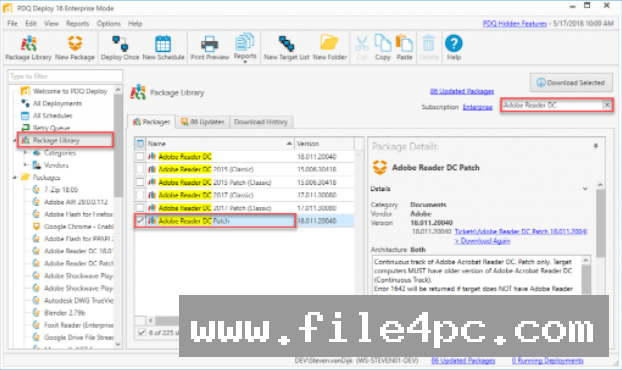
The software includes access to a pre-built repository containing hundreds of common third-party applications like web browsers, runtimes, utility programs, and business tools. PDQ tests and maintains these installers, ensuring they are pre-configured to run silently without user interaction or reboot prompts.
Custom Multi-Step Installer Builder
When proprietary or specialized internal tools need to be deployed, administrators can create customized multi-step packages. These packages can chain together command-line instructions, PowerShell scripts, MSI installers, batch scripts, and registry modifications into a single automated execution sequence.
Heartbeat Trigger Deployments
Rather than failing a software distribution when a target computer is powered off or disconnected from the office network, the scheduling engine includes a heartbeat trigger. The system continuously polls network devices and automatically executes queued deployments the exact moment a target PC reconnects or boots up.
Central Server Mode
For organizations with multiple IT support technicians, Central Server mode allows multiple administrative consoles to connect to a shared database. This ensures all team members share the same package library, target lists, deployment histories, and scheduled tasks in real time.
Dynamic Inventory Integration
While the software functions independently, linking it with PDQ Inventory creates automated collection-based patching. You can set rules to automatically deploy software updates only to computers flagged as having out-of-date versions, ensuring targeted execution.
Your May Also Like :: gSyncit for Microsoft Outlook PC Software
How PDQ Deploy PC Software Works
The operational model relies on agentless administrative access through standard Windows networking protocols like SMB and RPC.
To begin, you install the central console on a Windows workstation or server on your network. You supply administrative credentials that have local administrator permissions across your domain targets. You then import target machines manually, from Active Directory containers, or from linked inventory databases.
Next, you select or build a package. You can pick a ready-to-use installer from the cloud-synced Package Library or build a custom script sequence. In the package configuration options, you specify success codes, architecture filters (32-bit vs. 64-bit), and post-installation conditions.
When a deployment starts, the central server copies the required installer files to the administrative share (ADMIN$) of the remote target computer over SMB. It creates a temporary background service on the remote machine, executes the installation silently under the specified credentials, retrieves the exit code, cleans up the temporary files, and reports the final status back to the main console.
Benefits and Limitations
Understanding both network advantages and structural restrictions ensures proper implementation.
Benefits
The most significant benefit is speed and ease of setup. Because it operates without client agents, you can deploy applications across thousands of workstations within minutes of installation, with no pre-installation footprint required on target devices. The licensing model is charged per administrator rather than per endpoint target, making it cost-effective for large networks managed by small IT teams.
Limitations
The primary technical limitation is its dependency on direct local network connectivity. Because it uses SMB file sharing and RPC connections, target machines must either be connected to the local network or logged into an active corporate VPN. Off-network remote laptops without a VPN connection cannot receive deployments. Furthermore, the software focuses exclusively on Windows environments, offering no management capabilities for macOS, Linux, iOS, or Android endpoints.
What's New
PDQ maintains continuous updates across its software line. The stable 20.x series focuses on security enhancements, expanded PowerShell functionality, and seamless interoperability with modern Windows operating systems.
Key recent updates include:
-
Enhanced SMBv3 transfer protocols with AES encryption support for secure, high-speed file distribution.
-
Modernized Central Server database architecture to handle larger multi-user technician teams smoothly.
-
Expanded Package Library coverage to support newer enterprise applications and security hotfixes.
-
Updated UI scaling to ensure clear console navigation on 4K high-DPI administrative workstations.
Installation and Setup
Setting up the server console requires specific administrative preparations across your network domain.
You download the official installer onto your designated administrator console PC or dedicated Windows Server instance. During setup, you select whether to operate in standalone mode or central server mode.
Before pushing deployments, you must verify that Windows Firewall rules on target machines allow inbound file and printer sharing (IPC$ and ADMIN$ shares) and ICMP echo requests (pings). You must also configure a background service account in the console that holds local administrative privileges across all target domain devices.
Tips for Using PDQ Deploy PC Software
To prevent network congestion during massive software distributions, adjust your concurrent deployment thresholds in the performance preferences panel. Staggering copy operations prevents file servers from overwhelming network switches.
Utilize nested packages when creating complex workstation build sequences. Rather than recreating installation steps for common runtimes across multiple packages, build a master runtime package and nest it within your larger deployment workflows.
Always test custom multi-step installers on a single virtual test machine before pushing them to production collections. Verifying silent command switches in advance prevents hanging processes on end-user machines.
Modern Alternatives
Choosing between systems management tools depends heavily on network topology and endpoint locations.
PDQ Connect is the cloud-native alternative created by the same developer. While PDQ Deploy relies on agentless local network access, PDQ Connect uses an installed background agent to manage remote and work-from-home laptops over the internet without requiring a VPN.
Microsoft Intune is a cloud-based Enterprise Mobility Management (EMM) platform integrated into Microsoft 365. It provides full mobile device management, policy enforcement, and remote app distribution across Windows, macOS, iOS, and Android. However, it requires complex cloud architecture and per-user monthly subscriptions, making it much heavier to manage than an on-premises console.
NinjaOne and ManageEngine Endpoint Central are agent-based Remote Monitoring and Management (RMM) platforms. They offer broad multi-platform support (Windows, Mac, Linux) and include remote desktop utilities alongside deployment tools, but require active agent maintenance on every endpoint.
Who Should Use PDQ Deploy PC Software?
This utility is ideal for sysadmins, network engineers, and IT managers operating on-premises Active Directory environments or corporate networks connected via persistent VPNs. If you need a fast, agentless method to manage Windows software updates without paying ongoing per-device monthly fees, it provides an efficient solution.
However, organizations with a fully remote or hybrid workforce that rarely connects to a central corporate network should look toward cloud-native agent-based tools like PDQ Connect or Microsoft Intune instead.
FAQ
Does PDQ Deploy require an agent installed on every client PC?
No, the software operates agentlessly across local networks. It uses standard Windows administrative protocols, file shares (ADMIN$), and remote execution services to push installations without requiring permanent background client software.
Can I deploy software to remote work-from-home users?
The software can target remote machines only if they are actively connected to the corporate network via a Virtual Private Network (VPN). For off-network devices without a VPN, the developer offers a cloud-based agent platform called PDQ Connect.
What is the difference between the Free and Enterprise modes?
Free mode allows basic, single-step deployments using a small subset of pre-built packages. Enterprise mode unlocks the complete Package Library, multi-step installer creation, automated schedule triggers, central server capabilities, and auto-download patching.
How is the software licensed?
Licensing is based on the number of system administrators actively using the software console, rather than the total number of managed endpoint computers. A single administrator license allows managing unlimited target machines within the organization.
Conclusion
PDQ Deploy PC Software remains an exceptionally fast and practical solution for managing on-premises Windows workstation software and automated security patching. By combining an extensive pre-built package library with agentless local network deployment, it eliminates the administrative overhead associated with manual system updates.
While its reliance on direct local or VPN network connectivity limits its application for distributed, cloud-only workforces, its per-admin pricing and low resource footprint make it an essential tool for domain sysadmins. For local corporate environments seeking total control over Windows application lifecycle management, it offers a proven operational platform.


💬 0 Comments
✍ Leave a Comment