

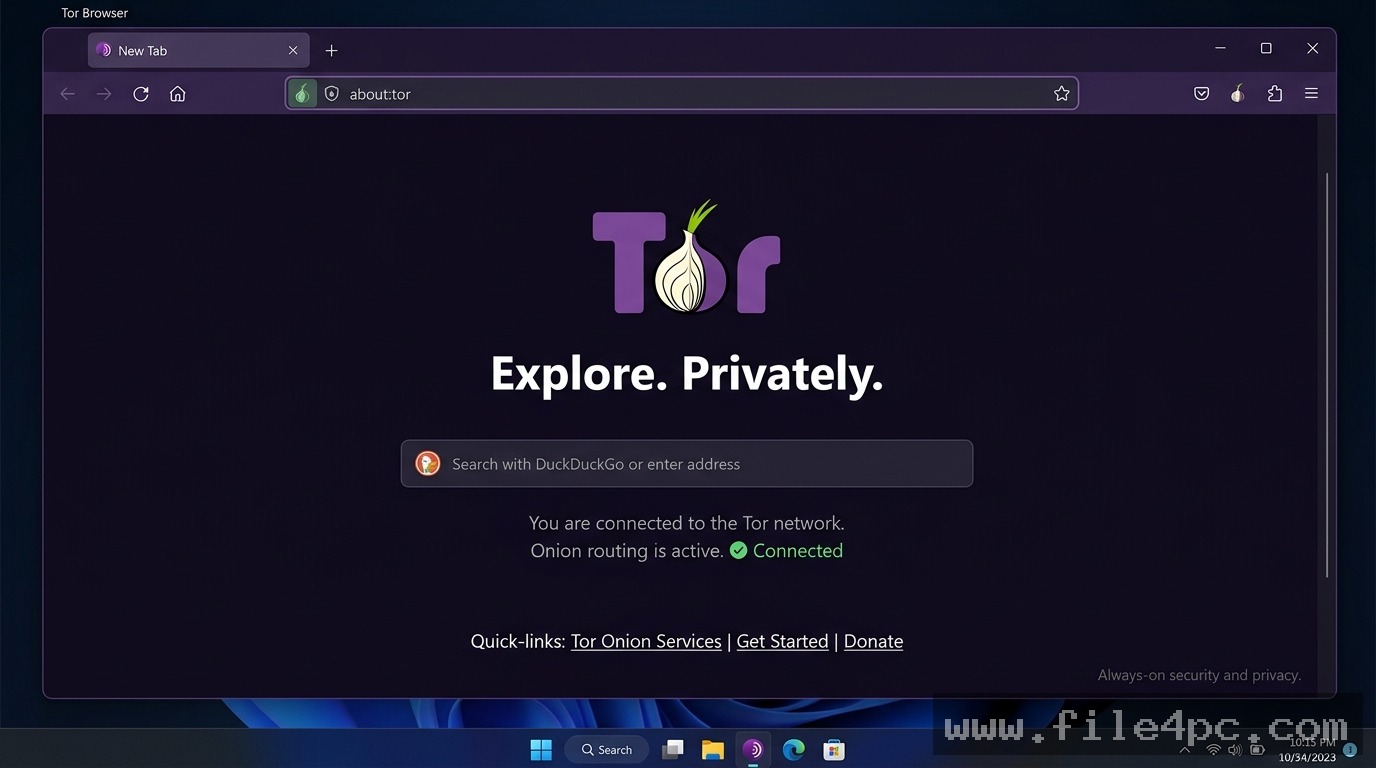
Tor Browser PC Software is a free, open-source privacy browser developed by The Tor Project. Built on top of Mozilla Firefox’s Extended Support Release (ESR) codebase, it is designed to protect users against internet surveillance, network tracking, and online data profiling. Unlike standard web browsers that send traffic directly from your PC to a website's server, this application routes all web requests through a globally distributed, multi-layered volunteer network known as the Tor (The Onion Router) network.
Operating locally across desktop platforms including Windows, macOS, and Linux, the software serves investigative journalists, human rights activists, security researchers, and privacy-conscious users. It isolates every website you visit to prevent third-party trackers and advertisers from following you across the web, automatically clearing all cookies and browsing history upon closure. Furthermore, it provides native access to .onion sites, enabling secure communication and content access even within heavily censored or restricted network environments.
The Tor Project actively maintains the platform, pushing regular security patches alongside Firefox ESR upstream releases. The browser continuously refines its fingerprinting defenses, anti-censorship pluggable transports (such as obfs4 and Snowflake), and connection bridges to maintain open internet access worldwide.
Key Features
The application incorporates a specialized collection of network routing protocols, privacy enforcement tools, and anti-fingerprinting controls.
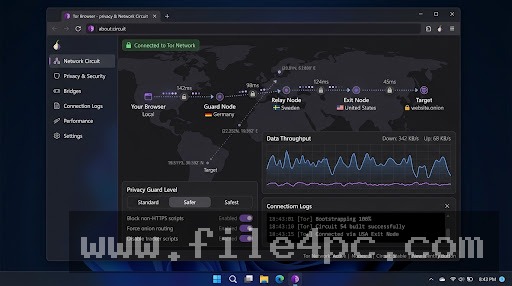
Multi-Layered Onion Routing When loading a web page, the software wraps your internet traffic in three distinct layers of encryption. Traffic is bounced sequentially through three volunteer relays: an Entry/Guard node, a Middle node, and an Exit node. Each node decrypts only one layer of encryption, ensuring that no single server knows both your real IP address and your final destination.
Advanced Browser Fingerprinting Protection Standard browsers leak subtle system details, such as installed fonts, screen resolution, graphics drivers, and hardware configurations, creating a unique digital fingerprint. Tor Browser forces a standardized screen layout, restricts WebGL capabilities, standardizes user-agent headers, and normalizes browser canvas outputs to make your desktop setup appear identical to millions of other Tor users.
Built-In Anti-Censorship Bridges and Pluggable Transports For users located in regions where network firewalls block standard Tor network connections, the browser includes built-in bridge mechanisms. Using pluggable transports like Snowflake and obfs4, the software disguises Tor traffic as standard HTTPS web browsing or video calls, allowing connection past deep packet inspection (DPI) firewalls.
Integrated Security Controls and NoScript Extensions The browser incorporates hardened security settings through a streamlined slider interface (Standard, Safer, and Safest) alongside pre-configured extensions like NoScript. At higher security levels, it automatically disables risky web scripts, media codecs, and HTML5 video elements that could potentially be exploited to reveal your real IP address.
Automatic Cookie Isolation and Session Wiping Each website tab operates inside an isolated browser circuit. Cookies, local storage, and tracker caches established on one site cannot leak or communicate with tabs browsing other domains. Closing the application automatically wipes all session cache, history, and form entries.
Your May Also Like :: Top Retouch PC Software
How Tor Browser PC Software Works
The operational process transitions from local network encryption to multi-node relay transmission.
To begin, you open the application executable on your desktop. , the browser initializes its internal Tor daemon and displays a connection interface (or connects automatically if configured). The daemon contacts public directory authorities to retrieve a list of active network relays.
Next, the browser constructs a three-hop circuit:
-
Guard Node: Receives your encrypted data packets. It sees your actual local IP address, but cannot see what website you are visiting or what data you are sending.
-
Middle Node: Receives encrypted data from the Guard node and passes it forward. It sees neither your real IP address nor your final destination.
-
Exit Node: Decrypts the final layer of encryption and routes your request to the target website. The target website sees only the IP address of the Exit node, keeping your actual IP address completely hidden.
Finally, the web response travels back through the same circuit in reverse, re-encrypting data at each step until it reaches your local machine, where the browser renders the web page.
Benefits and Limitations
Weighing the platform's privacy protections against its performance trade-offs helps clarify its role in daily desktop browsing.
Benefits
The primary advantage is unparalleled online anonymity and defense against network surveillance. Because your internet traffic is routed through multiple encrypted relays, Internet Service Providers (ISPs), network operators, and advertisers cannot track which websites you visit or map your real geographic location. It provides zero-cost access to censorship-resistant content, allows secure access to dark web (.onion) services, and operates completely free of commercial tracking or user profiling.
Limitations
The primary trade-off is reduced browsing speed. Bouncing encrypted traffic across three international volunteer servers introduces noticeable latency compared to standard internet connections, making high-bitrate 4K video streaming or online multiplayer gaming impractical. Additionally, many commercial websites block traffic coming from known Tor exit nodes, triggering frequent CAPTCHA challenges or complete access rejections on storefronts and banking portals.
What's New
The Tor Project maintains an active development lifecycle, releasing regular security updates mapped to Firefox's Extended Support Release schedule.
Verified development facts across recent release branches include:
-
Upstream Firefox ESR Engine Refinements: Continuous updates to the core Gecko rendering engine, patching browser vulnerabilities and improving execution stability on 64-bit platforms.
-
Next-Generation Pluggable Transports: Upgraded Snowflake proxy integration to improve connection speeds in heavily censored network regions.
-
Streamlined TorConnect Interface: Improved automated connection repair routines that detect local network blocking and suggest appropriate bridge configurations during launch.
-
Modern Interface Density Adjustments: Refined visual themes, font rendering, and dark mode controls adapted from upstream Firefox interface updates.
Installation and Setup
Getting the browser set up on a Windows PC is a simple, non-intrusive process.
-
Download the official setup installer executable directly from the official developer portal (
torproject.org). -
Run the installer package (
tor-browser-windows-x86_64-setup.exe). -
Select your preferred installation language and choose a destination folder. By default, it installs directly to your Desktop or user directory as a portable application.
-
Click Install to finish unpacking files.
-
Open the Tor Browser folder and launch
Start Tor Browser.exe. -
Click Connect on the startup screen to establish your first encrypted network circuit.
Installation Warning: Always download the software directly from torproject.org or official mirrors provided by The Tor Project. Never download version packages from third-party software sites, as unofficial bundles frequently incorporate malicious proxy configurations or tracking malware.
Tips for Using Tor Browser PC Software
Do not install third-party browser extensions or add-ons. Adding extra extensions (such as ad blockers or custom themes) alters your browser's unique digital footprint, making it easier for tracking scripts to identify your machine among other Tor users.
Avoid resizing the browser window manually when set to strict privacy levels. Keeping the window at standard letterboxed aspect ratios prevents web scripts from calculating your exact display monitor resolution.
Use HTTPS connections whenever possible. While traffic between your PC and the Exit node is encrypted, data traveling from the Exit node to non-HTTPS websites is unencrypted; ensuring target sites use HTTPS protects your unencrypted data from exit node inspection.
Modern Alternatives
Depending on whether your workflow requires lightweight everyday privacy, multi-hop VPN routing, or specialized operating system isolation, several alternative tools exist.
Brave Browser (Tor Mode) is a Chromium-based desktop browser that features built-in private windows with Tor routing. It allows users to route specific tabs through the Tor network while keeping a standard browser interface, though it does not provide the full anti-fingerprinting protections of the standalone Tor Browser.
Mullvad Browser is a privacy-focused desktop browser developed jointly by Mullvad VPN and The Tor Project. It provides Tor Browser's advanced anti-fingerprinting defenses and session isolation, but routes traffic through standard internet or VPN connections rather than the multi-hop Tor relay network.
Tails OS (The Amnesic Incognito Live System) is a complete security-focused portable operating system designed to boot from a USB flash drive. It routes all system-wide internet traffic through the Tor network, leaving zero traces on the host computer's hard drive upon shutdown.
Who Should Use Tor Browser PC Software?
This software is ideal for journalists, whistleblowers, researchers, human rights workers, and individuals living under restrictive political regimes who require private communication and uncensored internet access. If you need to bypass network censorship firewalls, protect your real IP address from commercial tracking networks, or access .onion services, it provides an essential toolkit.
However, users looking for high-speed video streaming, online gaming, or routine online banking access will find standard web browsers paired with trusted VPN services more practical for everyday tasks.
FAQ
Is Tor Browser PC Software free to use?
Yes. The browser and the underlying Tor network are 100% free and open-source software maintained by The Tor Project, a non-profit organization.
Is using Tor Browser legal?
Using the browser is entirely legal in most countries around the world. However, some restrictive governments attempt to block access to the network or restrict encryption tools.
Does Tor Browser conceal my internet activity from my ISP?
Yes and no. Your Internet Service Provider (ISP) can see that you are connecting to the Tor network, but they cannot see what websites you visit, what pages you view, or what data you send and receive.
Can I run the browser directly from a USB flash drive?
Yes. The software installs as a portable bundle by default, allowing you to copy the entire application folder to a USB drive and run it on any compatible PC without leaving registry tracks on the host machine.
Conclusion
Tor Browser PC Software remains an indispensable foundation of digital privacy, providing reliable defense against internet tracking, location surveillance, and online censorship. By routing web traffic through multi-layered onion encryption and enforcing strict anti-fingerprinting rules, it enables users to reclaim control over their personal data.
While users must accept lower browsing speeds compared to traditional web browsers, its open-source transparency, active developer support, and zero-cost availability make it a vital utility. For anyone seeking true online anonymity and open web access on Windows PCs, it provides a safe, independent platform.

💬 0 Comments
✍ Leave a Comment