

Clean Space Professional PC Software is a specialized disk maintenance and privacy protection utility designed for Windows computers, created to help users remove hidden digital clutter, temporary files, and online tracking traces. Over time, regular computer use leads to an accumulation of leftover data such as browser caches, system logs, cookies, and installation residuals that consume valuable storage space and can impact overall system efficiency. This software offers a centralized interface to scan, identify, and securely clear out unwanted data without requiring deep technical expertise in operating system maintenance.
Overview
Modern desktop computers constantly generate background files during daily operations. Whenever you browse the internet, stream videos, or install software applications, temporary files are written to your local storage drives. While these files are initially useful for quick loading and caching, they frequently linger long after their purpose has passed. Over weeks and months, this hidden electronic accumulation can claim gigabytes of storage capacity.
The application is structured to serve home users, professionals, and system administrators who want a streamlined method for maintaining tidy storage volumes. Operating locally on Windows systems, the utility scans target directories to locate junk data that standard system tools might overlook. Its purpose is focused purely on housekeeping and privacy safeguarding, making it a practical addition for users looking to keep their drives organized without sorting through complex folder hierarchies manually.
Key Features
The utility incorporates several targeted tools aimed at identifying and removing redundant files while protecting user privacy.
-
Deep System Scanning: The software searches deep into system directories, temporary folders, and user profiles to find hidden logs and caches left behind by active applications.
-
Privacy Trace Elimination: It targets browser cookies, history records, autocomplete entries, and session caches to protect user confidentiality across popular web browsers.
-
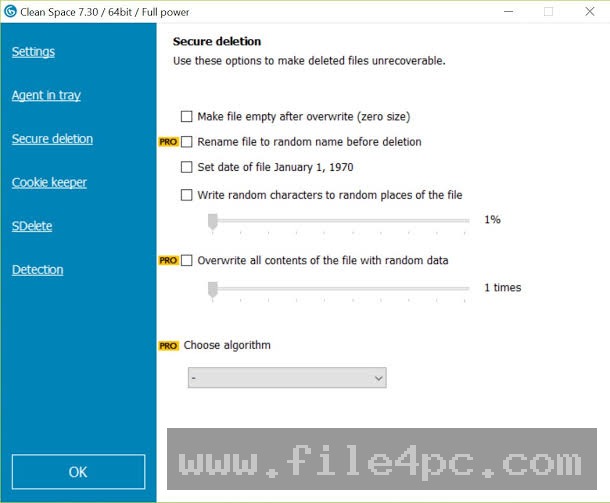
Secure File Deletion: Advanced wiping protocols overwrite deleted data with random characters, ensuring that sensitive files cannot be recovered by unauthorized parties.
-
Third-Party App Cleanup: The utility recognizes garbage files produced by various third-party software packages, extending maintenance beyond core operating system files.
-
One-Click Optimization: A simplified cleaning mode allows users to initiate a complete system sweep instantly with a single button click.
How Clean Space Professional PC Software Works
Operating the utility follows a straightforward workflow designed to keep maintenance tasks efficient and transparent.
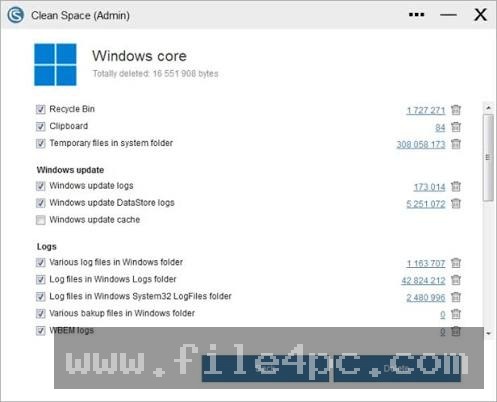
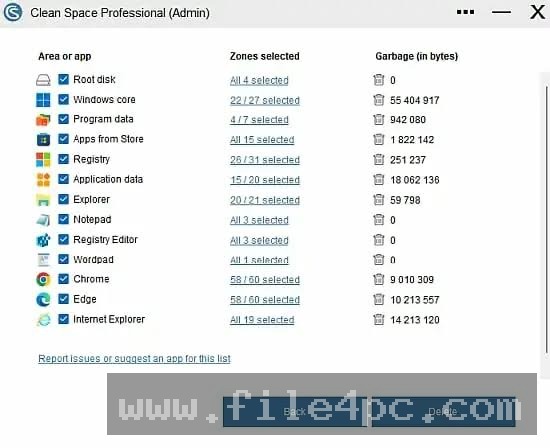
First, the user obtains the installation package from a reputable source or the official developer portal and completes the standard setup wizard on their Windows machine. Upon opening the application, the main dashboard presents a clean layout where users can initiate a comprehensive system scan. The program analyzes predefined cleaning zones, including web browsers, system temporary directories, and application logs, categorizing the discovered items clearly.
Once the scan finishes, users are presented with a breakdown of removable items, allowing them to review what will be deleted before confirming the action. Users can configure settings to ignore specific files or folders if they wish to preserve certain cached items. Clicking the execution button prompts the application to safely remove the selected clutter or perform secure overwriting routines. Users should ensure they close active web browsers and critical applications before running a sweep to allow the utility to access locked temporary files successfully.
Benefits and Limitations
Benefits
The primary advantage of using a dedicated cleanup utility is the recovery of valuable disk space that would otherwise remain occupied by obsolete files. It simplifies routine maintenance by automating the detection of scattered caches and logs. Additionally, wiping online activity traces helps safeguard personal privacy on shared computers, while secure deletion options prevent data recovery.
Limitations
Despite its utility, the software operates within specific boundaries. It requires manual or scheduled intervention to run scans, meaning it does not operate entirely invisibly without user setup. Furthermore, cleaning browser caches and session cookies will log users out of active web accounts, requiring them to sign back in after a thorough sweep. It is also a commercial application requiring a valid license for full professional features, and it cannot repair corrupted operating system files or hardware failures.
What's New
Recent development updates for system maintenance utilities have focused heavily on improving compatibility with modern Windows builds and expanding cleanup targets for contemporary web browsers. Recent versions introduce enhanced support for cleaning application-specific caches, including emerging browser components and background telemetry logs.
Developers have also refined error handling protocols to manage locked system files more gracefully, reducing unexpected application freezes during intensive scans. These continuous refinements ensure that the software maintains stable performance on up-to-date operating system configurations.
Your May Also Like :: Classroom Spy Pro PC Software
Installation and Setup
Installing the utility requires basic administrative privileges on the target Windows computer to ensure the program can access necessary system directories. Users should always obtain installation files directly from official developer channels or trusted software repositories to maintain file security.
Launch the setup executable and follow the prompts provided by the installation wizard. Select your preferred destination folder and complete the installation steps. Upon first launch, the software may prompt for administrative authorization so it can scan protected system areas effectively. Users should review the initial configuration settings to customize which cleaning zones and browsers are included in regular sweeps.
Tips for Using Clean Space Professional PC Software
To achieve the best results when managing your system storage, keep several practical guidelines in mind:
-
Close Browsers Before Scanning: Shut down active web browsers prior to running a cleanup to allow the software to clear locked cache files completely.
-
Customize Cleaning Zones: Review the available zones in the settings menu to exclude specific application data that you prefer to keep intact.
-
Utilize Secure Wiping Wisely: Enable secure overwrite options only when deleting sensitive documents, as standard deletion is faster for routine junk removal.
-
Schedule Regular Maintenance: Set up periodic scans to prevent electronic garbage from accumulating unnoticed over long periods.
Modern Alternatives
Several alternative utilities exist for users seeking different approaches to disk maintenance and privacy management. CCleaner provides a long-standing cleaning environment with extensive registry tools and startup management features. Wise Disk Cleaner offers a lightweight alternative with fast scanning speeds and flexible file exclusion rules.
Other users rely on built-in Windows storage management tools, such as Storage Sense, to handle basic temporary file removal without installing third-party software. Choosing between these alternatives depends on whether you prefer a feature-rich suite, a lightweight utility, or native operating system options.
Who Should Use Clean Space Professional PC Software?
This software is well-suited for everyday computer users, professionals, and home office workers who want to reclaim storage space and maintain digital privacy without navigating complex command-line tools. It benefits anyone who handles sensitive data on shared workstations and wants assurance that online tracking traces are regularly cleared.
Conversely, advanced systems engineers looking for enterprise-grade server deployment tools or low-level disk partitioning utilities will find specialized management software more appropriate. Similarly, users who prefer managing file deletion entirely manually through native operating system features will not need a dedicated cleaner.
FAQ
Is Clean Space Professional compatible with Windows 11?
Yes, the application is fully optimized to run on modern Windows environments, including both Windows 10 and Windows 11 operating systems.
Will running a clean delete my personal documents?
No, the software targets temporary files, caches, logs, and cookies, leaving user documents, photos, and personal files untouched unless explicitly selected.
Why do I need to log back into my websites after cleaning?
Clearing browser caches and session cookies removes temporary authentication tokens, which is a standard result of privacy cleaning.
How often should I run a system cleanup?
Running a comprehensive scan once every few weeks is generally sufficient to keep storage drives free of unnecessary electronic clutter.
Conclusion
Clean Space Professional PC Software provides a practical, efficient way to eliminate hidden digital clutter and protect online privacy on Windows computers. By automating the detection of scattered temporary files and browser traces, it helps users maintain organized storage volumes effortlessly.
Evaluating your storage management habits will help determine whether a dedicated cleaning utility fits your routine. For anyone seeking a straightforward tool to reclaim disk space and enhance privacy protection, this application offers dependable performance.
💬 0 Comments
✍ Leave a Comment