
Lazesoft Recovery Suite PC Software gives Windows users, IT support specialists, and system administrators a reliable rescue toolkit to handle unbootable computers, forgotten passwords, formatted hard drives, and corrupted system partitions. System crashes and hardware failures often strike without warning, leaving critical personal files inaccessible and rendering the operating system unusable. By deploying a self-booting rescue media builder alongside deep file extraction and partition management modules, this recovery suite provides a practical path to restore system functionality and safeguard digital assets.
Overview
Lazesoft Recovery Suite PC Software is a multi-purpose system repair, data rescue, disk cloning, and password recovery utility developed by Lazesoft. The application addresses emergency system scenarios where Microsoft Windows fails to start due to corrupted Master Boot Records (MBR), broken boot configuration data (BCD), missing system files, or virus infections. It provides both a local desktop interface for routine maintenance and a bootable WinPE environment for total system recovery.
Lazesoft maintains active development for the software, operating within its major 5.x build line. The suite is available across multiple licensing tiers, starting with a Home Edition that is completely free for personal non-commercial use, alongside paid Professional, Server, Unlimited, and Technician licenses designed for business environments and IT maintenance shops. It targets home users needing an easy rescue solution, small business owners, and corporate IT departments managing large fleets of Windows workstations and servers.
Your May Also Like :: Firetrust MailWasher Pro PC Software
Key Features
The application consolidates several specialized recovery and disk utility tools into a single, unified interface.
Lazesoft Windows Recovery
This module addresses startup crashes, blue screen errors, and boot loader failures. It includes automated One-Click Boot Repair tools alongside manual diagnostic utilities to rebuild corrupted MBRs, repair damaged partition tables, fix broken boot.ini or BCD files, restore system registry entries, and undelete lost boot partitions.
Lazesoft Data Recovery
When files are deleted or drive partitions become inaccessible, the data extraction engine performs deep scans across mechanical hard drives (HDDs), solid-state drives (SSDs), USB flash drives, and memory cards. It recovers deleted files, extracts data from reformatted or RAW file systems, and supports file recovery across FAT, FAT32, NTFS, exFAT, and macOS HFS+ file systems.
Lazesoft Recover My Password
Forgetting a Windows login password can lock users out of their operating system completely. This password utility clears or resets local administrator and user account passwords directly from the bootable environment. Higher commercial editions also support resetting Windows Active Directory domain controller passwords, converting Microsoft Live ID accounts to local accounts, and retrieving lost Windows CD product installation keys.
Lazesoft Disk Image & Clone
To assist with hard drive upgrades and system backups, the suite includes comprehensive disk imaging, partition cloning, and disk wiping modules. Users can clone existing drives directly to new SSDs with automatic partition resizing, construct sector-by-sector disk backups, create or format drive partitions, and permanently sanitize data using secure wiping protocols.
WinPE Bootable Media Builder
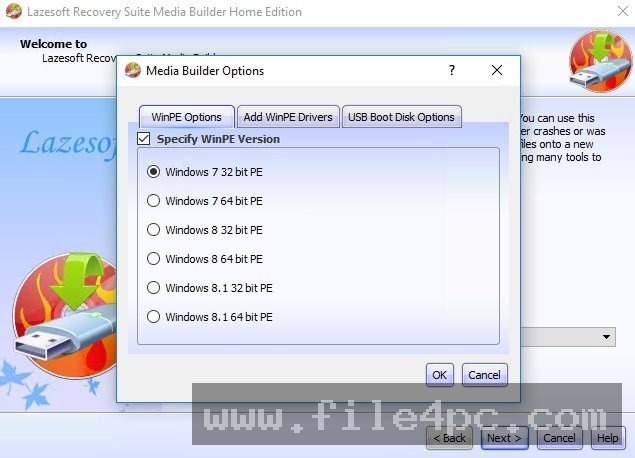
The core feature that enables emergency recovery is the integrated WinPE Recovery CD/USB builder. It automatically builds a customized 32-bit or 64-bit Windows PE bootable media image (on a USB flash drive or optical disc), allowing users to boot unresponsive computers, access local files via a built-in file manager, and execute repairs completely outside the installed operating system.
How Lazesoft Recovery Suite PC Software Works
The software uses a two-phase workflow involving a host installation phase and an emergency boot execution phase.
First, you install the suite on a working Windows computer and insert a USB flash drive or blank CD/DVD. Launch the Media Builder wizard, select your target Windows architecture (32-bit or 64-bit), and allow the program to burn the WinPE environment directly onto your USB drive.
Second, insert the created bootable USB drive into the crashed or target computer. Power on the system and access the BIOS/UEFI boot menu (typically by pressing F12, F11, or DEL at startup) to select the USB drive as the primary boot device.
Third, once the Lazesoft WinPE desktop loads, select the required module from the graphical launcher menu—such as Windows Recovery to fix boot loops, Data Recovery to scan for deleted files, or Recover My Password to unlock a user account. Apply the automated fixes or follow the step-by-step wizard to complete the recovery operation, then reboot the computer back into Windows.
When performing data recovery scans or system repairs on drives with suspected physical hardware damage, refrain from writing new files or saving recovered data onto the same physical drive. Always save extracted files onto an external storage device to prevent overwriting unrecovered data clusters.
Benefits and Limitations
Weighing the suite's functional strengths against system restrictions helps clarify its role in PC maintenance.
Benefits
-
Generous Free Tier: The Home Edition offers functional Windows system repair, password clearing, disk cloning, and data recovery completely free for non-commercial home use.
-
Comprehensive Offline Recovery: Operating from a self-contained WinPE bootable drive allows users to repair systems that cannot launch standard Windows OS environments.
-
Broad Operating System Support: Compatible across desktop Windows releases (Windows 11, 10, 8.1, 7) and Windows Server releases (Server 2025 down to Server 2003).
-
All-in-One Utility Integration: Consolidates password resetting, file undeletion, MBR fixing, drive cloning, and partition management into one tool.
Limitations
-
Dated Graphical Interface: The user interface inside both the desktop app and the WinPE environment uses a classic layout that can feel aged compared to modern Windows software.
-
Requires Pre-Emptive Media Creation: If you only have one computer and it crashes completely, you will need access to a second working PC to create the bootable USB rescue drive.
-
Edition Feature Restrictions: Features like Active Directory domain password resets, BitLocker volume backup options, and HFS+ file system recovery are restricted to paid commercial or server editions.
What's New
Lazesoft maintains consistent maintenance updates across its 5.x build releases, focusing on modern hardware integration and filesystem optimizations.
Recent build updates introduce faster BitLocker volume backup routines, enhanced One-Click Windows Boot Repair algorithms, improved exFAT file system data recovery engines, and full compatibility support for modern Windows 11 releases and Windows Server 2025 environments.
Installation and Setup
Acquire the setup installer directly from official Lazesoft distribution channels or reputable software repositories like MajorGeeks or FileHorse.
Run the installation file, accept the software license agreement, and complete the setup wizard. The desktop wizard requires standard local storage space and installs within seconds.
Once opened, click the "Burn Recovery CD/USB" button immediately to prepare an emergency boot drive. Store the bootable USB drive in a safe location so it is readily available if your computer encounters a boot failure.
Tips for Using Lazesoft Recovery Suite PC Software
-
Build Your Boot Drive Early: Do not wait for a boot failure to occur. Create your bootable USB rescue flash drive ahead of time on a healthy system.
-
Match the WinPE Architecture: When creating bootable media for modern PCs, select the 64-bit WinPE option to ensure full UEFI and modern hardware controller compatibility.
-
Use the Built-In File Manager: If Windows fails to boot and system repair cannot fix the issue, open the Lazesoft File Manager inside the WinPE desktop to manually copy your essential documents to an external hard drive before reinstalling the OS.
-
Keep BitLocker Keys Handy: If your drive uses Windows BitLocker encryption, ensure you have your 48-digit recovery key written down, as data recovery tools require decryption keys to parse protected volumes.
Modern Alternatives
-
Hiren's BootCD PE: A popular, community-maintained bootable environment based on Windows 11 PE, pre-loaded with a vast collection of free third-party hardware diagnostic, data recovery, and system repair utilities.
-
AOMEI Backupper / System Recovery: A well-known commercial backup and disk cloning suite offering bootable media creation, system image restoration, and automated cloud backup features.
-
PassFab 4WinKey / Ophcrack: Specialized password recovery tools focused specifically on bypassing, removing, or decrypting local and network Windows account credentials.
Who Should Use Lazesoft Recovery Suite PC Software?
This software is an excellent choice for computer technicians, system administrators, and home users who want a versatile, offline rescue tool. If you need to recover deleted files, bypass forgotten login passwords, clone a hard drive to a new SSD, or fix corrupted Windows startup files without losing data, the suite handles these scenarios efficiently.
Casual users who only require basic file backups or simple cloud syncing without dealing with bootable USB environments may find native Windows Backup tools or cloud storage services simpler for everyday file protection.
FAQ
Is Lazesoft Recovery Suite PC Software free to use?
Yes. The Home Edition is completely free for personal non-commercial use on personal desktop operating systems. Commercial use, Windows Server support, and advanced domain tools require purchasing a paid license tier.
Can I reset a forgotten Windows password without reinstalling the operating system?
Yes. Using the Lazesoft Recover My Password tool inside the bootable rescue USB, you can clear or reset local administrator and user passwords directly without modifying your installed files or reinstalling Windows.
Does the software work on computers that cannot boot into Windows?
Yes. The suite creates a standalone bootable USB flash drive or CD running a WinPE environment. You boot the computer directly from the USB drive, completely bypassing the broken installed operating system.
Will data recovery guarantee that all my deleted files can be restored?
Data recovery success depends on whether the storage sectors containing the deleted files have been overwritten by new data. If the drive has not been heavily used after file deletion, recovery chances are high.
Is UEFI boot mode supported on modern PCs?
Yes. The software fully supports both modern UEFI boot mode and legacy BIOS boot configurations across 32-bit and 64-bit systems.
Conclusion
System crashes, forgotten passwords, and accidental file deletions can disrupt productivity and risk critical data loss. Lazesoft Recovery Suite PC Software provides a practical, comprehensive safety net by combining offline boot repair, file recovery, password management, and disk cloning into a single, accessible package.
While creating emergency boot media requires initial preparation, having a ready-to-use rescue USB flash drive offers immense peace of mind. Preparing a recovery drive and storing it safely ensures you remain equipped to restore system stability whenever unexpected computer emergencies arise.


💬 0 Comments
✍ Leave a Comment