

VovSoft VCF Editor PC Software is an offline contact management, vCard editing, and file conversion utility developed by Vovsoft. Built specifically for Windows operating systems, it provides a dedicated environment for creating, opening, editing, and converting vCard files (VCF). When moving contacts between smartphones, email clients, or desktop operating systems, users frequently encounter bloated or misformatted VCF files containing hundreds of individual contact cards. Rather than relying on cloud-based web tools that require uploading personal address books to unknown external servers, this software runs completely locally on your desktop hardware to ensure full data privacy.
The software acts as both an address book viewer and a batch contact editor, allowing users to modify contact details, remove duplicate entries, insert personal profile images, and generate QR codes for immediate mobile sharing. It targets business professionals, IT administrators, sales teams, and everyday users who need to clean up messy contact lists before importing them into Android devices, iPhones, Microsoft Outlook, or webmail platforms.
Vovsoft actively maintains the application across its Version 3.x release branch (including Version 3.3), ensuring broad compatibility across Windows platforms—from older Windows XP installations up through modern 64-bit Windows 11 systems.
Key Features
The application incorporates a rich set of vCard parsing, entry modification, export, and visual management features.
Your May Also Like :: S-IT SSD-Check PC Software
Offline vCard Management and Data Privacy
The defining characteristic of the platform is its 100% offline execution model. Contact files containing sensitive phone numbers, home addresses, private emails, and personal notes are parsed directly within local system memory. No telemetry or contact records are uploaded to remote servers, giving privacy-conscious users full control over their digital address books.
Bulk VCF Loading and Alphabetical Index Navigation
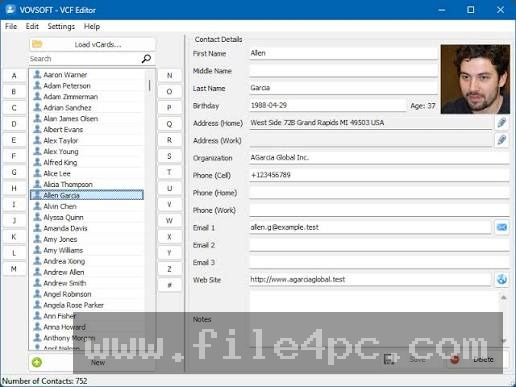
Handling large contact archives is straightforward thanks to built-in batch processing support. The software can load VCF files containing thousands of aggregated contact entries or process collections of single .vcf files simultaneously. An interactive alphabetical index selector lets users skip directly to specific letter groups (like an agenda) to locate records quickly.
Comprehensive Field Editing
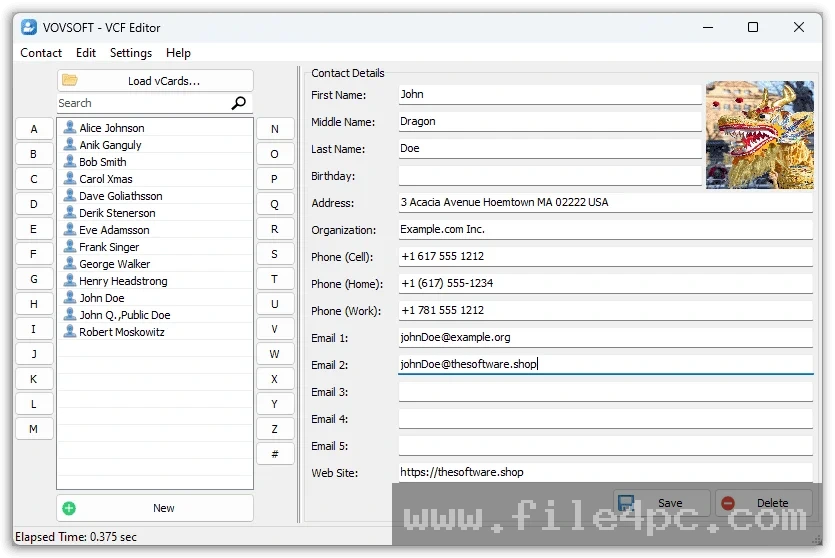
The editor interface provides access to standard vCard attribute fields. Users can view, add, or update primary names, surnames, job titles, company names, work and personal phone numbers, physical street addresses, website links, custom notes, and profile pictures. It also supports assigning multiple email addresses to a single entry without breaking underlying vCard code syntax.
Dynamic QR Code Generation
A notable feature inside the contact management panel is automated QR code rendering. The application automatically generates a scannable QR code representing the active contact record. Users can adjust the width and height parameters of the code and export it as a PNG, JPG, GIF, or BMP image file, or scan the screen directly with a smartphone camera to transfer a contact instantly without typing.
VCF to CSV Conversion and Data Export
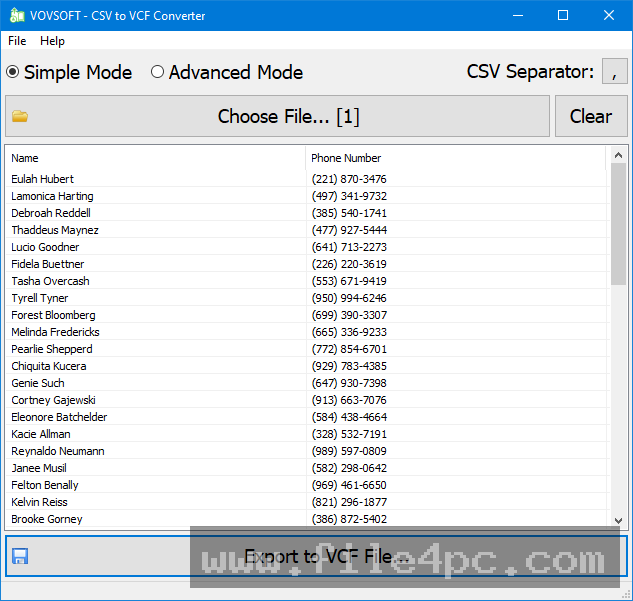
Interoperability across different contact management platforms requires flexible export choices. The software allows users to save modified vCard files back into updated VCF format or convert entire contact databases into structured CSV files. The CSV export option makes it easy to open address books inside spreadsheet applications like Microsoft Excel or Google Sheets for further auditing.
Direct Contact Printing
Recent software updates introduce direct printing capabilities. Users can format and print individual contact details or selected list groups straight to desktop office printers or virtual PDF drivers for physical record keeping.
How VovSoft VCF Editor PC Software Works
The operational workflow follows a logical progression from file import and field editing to local file export.
To begin, launch the desktop executable and click the Add File button or drag your target .vcf file into the main application workspace. The software parses the underlying vCard code structure and populates the left-hand navigation list with sorted contact names.
Next, select a contact entry from the index list to view its full profile in the right-hand inspection window. Here, you can edit text fields directly—updating phone numbers, correcting misspelled names, adding job titles, or embedding new profile photos. If you want to transfer a single entry to your mobile device immediately, click the QR Code tab and scan the generated matrix code using your phone's camera app.
Once your address book modifications are complete, navigate to the File menu. You can overwrite the existing VCF file, save the edited list as a newly consolidated single VCF file, or select the CSV Export option to convert your entries for spreadsheet usage.
Benefits and Limitations
Weighing the software's functional benefits against its interface boundaries helps determine if this utility fits your workflow.
Benefits
The most significant advantage is data security and speed. By processing contact archives locally, users avoid security risks associated with uploading private contact lists to online conversion portals. The software installer is lightweight (under 6 MB), loads in seconds, and consumes minimal system resources during batch operations. The inclusion of both an installer version and a portable ZIP package ensures that system administrators can run the utility directly from a USB flash drive across client machines without altering host registries.
Limitations
The main restriction is that the interface is designed as a functional desktop utility rather than a full-featured personal information manager (PIM). It does not include direct background cloud synchronization hooks for live Google Contacts or Microsoft 365 syncing, meaning updates made in the software must be exported and re-imported into those cloud platforms manually. Additionally, while it handles standard vCard version schemas effectively, highly customized non-standard fields created by obscure third-party apps may occasionally require manual mapping.
What's New
Vovsoft maintains an active development cycle for the application, with recent updates across the Version 3.2 and Version 3.3 releases expanding export options and contact management features.
Key recent updates include:
-
Version 3.3 Release: Refined core memory parsing for faster bulk loading of multi-gigabyte contact archives.
-
Print Contact Details Feature: Added direct printing support for selected contact records and physical address summaries.
-
Custom QR Code Formatting: Enhanced QR code rendering engines allowing custom dimension selection and multi-format image export (PNG, JPG, GIF, BMP).
-
Interface Scaling Updates: High-DPI monitor auto-scaling improvements across Windows 10 and Windows 11 environments.
Installation and Setup
Getting the software ready on a PC involves a minimal setup footprint.
Download the setup executable (vcf-editor.exe) or the portable ZIP archive directly from the official Vovsoft download center. If using the standard installer, run the wizard, accept the software agreement, and complete installation in a few seconds.
If you prefer a zero-footprint setup, download the portable edition, extract the folder contents to a local drive or USB stick, and double-click the main executable. The software runs immediately without creating background services or modifying Windows system registry keys.
Tips for Using VovSoft VCF Editor PC Software
Export a backup copy of your original VCF file before performing batch edits or deleting contacts. Maintaining a raw backup ensures you can restore your original address book if you accidentally delete records during cleanup.
Utilize the CSV export feature if you need to perform mass find-and-replace actions (such as updating area codes or changing company name formats across hundreds of entries). You can export to CSV, edit the values in Excel, and then convert the clean dataset back into vCard format.
When transferring contacts to non-tech-savvy colleagues, use the QR code generation tool. Save the generated contact QR code as an image file and paste it into presentation slides or onboarding emails so team members can scan and save company contact info directly to their mobile devices.
Modern Alternatives
Depending on whether you need a quick standalone file editor or an all-in-one cloud contact suite, several alternatives exist.
Vovsoft VCF to CSV Converter is a specialized sister application from the same developer. While the VCF Editor provides full individual record editing and QR code generation, the VCF to CSV Converter focuses purely on automated, rapid batch format conversion between address book file types.
Open Contacts is an open-source desktop contact management program for Windows. It provides advanced field tracking, relationship mapping, and database linking features. However, its interface is significantly more complex and harder to navigate than Vovsoft's streamlined workspace.
Web-Based VCF Converters (such as online conversion sites) allow quick VCF-to-CSV file transformation within web browsers. While convenient, they require uploading your entire private contact database to third-party web servers, posing privacy concerns compared to offline desktop editors.
Who Should Use VovSoft VCF Editor PC Software?
This application is ideal for IT support technicians, sales personnel, small business owners, and everyday Windows users who frequently migrate or organize digital address books. If you need to edit VCF files, convert contact lists to CSV spreadsheets, fix misformatted phone entries, or transfer single contacts to smartphones via QR codes without sacrificing data privacy, this tool delivers a practical workspace.
However, users seeking automatic cloud-synchronization tools that update Google Contacts or Apple iCloud address books in real time without manual file imports will be better served by cloud-native management suites.
FAQ
Is VovSoft VCF Editor PC Software free or paid?
The software is provided as a free-to-try evaluation version. Users can test its viewing and editing features before purchasing a affordable single-user perpetual license key (priced around $19), which unlocks full unrestricted features with lifetime updates and no nag screens.
Can the software open VCF files created on Android or iPhone devices?
Yes. The application parses standard vCard files created across Android, iOS, Windows, and email clients like Outlook.
Can I convert my VCF file into an Excel spreadsheet?
Yes. You can load your VCF file into the program and use the built-in CSV export option to save the contacts in a format fully compatible with Microsoft Excel and Google Sheets.
Does the editor require an active internet connection to function?
No. The software executes 100% locally on your computer, ensuring complete offline operation and data privacy.
Conclusion
VovSoft VCF Editor PC Software provides a practical, privacy-focused solution for managing and editing vCard files on Windows computers. By combining bulk VCF parsing, field modification, CSV export, and dynamic QR code generation into a lightweight interface, it simplifies the task of keeping digital address books clean and organized.
While it relies on manual file importing rather than direct background cloud syncing, its zero-installation portable option, offline data protection, and low system resource overhead make it an essential utility. For anyone seeking full control over their contact files without risking private data on third-party web servers, it offers an authoritative desktop tool.
💬 0 Comments
✍ Leave a Comment