

Pepakura Designer PC Software is a specialized 2D pattern unfolding utility developed by Tama Software Ltd that bridge the gap between digital 3D models and physical papercraft. Rather than functioning as a standard 3D modeling program, this application takes pre-existing polygon mesh files created in external software and calculates how to flatten them into printable 2D net templates. It is widely adopted across the cosplay community, prop makers, scale modelers, and industrial designers who need to transform digital assets into tangible physical physical builds using cardstock, foam, or paper.
Operating directly on local Windows desktop systems, the software allows creators to translate intricate digital geometry into physical craft patterns without relying on web services or cloud processors. By giving users granular control over seam cuts, flap placements, and sheet layouts, it acts as a core prepress tool for physical assembly. The application is maintained under active development, receiving steady updates that introduce features like PDF vector export, tightly packed layout algorithms, and cutting plotter integrations.
Key Features
The platform provides a suite of pattern unfolding, editing, and layout utilities engineered specifically to simplify manual assembly.
Your May Also Like :: HSX PromptKinetics PC Software
One-Click Unfolding Engine
The software includes an automated engine that calculates how 3D polygon meshes should be cut and laid flat. It automatically converts interconnected spatial polygons into flat 2D components, generating folding lines, mountain/valley line indicators, and numerical edge-matching markers.
Interactive Seam and Flap Editing
Automated unfolding often creates awkward cuts for complex models. The built-in editing tools allow creators to manually join or disconnect specific faces, relocate glue flaps, alter tab shapes, and adjust tab angles. This fine-tuning ensures that glue surfaces are easy to reach during real-world construction.
Format Compatibility for 3D Imports
The application supports a wide array of standard 3D file formats. Designers can import OBJ, 3DS, STL, DXF, LWO, SKP, and Metasequoia files, making it compatible with major 3D design applications such as Blender, Maya, 3ds Max, SketchUp, and Rhino.
Texture and Color Mapping
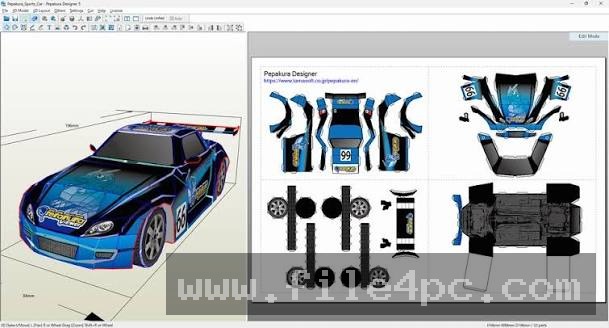
If an imported 3D model contains image textures or vertex colors, the software projects these visuals onto the flat 2D pattern sheets. This feature allows makers to print fully colored papercraft parts directly without requiring post-assembly hand painting.
Cutting Plotter Registration Support
For creators who use automated craft cutters, the application offers integrated support for Silhouette CAMEO and Graphtec cutting plotters. It can generate registration marks on printed sheets, enabling cutting machines to precisely score and cut out parts automatically.
How Pepakura Designer PC Software Works
The operational workflow transitions sequentially from digital asset preparation to printed physical sheets.
The process begins outside the application. You must first create or acquire a 3D model using dedicated modeling software. Low-polygon geometry works best for papercraft, as excessive vertex counts produce an overwhelming number of tiny paper pieces. Once your 3D asset is ready, you export it as a supported file type (such as an OBJ or STL file) and open it inside the application.
Upon importing the file, the interface presents a split-screen view: the left panel displays the 3D model, while the right panel represents the 2D printable page layout. Clicking the Unfold button instantly lays the 3D faces flat onto the 2D canvas.
From there, you refine the pattern layout. You can drag individual parts across pages, rotate elements to maximize paper usage, and use the Join/Disjoin tools to clean up awkward geometry. You can also scale the entire model to match specific real-world dimensions, such as sizing a wearable helmet to fit a user's head measurements.
Once the layout is organized, you can print the template directly to standard home printers, export the layout as a vector PDF or SVG file for digital die-cutters, or save the file in the proprietary PDO format for sharing with other crafters.
Benefits and Limitations
Evaluating the utility requires balancing its pattern-generation strengths against its intentional design boundaries.
Benefits
The primary advantage is the immense time savings it offers when turning digital concepts into real-world objects. Instead of manually calculating geometric developments using complex math, creators can generate accurate physical templates in minutes. The licensing model is straightforward, offering a one-time perpetual purchase rather than a recurring monthly subscription. Additionally, because the software runs locally on low-spec hardware, it remains exceptionally fast and responsive even when handling multi-page assembly projects.
Limitations
The most notable restriction is that the application contains no internal 3D creation or mesh-sculpting tools. If an imported 3D model has non-manifold geometry, inverted normals, or unwanted internal walls, you cannot repair those mesh errors inside the application; they must be fixed in an external 3D editor prior to unfolding. Furthermore, the user interface uses a legacy desktop layout that can feel dense to beginners who are unfamiliar with technical CAD interfaces.
What's New
Tama Software actively maintains the platform, with recent Version 6.x releases bringing modern workflow improvements.
Key recent updates in the Version 6 series include:
-
Enhanced unfolding algorithms, including an optional fast algorithm and tight-packing modes to minimize wasted paper.
-
Direct PDF format vector export alongside SVG improvements, streamlining workflows for Cricut and Silhouette users.
-
UI additions such as French and Portuguese language support, box-selection tools in the 3D viewport, and 0.1-degree precision fold angle readouts.
-
Extended page size parameters effectively removing upper limits for large-scale industrial or architectural patterns.
Installation and Setup
Installing the software on Windows involves a lightweight setup process.
You download the setup executable directly from the official Tama Software website. Running the installer guides you through standard installation prompts and places the executable on your storage drive.
The application installs initially in keycode-unlocked evaluation mode. In this mode, you can open files, test the unfolding features, and preview layouts, but saving files and exporting vector/raster formats requires purchasing a product key from the developer. Once licensed, entering the registration key unlocks full export capabilities permanently.
Tips for Using Pepakura Designer PC Software
To get the cleanest results, keep your source 3D models as low-poly as possible. High polygon counts create hundreds of microscopic tabs that make physical gluing nearly impossible.
Use the Show Flap Match Numbers toggle during layout configuration. This prints small corresponding numbers on connected edges, allowing you to easily identify which parts glue together during manual construction.
When designing patterns for EVA foam cosplay props rather than paper, turn off glue flaps entirely in the 2D menu settings. Foam armor pieces are edge-glued using contact cement, making extra paper flaps unnecessary.
Modern Alternatives
While this utility is the long-standing standard for papercraft unfolding, other design tools approach 3D-to-2D processing differently.
Blender Paper Model Add-on is an open-source extension built directly into the free Blender 3D suite. It allows users to mark seams and unfold meshes into papercraft patterns without leaving the modeling interface. While powerful and cost-free, it lacks the specialized cutting plotter integration and standalone viewer ecosystem provided by Tama Software.
Ultimate Papercraft3D is an alternative standalone unfolding utility. It offers basic mesh editing features alongside unfolding capabilities, but it has a smaller user community and less frequent software updates compared to the Version 6 series of Tama Software's offering.
Euratex and standard CAD sheet metal unfolders (like those found in Fusion 360 or SolidWorks) serve industrial sheet metal bending needs rather than papercraft, focusing on material stretch calculations rather than paper/foam assembly tabs.
Who Should Use Pepakura Designer PC Software?
This software is ideal for cosplayers, prop builders, papercraft enthusiasts, and architectural modelers who need to construct physical 3D objects from flat materials like cardstock, cardboard, or EVA foam. It is particularly valuable for creators who share or download PDO pattern files across the online crafting community.
However, if you do not work with physical media or need to sculpt 3D models from scratch, this utility is not appropriate, as it is strictly a prepress unfolding tool rather than a 3D creation suite.
FAQ
Can I create a 3D model inside this software?
No, the application does not feature 3D modeling tools. You must build or download your 3D assets using external 3D software (such as Blender, SketchUp, or 3ds Max) and import them into the application.
What is a PDO file?
A PDO file is the native project file format created by the software. It contains the imported 3D model data, 2D unfolded page layouts, texture placements, flap settings, and assembly line notes.
What is the difference between Pepakura Designer and Pepakura Viewer?
Pepakura Designer is the paid authoring tool used to import 3D files, edit seams, configure flaps, and export layouts. Pepakura Viewer is a free companion program designed for end-users who only need to view, scale, and print pre-made PDO templates created by others.
Does the software work for EVA foam armor building?
Yes, it is widely used in cosplay for EVA foam builds. Users import 3D armor files, unfold them, disable the glue flaps, scale the pattern to human proportions, and trace the printed page templates onto foam sheets.
Conclusion
Pepakura Designer PC Software provides an essential link between digital 3D modeling and physical papercraft construction. By automating the complex mathematical process of flattening 3D polygon meshes into structured 2D print layouts, it enables makers, cosplayers, and modelers to bring virtual concepts into the real world with high precision.
While users must rely on external software to repair or build their original 3D models, its low resource footprint, robust vector export options, and perpetual licensing model make it an invaluable utility for physical builders. For anyone seeking to convert digital models into printable, buildable templates, it remains a practical standard.

💬 0 Comments
✍ Leave a Comment