

TubeDownload Pro PC Software is a desktop video downloading and media conversion utility created by TubeDownload to help Windows users save web-based video content for offline playback. Built as a simple media acquisition manager, it allows users to download video streams from popular streaming platforms, social media networks, and video hosting sites. Beyond raw video downloading, it incorporates an integrated media converter that transcode saved files into common playback formats suitable for smartphones, tablets, home theater systems, and car audio head units.
Operating locally on Windows systems, the program eliminates reliance on unpredictable web browser extensions or ad-heavy online downloading sites. It targets everyday consumers, offline commuters, educators, and media collectors who want a straightforward desktop application to store tutorials, music videos, and online lectures directly onto local storage drives.
While the software remains functional for basic media grabbing, its development activity has slowed in recent years. Potential users should evaluate how well its fixed extraction engine handles modern streaming protocol changes before choosing it over open-source alternatives.
Your May Also Like :: Process Explorer PC Software
Key Features
The application offers a streamlined suite of video grabbing, quality selection, and media conversion tools.
Multi-Site Video Capture The software is engineered to detect and capture video streams across numerous video hosting platforms and social networks. Users paste a video web URL into the interface, and the internal engine parses the site to locate underlying media streams.
Multi-Resolution Output Options When analyzing a video link, the application presents available quality presets offered by the host site. Users can choose between standard definition (360p, 480p), high definition (720p, 1080p Full HD), and higher resolutions where available, balancing file size against visual quality.
Integrated Format Converter A core component of the software is its built-in media encoder. Users can convert downloaded videos into various containers, such as MP4, WMV, AVI, MOV, or 3GP. It also supports direct audio extraction, allowing users to save video sound tracks straight into MP3, AAC, or WAV audio files.
Simultaneous Batch Downloading To speed up playlist processing, the application supports batch queuing. Users can add multiple video links into a central download queue, allowing the software to process several downloads concurrently rather than forcing manual one-by-one file transfers.
Drag-and-Drop URL Input Alongside traditional copy-pasting, the interface supports drag-and-drop actions. Users can drag video links directly from their web browser window and drop them into the application window to initiate media extraction instantly.
How TubeDownload Pro PC Software Works
The operational workflow transitions sequentially from web link capture to local media file conversion.
The process begins in your standard web browser. You find the video you wish to download, highlight its web address in the URL bar, and copy the link to your clipboard.
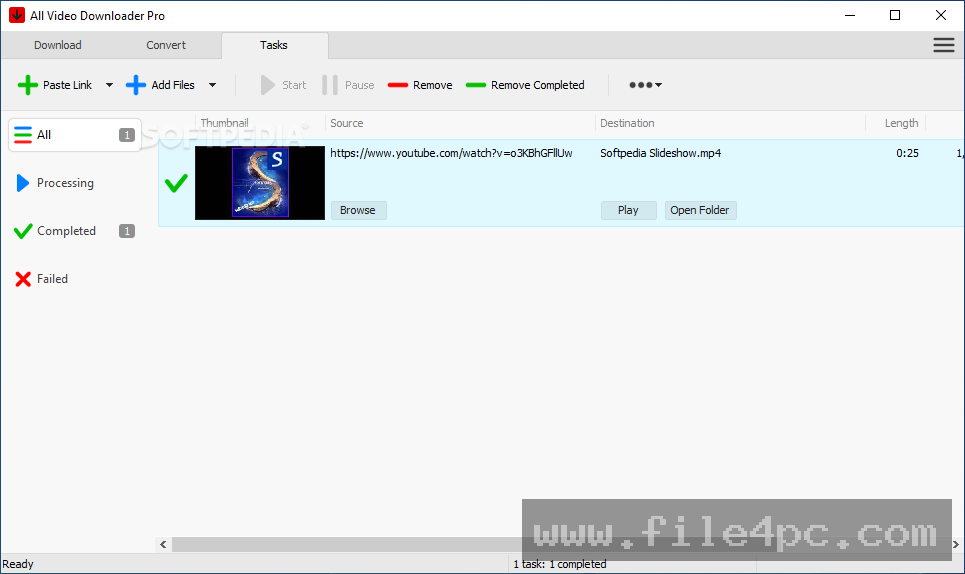
Next, you open the application interface and click the Add Download button, or drag the URL directly into the drop zone. The software parses the web page, establishes a connection with the host server, and displays a list of detected video resolutions and file formats.
From there, you select your target quality tier and destination format. If you only require the audio track, you select an audio profile like MP3 from the format drop-down list. You specify your local output folder and click Start. The application downloads the raw data stream and automatically encodes it into your chosen file format, placing the finished media file into your designated storage folder.
Benefits and Limitations
Evaluating the utility requires balancing its simple user workspace against evolving web stream compatibility.
Benefits
The main advantage is simplicity. Its uncluttered interface makes downloading and converting web videos accessible to non-technical users who want to avoid command-line utilities. Having an integrated converter inside the download manager eliminates the need to run separate transcoding software after downloading a file. Additionally, its lightweight local footprint ensures it runs smoothly without consuming excessive system resources.
Limitations
The primary restriction relates to ongoing software maintenance. Streaming platforms frequently update their underlying video delivery algorithms and encryption formats. Because commercial shareware tools like this depend on regular engine updates to maintain site compatibility, unmaintained versions may fail to parse links or download content from certain platforms. Furthermore, the shareware trial limits the number of downloads or video duration until a commercial license key is registered.
What's New
The development status of the software reflects a mature, legacy utility phase rather than an actively updated platform.
Key factors regarding its current status include:
-
Maintenance on the primary parsing engine has slowed compared to active open-source video download tools.
-
The latest known versions focus on maintaining basic MP4 and MP3 conversion pipelines for standard desktop Windows builds.
-
Software performance remains stable on traditional 32-bit and 64-bit Windows environments, though compatibility with newer web streaming security protocols may vary.
Installation and Setup
Installing the software on a Windows computer follows a simple setup process.
You download the official setup package (.exe) from the publisher's portal or a reputable software repository. Run the setup wizard, review the license agreement, and select your target installation directory.
Upon launching the application for the first time, it opens in trial mode. Users can test the download queue and format options. Entering a purchased license key in the registration panel unlocks full, unrestricted downloading and conversion features.
Tips for Using TubeDownload Pro PC Software
Test your target video links using the trial version before purchasing a license. Verifying that the application successfully parses your preferred video websites ensures the extraction engine is compatible with those specific platforms.
Select MP4 as your default output format for video downloads. MP4 provides the highest hardware playback compatibility across modern Windows PCs, Android devices, iPhones, and smart TVs.
Set a dedicated output directory on a drive with ample free space. High-definition video files can consume several gigabytes quickly, so routing downloads to a secondary storage hard drive prevents clogging your primary operating system partition.
Modern Alternatives
Because web video delivery mechanisms change rapidly, several alternative tools exist for downloading and managing online media.
4K Video Downloader is a widely used commercial application for Windows and macOS. It receives frequent software updates to maintain compatibility with major video platforms, supporting 4K/8K downloads, channel subscriptions, and automated playlist grabbing.
yt-dlp is a powerful, free, and open-source command-line media extraction utility. Maintained actively by an open-source community, yt-dlp supports thousands of websites and streaming protocols. While it lacks a graphical user interface by default, it serves as the underlying engine for many modern desktop video downloaders.
ClipGrab is a free, open-source desktop downloader and converter for Windows, Mac, and Linux. It offers a user-friendly graphical interface with built-in search and format conversion options, providing a free alternative for casual downloading.
Who Should Use TubeDownload Pro PC Software?
This software is suitable for casual Windows users who want a basic, graphical desktop application to download web videos and convert them into standard MP3 or MP4 formats for offline viewing. It works adequately for users saving simple video links who prefer a basic interface over command-line tools.
However, power users, archivists, or users needing to download high-resolution 4K/8K playlists regularly will find active open-source tools like yt-dlp or frequently updated applications like 4K Video Downloader better suited to their needs.
FAQ
Is TubeDownload Pro PC Software free?
No, it is distributed as commercial shareware. It provides a free trial version with functional limitations, requiring users to purchase a license key for unrestricted use.
Can I convert downloaded videos to MP3 audio files?
Yes. The built-in converter allows you to select MP3 as the target output profile, automatically extracting and saving the audio track from a video link.
Why does a video link fail to download?
Video downloads usually fail when a host website changes its underlying video streaming code, or when content is protected by digital rights management (DRM). If the software's parsing engine has not been updated to reflect those changes, it cannot extract the stream.
What operating systems are supported?
The application is designed for Microsoft Windows operating systems, supporting 32-bit and 64-bit editions of Windows 10, Windows 8/8.1, and Windows 7.
Conclusion
TubeDownload Pro PC Software provides a basic solution for capturing web videos and converting them into offline media files on Windows PCs. By combining link extraction, resolution options, and format conversion into a single application, it offers an accessible workflow for casual offline media storage.
While its slow update cycle limits its effectiveness against modern streaming security changes compared to actively maintained open-source tools, its clean layout remains easy to navigate. For users seeking a simple desktop tool to save basic web videos, it offers a functional workspace.


💬 0 Comments
✍ Leave a Comment