

Pazu StreamGet PC Software is a specialized desktop application built for saving movies and television shows from major subscription streaming platforms for offline viewing. Rather than relying on official streaming apps which restrict downloads to mobile devices and impose time limits, this tool creates standard MP4 or MKV files that you can keep permanently. It is designed for viewers who want to build a local media library, travel frequently without reliable internet, or simply prefer watching their favorite shows without the risk of buffering.
The software targets platforms like Netflix, Amazon Prime Video, Disney+, Hulu, and Max. It operates as a local utility on your Windows machine, effectively bypassing the limitations of ad-supported tiers and offline-viewing restrictions. Because it saves a DRM-free local copy, the files will not expire even if your subscription to the streaming service eventually lapses.
Your May Also Like :: Duplicate Finder Professional PC Software
Key Features
The application focuses heavily on making the downloading process repeatable and highly customizable, especially for users building large digital libraries.
Multi-Platform Integration
The All-In-One version of the software supports over a dozen major streaming services from a single interface. You do not need to juggle different applications for Netflix and Disney+; you simply select the platform you want from the main menu and log in.
High-Definition Output
The software is capable of downloading videos in full 1080p high definition, assuming the source title is available in that resolution. You can choose to export these files as either MP4 or MKV, which ensures compatibility with almost every modern television, media server, and mobile device.
Multilingual Audio and Subtitle Preservation
When you download a movie, you are not locked into a single language. The software can extract and preserve multiple audio tracks and subtitle languages. Furthermore, it gives you the option to save subtitles as hardcoded text embedded in the video, or as independent soft-coded files which can be toggled on and off in your media player.
Hardware-Accelerated Batch Downloading
Users can queue up entire seasons of a television show rather than downloading episodes one by one. The software utilizes multi-threading technology to download files simultaneously, which the developer claims can increase download speeds up to eight times faster than standard single-file transfers.
How Pazu StreamGet PC Software Works
The workflow is straightforward and designed to mimic the experience of browsing a standard streaming website.
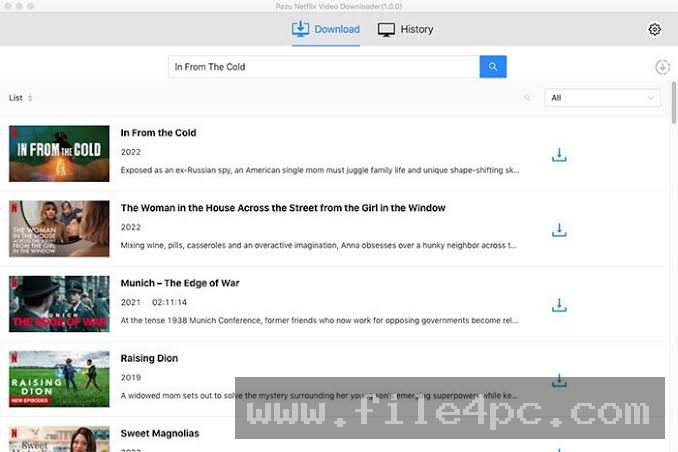
When you launch the application, you use the built-in browser to select a streaming service and log into your account. From there, you simply search for the movie or television show you want to save. Alternatively, if you already know exactly what you want, you can paste the URL of the video directly into the software's address bar.
Once you select a title, a configuration window appears. Here, you define your output preferences. You select your video quality (ranging from standard definition up to 1080p), pick your desired format (MP4 or MKV), and choose which audio and subtitle languages you want to keep.
After confirming your settings, you hit download. The software handles the rest, saving the final video file directly to your designated local folder.
Benefits and Limitations
A realistic assessment of the software requires looking at both its strengths and where it falls short compared to more expensive alternatives.
Benefits
The biggest advantage is the total elimination of viewing restrictions. The files you download are yours to keep, transfer, and watch on any device without needing an active internet connection or a specific streaming app. The interface is extremely easy to navigate, and the multi-language support is excellent for users who prefer watching international content. The software also successfully bypasses the download limitations imposed on ad-supported streaming tiers.
Limitations
The most notable limitation is the resolution ceiling. The software cannot download video in 4K resolution. It tops out at 1080p. Furthermore, it does not support High Dynamic Range (HDR) formats like HDR10 or Dolby Vision. If you are trying to build a premium 4K home theater library, this limitation will be a significant roadblock.
Additionally, the software relies on your active subscriptions. It does not provide free access to premium streaming content; you must already pay for the services you are downloading from.
What's New
The software receives frequent updates, primarily to maintain compatibility with the constantly changing DRM (Digital Rights Management) protocols used by major streaming platforms. Recent updates in late 2026 (Version 3.2.6) have focused on improving the multi-threading download speeds and expanding the built-in browser's stability. The developer has also refined the multilingual support to handle a wider variety of subtitle encodings.
Installation and Setup
Installing the software is a standard procedure. Download the installer from the official website and run the setup wizard.
Because video files are large, ensure you have sufficient hard drive space. It is highly recommended to immediately change the default output directory in the software's settings to a large external hard drive or a dedicated media server, rather than filling up your primary operating system drive.
Be aware that you must log in with your actual streaming account credentials within the software's built-in browser.
Tips for Using Pazu StreamGet PC Software
If you have a slower internet connection, do not attempt to batch download a dozen high-definition movies simultaneously, as this will saturate your bandwidth. Queue them up to download sequentially overnight.
When configuring your subtitle preferences, choosing to save them as external files (like .srt) rather than hardcoding them into the video provides much more flexibility, allowing you to turn them off or adjust their appearance in a media player like VLC.
Modern Alternatives
StreamFab is a major competitor that offers a significantly higher ceiling for visual quality. Unlike Pazu, StreamFab can download 4K video and supports HDR10 and Dolby Vision. However, it is also considerably more expensive.
AnyStream (by RedFox) is another well-known alternative. It offers a very similar feature set to Pazu but has a different licensing structure and is often praised for its incredibly fast updates when streaming platforms change their DRM.
Who Should Use Pazu StreamGet PC Software?
This software is highly recommended for people who travel frequently, such as commuters, pilots, or individuals working in remote areas without reliable internet access. It is also useful for users who want to consolidate their favorite movies and shows from various fragmented streaming platforms into one offline, highly organized local library.
However, videophiles who demand uncompressed 4K resolution and HDR support for their high-end home theaters should look elsewhere, as the 1080p limitation will be a dealbreaker.
FAQ
Does this software give me free access to Netflix or Disney+?
No. You must have an active, paid subscription to the streaming service you want to download from. You log in with your own credentials.
Can I watch the downloaded videos on my television?
Yes. Because the software exports standard MP4 or MKV files, you can copy them to a USB drive and plug it directly into most modern smart TVs, or stream them via a local network using software like Plex.
Are the downloads permanent?
Yes. The downloaded files are stored locally on your hard drive and do not expire. They will remain accessible even if you cancel your streaming subscription later.
Is there a Mac version available?
Yes, the developer offers versions of the software for both Windows and macOS operating systems.
Conclusion
Pazu StreamGet PC Software offers a highly effective, streamlined solution for taking control of your streaming media. By allowing users to save high-definition, multi-language files locally, it removes the frustration of buffering, expiring titles, and restrictive official apps.
While the lack of 4K and HDR support limits its appeal for hardcore home theater enthusiasts, its simplicity, batch downloading capabilities, and reliable output make it an excellent tool for the average viewer looking to build an accessible, permanent digital media collection.


💬 0 Comments
✍ Leave a Comment