

MadCap Flare PC Software gives technical communicators, documentation managers, and enterprise authors an advanced environment for topic-based authoring and multi-channel publishing. Creating complex user manuals, online help portals, API references, and policy guides often becomes inefficient when managing separate documents for different formats and audience tiers. By utilizing XML-based single-source publishing, conditional content tags, and flexible target outputs, this platform allows documentation teams to write content once and deploy it across web, mobile, print, and PDF channels without repeating manual layouts.
Overview
MadCap Flare PC Software is a flagship help authoring tool (HAT) and content management platform developed by MadCap Software. Designed specifically for structured technical writing, it uses an XML-based architecture that separates content creation from visual presentation. Rather than compiling static standalone documents, writers construct modular topic files that combine dynamically into varied publication targets.
MadCap Software actively maintains the platform, continuously updating the desktop authoring suite and its companion cloud service, MadCap Central. The application operates under a commercial subscription model aimed at professional documentation teams. It targets technical writers, information architects, instructional designers, and enterprise documentation departments that manage extensive knowledge bases, multi-language translation pipelines, and complex product manuals.
Your May Also Like :: DxO ViewPoint PC Software download
Key Features
The software incorporates a structured set of authoring, layout, and publishing modules designed to streamline long-form documentation production.
Topic-Based Single-Source Authoring
Instead of writing long chapter files, content is divided into small, reusable XML topic files. Writers can reference these topics across multiple books, online help sites, and PDF manuals simultaneously. Updating a single source topic automatically pushes changes across every target output where that topic is referenced.
Conditional Text and Content Variables
Conditional tags allow authors to apply filters to text blocks, images, or entire topics based on target outputs. For example, advanced administrator steps can be tagged to appear only in PDF manuals while remaining hidden on public web help portals. Variables allow dynamic text replacement for items like product names, version numbers, and release dates across thousands of pages.
Multi-Channel Target Publishing
The build engine compiles XML content into multiple output formats without altering the underlying source files. Supported targets include responsive HTML5 help portals, print-ready PDF manuals, Microsoft Word files, clean XHTML, and EPUB e-books. Outputs can be customized using Cascading Style Sheets (CSS) to maintain corporate visual branding.
Integrated Source Control and Collaboration
Teams can manage source files using native integrations for Git, Subversion (SVN), and Azure DevOps. Collaborative review features allow subject matter experts (SMEs) to review, comment on, and edit topics without breaking underlying XML markup tags.
Translation and Localization Management
The software structure simplifies multi-language translation projects. By integrating with computer-assisted translation (CAT) tools like MadCap Lingo, the system isolates changed text segments, reducing translation costs and ensuring consistent terminology across localized documentation libraries.
How MadCap Flare PC Software Works
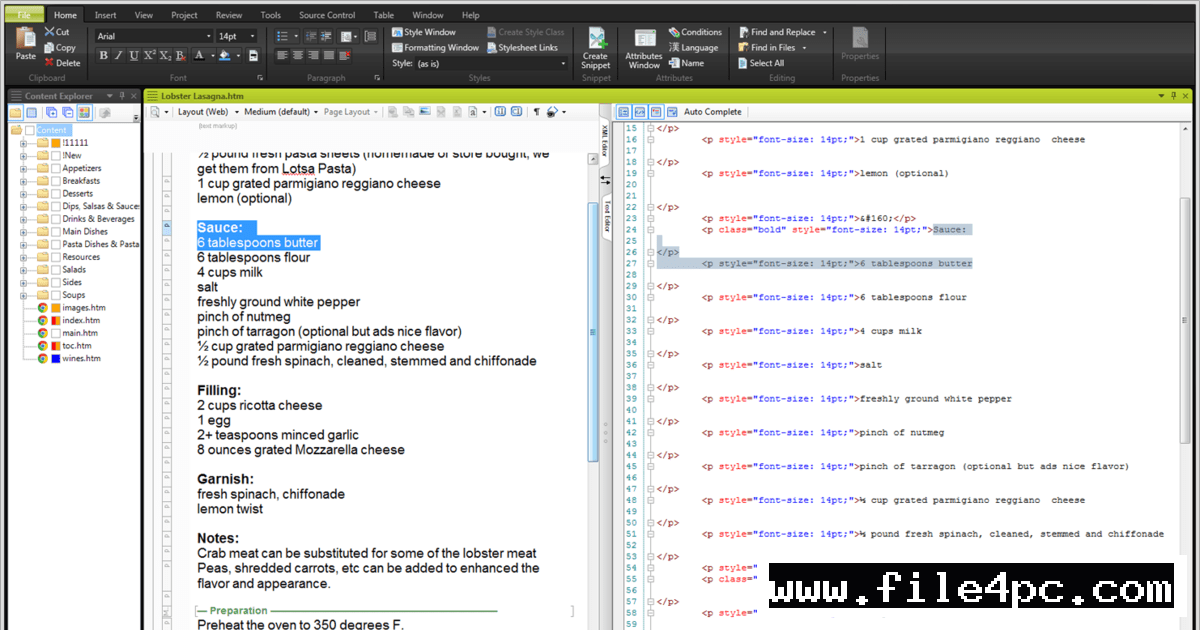
The application operates through an integrated authoring workspace consisting of the XML Editor, Project Organizer, Content Explorer, and Target Editor.
First, launch the software and create a new project using a pre-configured template or import existing files from Microsoft Word, Adobe FrameMaker, or HTML sources. Define target formats, such as HTML5 web portals or PDF books.
Second, write content in the visual XML Editor. Authors can edit in a WYSIWYG view or switch directly to raw code view. Apply CSS style classes, insert snippet components, set conditional display tags, and assign variables to recurring product terms.
Third, organize topics into a Table of Contents (TOC) structure within the Project Organizer. Select a Target profile, configure layout skins, and trigger a build. The software parses the XML topics, applies style rules, filters conditional text, and generates the final published documentation package.
Before running batch builds, verify that broken hyper-links and unassigned variables are resolved using the built-in Analysis reporting tool. Compiling large projects with unresolved link errors can generate missing cross-references across published web help sites.
Benefits and Limitations
Evaluating the application's strengths alongside its operational complexity helps determine its fit for your organization.
Benefits
-
Unmatched Content Reusability: Single-sourcing eliminates redundant copying, ensuring updates are made once and applied everywhere.
-
Flexible CSS Styling: Complete control over Cascading Style Sheets allows precise visual customization for both web and print layouts.
-
Multi-Format Output: Generates responsive web help, printable PDFs, and Word documents from the same set of source files.
-
Robust Translation Support: Modular XML design integrates cleanly with translation software, lowering localization overhead.
Limitations
-
Steep Learning Curve: Mastering CSS, conditional logic, snippet relationships, and target setups requires significant initial training.
-
High Tier Pricing: Enterprise subscription pricing represents a major investment compared to lightweight Markdown tools.
-
Windows System Requirement: The desktop authoring application is built natively for Microsoft Windows and requires a Windows environment to run.
What's New
MadCap Software maintains a regular release schedule, expanding cloud collaboration features and publishing capabilities.
Recent platform updates focus on enhanced cloud-based authoring inside MadCap Central, improved track-changes workflows for peer review, expanded API publishing connectors, and refined SVG graphic rendering. Additional updates improve Git source control syncing speed, upgrade search engine indexing options for HTML5 outputs, and enhance accessibility compliance (WCAG) across generated web help skins.
Installation and Setup
Acquire the official installation executable directly from MadCap Software distribution channels. Ensure your system meets requirements, including a modern multi-core processor, sufficient RAM, and the Microsoft .NET Framework runtime environment.
Run the setup wizard with administrative permissions. Select your installation path, accept the end-user license agreement, and complete the installation process.
Launch the software and enter your subscription license key in the activation window. Once activated, configure your default source control repositories, set up global dictionary preferences, and load your custom CSS style sheets.
Tips for Using MadCap Flare PC Software
-
Master Snippets for Common Text: Use Snippets for recurring text blocks like warning notices, support contact info, or safety disclaimers to ensure single-source updates.
-
Keep CSS Clean and Structured: Avoid inline styling on text elements; always apply style classes through master CSS stylesheets to ensure consistent global formatting.
-
Set Up Condition Strategy Early: Plan your conditional tagging strategy (e.g., Internal vs. External, Admin vs. User) before creating large topic libraries.
-
Use the Built-In Project Analysis Tool: Run regular project reports to detect orphaned topics, unused styles, undefined variables, and broken cross-references.
Modern Alternatives
-
Adobe FrameMaker: A long-standing enterprise documentation processor favored for extremely long books, structured DITA XML authoring, and complex technical manuals.
-
Paligo: A cloud-based Component Content Management System (CCMS) that provides single-sourcing and topic-based authoring entirely inside a browser interface.
-
GitBook: A modern collaborative documentation platform tailored for software API guides, developer docs, and lightweight internal team knowledge bases.
Who Should Use MadCap Flare PC Software?
This software is an ideal choice for professional technical writers, information architects, and documentation teams that manage complex, multi-version product manuals. If your organization produces content that must be published simultaneously as web portals, PDF books, and localized multi-language guides, its single-sourcing engine saves immense time.
Small teams or solo writers who produce simple internal notes or short single-format guides may find lightweight Markdown editors or cloud wikis simpler and more cost-effective.
FAQ
Is MadCap Flare PC Software available for macOS?
No. The desktop authoring application runs natively on Microsoft Windows operating systems. Mac users must run Windows using virtual machines or boot configurations to use the software.
What output formats can the software generate?
It generates responsive HTML5 web portals, PDF documents, Microsoft Word files, clean XHTML, EPUB e-books, and Eclipse Help systems from a single project.
Can I import existing Microsoft Word documents?
Yes. The software includes an import wizard that converts Microsoft Word documents and Adobe FrameMaker files into structured XML topics and CSS styles.
Does the software require an internet connection?
An internet connection is required for initial license activation, downloading component updates, and publishing directly to cloud hosting portals like MadCap Central. Core authoring and local builds function offline.
What is the difference between Snippets and Variables?
Variables are short, unformatted text strings (like product names or dates) substituted inline, while Snippets are reusable formatted XML content blocks (like caution boxes or steps) that can contain multiple paragraphs, tables, and images.
Conclusion
Managing large-scale technical documentation across multiple formats requires authoring tools built specifically for single-sourcing and content reuse. MadCap Flare PC Software delivers an enterprise-grade authoring environment by combining topic-based XML editing, flexible CSS styling, conditional text filters, and multi-channel target publishing.
While learning its advanced feature set involves a learning curve, the resulting efficiency gains in content maintenance, translation management, and publishing speed are substantial. Establishing structured conditional strategies and CSS stylesheets ensures a scalable documentation pipeline that grows alongside your product ecosystem.


💬 0 Comments
✍ Leave a Comment