

PilotEdit Pro PC Software is a specialized text, code, and hex editor for Windows designed to open, manipulate, compare, and encrypt massive data files that exceed standard system memory limits. While traditional text editors like Notepad++ or VS Code tend to crash or freeze when opening files larger than a few gigabytes, this software utilizes an optimized disk-buffering engine capable of handling files over 400 GB (or 40 billion lines) without compromising system stability. It serves developers, database administrators, security auditors, and data analysts who work with raw server logs, large CSV exports, binary streams, and multi-gigabyte SQL databases.
Operating completely on your local Windows PC, the application offers extensive file-processing tools ranging from multi-line regex search-and-replace to built-in SFTP file transfer capabilities. It bridges the gap between everyday programming environments and heavy-duty data parsing utilities. Actively maintained by PilotEdit, the application receives regular updates to ensure high-speed file rendering, code syntax highlighting, and secure file handling across modern 64-bit Windows operating systems.
Key Features
The editor incorporates features targeted at large-scale file manipulation, automated script execution, and secure file sharing.
Uncapped Large File Handling
The defining capability of the platform is its specialized memory architecture. It can open, edit, sort, and save massive text and binary files reaching hundreds of gigabytes. The editor loads data in Quick Mode dynamically, allowing users to scroll through multi-gigabyte files instantly without waiting for the entire document to load into RAM.
Dual Text and Hexadecimal Editing
Switching between standard text rendering and raw byte editing takes a single click. The Hex Mode allows users to inspect binary structures, modify byte sequences directly, and fix corrupted file headers. This makes it a versatile tool for lower-level software debugging and reverse-engineering tasks.
Advanced File Comparison and Merging
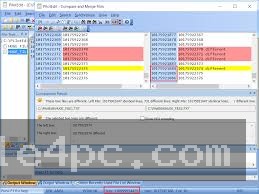
The Pro version includes a built-in comparison engine capable of comparing two files larger than 100 GB line-by-line or byte-by-byte. It highlights additions, deletions, and line modifications in a side-by-side view, allowing users to merge differences directly between huge log files or database dumps.
Your May Also Like :: Directory Opus PC Software
256-Bit AES File Encryption and Decryption
Data security is integrated natively into the editing workflow. Users can encrypt large files or entire directories using 256-bit AES encryption. Furthermore, the software supports transparent editing of encrypted files, letting you open, edit, and save protected files without manually decrypting them to your hard drive beforehand.
Integrated FTP/SFTP Client
Remote server administration is streamlined through an integrated network panel. You can open remote files directly from web servers via FTP or SFTP, edit the code or configuration parameters locally, and upload the changes back to the remote server upon saving.
Automated Scripting and Duplicate Removal
For repetitive data cleanup, the editor supports custom execution scripts. Users can run automated find-and-replace scripts across directories, remove duplicate lines from multi-gigabyte text files, or extract specific string patterns using regular expressions into new target files.
How PilotEdit Pro PC Software Works
The operational model relies on dynamic disk-caching and memory-mapped file techniques rather than loading entire files directly into system RAM.
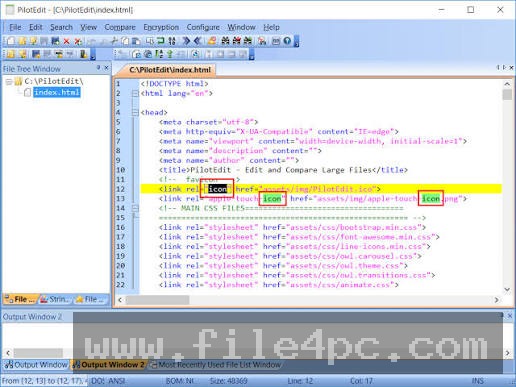
To begin, you launch the application and open a document using the standard file browser or by dragging a file onto the tabbed workspace. If you open a file smaller than a few hundred megabytes, the application processes it like a standard text editor, providing full syntax highlighting, code collapsing, and word wrapping.
When you select a multi-gigabyte log or CSV file, the software automatically prompts or switches to Quick Mode. Instead of reading the entire file into memory, it maps index points along the file structure and loads only the visible block of lines into active memory. As you scroll, it streams adjacent file blocks from your disk drive in the background.
Within the main window, you can switch viewing modes via the toolbar. Select Hex Mode to edit raw binary bytes, or switch to Column Mode to highlight and edit specific character columns vertically across thousands of lines. To compare files, you open the File Comparison window, choose your target source files, set line-matching parameters, and review highlighted differences in a dual-pane layout.
Once modifications are complete, you can save the file locally, export specific extracted string patterns, or transmit the file directly back to a remote host via the built-in SFTP connection.
Benefits and Limitations
Understanding both technical strengths and practical limitations helps clarify whether this application fits your operational workflow.
Benefits
The major benefit is stability when processing massive files that cause standard text editors to crash. Its ability to execute multi-line regular expression find-and-replace operations across multi-gigabyte datasets saves substantial time during data sanitization. The pricing structure is also straightforward, operating on a low one-time license fee per Computer ID rather than a recurring software subscription.
Limitations
The primary downside is the user interface, which uses a traditional multi-document interface layout that feels visually dated compared to modern code editors. While it offers syntax highlighting for over 30 programming languages, it lacks the modern extension ecosystems, intelligent code autocompletion (IntelliSense), and rich plugin integrations found in specialized IDEs like VS Code or JetBrains tools. Licensing is also bound tightly to your hardware Computer ID; if you replace your PC or main storage drive, you must contact support or acquire a new license key.
What's New
PilotEdit maintains a frequent release cycle, continuously refining file processing speeds and expanding character encoding support. Recent releases in the Version 21.x series focus on binary comparison accuracy, performance optimizations, and expanded language localization.
Key updates in the 21.x series include:
-
Refined binary file comparison algorithms for high-speed differential analysis.
-
Improved code folding performance and smoother rendering on complex nested code structures.
-
Enhanced startup times and reduced initial memory overhead when opening multi-tab workspaces.
-
Added support for additional file types, updated language translations (including Japanese and Vietnamese), and updated keyword highlighting definitions.
Installation and Setup
Setting up the application on a Windows system is fast and requires minimal storage.
You download the setup package (available in both 32-bit and 64-bit installers) from the official website. Run the installer wizard, accept the agreement, and choose your destination directory. The total installation footprint takes less than 50 MB of disk space.
When running the software for the first time, it operates in trial mode. To register the product, copy your unique Computer ID from the Help menu registration window, provide it during license purchase, and paste your received serial key back into the activation panel.
Tips for Using PilotEdit Pro PC Software
When dealing with files larger than 10 GB, always enable Quick Mode before opening the document. This disables automatic line wrapping and heavy real-time syntax highlighting, speeding up file navigation and search operations significantly.
Take full advantage of the Column Selection Mode when working with structured text logs or fixed-width database dumps. Holding down the ALT key or switching to Column Mode lets you highlight vertical blocks of text, making it simple to delete unwanted timestamps or insert new data columns across millions of rows simultaneously.
If you repeatedly execute complex regex replacements on daily log updates, save your search parameters into a PilotEdit Script file (.pes). Running this script file automates multi-step find-and-replace procedures across entire directories in a single action.
Modern Alternatives
Depending on whether your workflow prioritizes light code editing, software development, or heavy file processing, several alternatives exist.
Notepad++ is a free, open-source Windows text editor. It is exceptionally fast and rich with community plugins, making it ideal for everyday programming and script editing. However, it struggles or fails when forced to open files larger than 2 GB to 4 GB.
UltraEdit is a commercial text editor known for handling large files, hex editing, and enterprise workflow support. It offers a modern user interface and multi-platform compatibility (Windows, Mac, Linux), but commands a significantly higher subscription or perpetual license cost.
EmEditor is another high-performance Windows text editor designed specifically for massive files and huge CSV data processing. It handles multi-gigabyte files smoothly with fast sorting and filtering, serving as a direct competitor to PilotEdit Pro.
Who Should Use PilotEdit Pro PC Software?
This utility is ideal for database administrators, systems engineers, cybersecurity researchers, and software developers who routinely interact with massive data files. If your daily responsibilities involve parsing multi-gigabyte web server logs, comparing massive database backups, editing binary files, or running regular expressions across huge text directories, this software provides the necessary hardware stability.
Conversely, web developers who primarily work on standard HTML/CSS/JavaScript files or require advanced IDE capabilities like git integration, debugging tools, and live extensions will find modern lightweight editors like VS Code or Sublime Text better suited for general coding.
FAQ
What is the maximum file size supported by the software?
The software has no strict upper file size limit. It is designed to open and edit files exceeding 400 GB (or 40 billion lines) as long as your local disk storage has sufficient space for caching operations.
Can I run the software on macOS or Linux?
No, the application is designed exclusively for Microsoft Windows operating systems. It runs on 32-bit and 64-bit versions of Windows 7 through Windows 11 and Windows Server editions.
Is there a free version available?
Yes, the developer offers PilotEdit Lite, which is completely free for basic editing. However, the Lite version imposes limits on maximum file sizes, encryption capabilities, and advanced comparison features.
How does license transfer work if I buy a new computer?
Licensing is tied directly to your hardware's unique Computer ID. If you change your computer or replace your primary motherboard/hard drive, the old serial number will not activate on the new Computer ID, requiring you to contact support or purchase a new license key.
Conclusion
PilotEdit Pro PC Software remains a reliable utility for handling heavy data tasks that overwhelm standard text editors. By combining disk-buffering algorithms, hex editing, 256-bit AES encryption, and direct SFTP access, it offers a functional workspace for managing multi-gigabyte files safely.
While its user interface retains a traditional utility aesthetic, its performance stability and low one-time license cost make it an appealing addition to any technical toolkit. For professionals who routinely process massive raw logs, database exports, and binary streams, it provides an efficient operational solution.

💬 0 Comments
✍ Leave a Comment