

IntraWEB Ultimate PC Software provides Delphi and C++Builder developers with a powerful framework to build full-featured, interactive web applications using RAD (Rapid Application Development) concepts. Transitioning desktop applications to the web often requires software engineers to learn complex frontend JavaScript frameworks, manage stateless HTTP connections, and rewrite backend business logic from scratch. By allowing developers to design web user interfaces visually with drag-and-drop components while writing standard Object Pascal or C++ code, this development suite bridges the gap between Windows desktop software engineering and modern web application deployment.
Overview
IntraWEB Ultimate PC Software is a web application development framework developed by Atozed Software. Designed specifically to integrate with Embarcadero RAD Studio, Delphi, and C++Builder IDEs, it enables software engineers to create web applications using the same event-driven architecture used for standard desktop software. Instead of managing raw HTML, CSS, JavaScript, and HTTP session states manually, developers design forms visually and write server-side Object Pascal or C++ code that executes on the host server.
Atozed Software actively maintains the framework across its major release branches (including IntraWEB 15 and 17 development lines). The Ultimate edition represents the top-tier commercial offering, providing unlimited concurrent connections, deployment flexibility, advanced security features, source code access, and integration options for enterprise environments. It targets software houses, enterprise developers, and database application creators who need to deploy secure, data-driven web applications rapidly without abandoning their existing Delphi or C++ codebase.
Key Features
The framework offers specialized tools and deployment architectures engineered to streamline web application engineering.
Your May Also Like :: GoodSync PC Software - File4PC
RAD Visual Form Designer
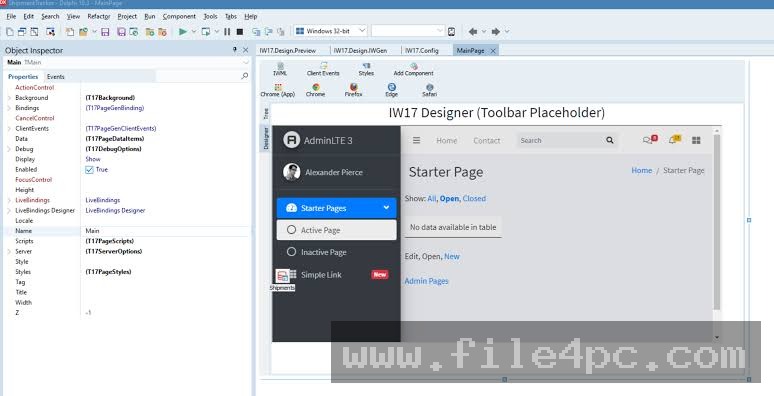
Developers can design web forms inside the RAD Studio IDE using drag-and-drop components, much like building a traditional VCL or FireMonkey desktop interface. The framework handles rendering components into HTML, CSS, and asynchronous JavaScript automatically, shielding developers from manual web layout scripting.
Automatic State and Session Management
HTTP is natively stateless, which usually forces web developers to handle cookies, session tokens, and database state persistence manually. The framework maintains stateful user sessions automatically on the server. User interactions trigger server-side events directly, preserving state across page updates without complex custom backend wiring.
Full AJAX Engine
Interactive modern web interfaces require dynamic page updates without full browser reloads. The built-in AJAX engine manages partial page updates in the background. Changing a component property or executing a database query on the server updates only the relevant visual elements on the client browser seamlessly.
Flexible Deployment Options
Applications can be compiled and deployed in multiple formats based on infrastructure requirements. Developers can compile projects as standalone Windows services, independent executable HTTP servers, or integrate them into enterprise web servers like IIS using ISAPI modules, or run them on Linux environments via Apache modules.
Enterprise Security and Authentication
The Ultimate edition incorporates built-in security features designed to protect web applications against common vulnerabilities. It includes native protection against Cross-Site Scripting (XSS), Cross-Site Request Forgery (CSRF), session hijacking, and automated bot attacks without requiring external web application firewall plugins.
How IntraWEB Ultimate PC Software Works
The framework operates by compiling visual form layouts and server-side logic into a unified web server application.
First, you open RAD Studio (Delphi or C++Builder) and create a new IntraWEB application project. You add forms to the project and drop visual controls (such as buttons, edit boxes, grids, and database navigators) onto the form canvas.
Second, you write event handler logic in Object Pascal or C++ for user actions, such as button clicks or database record edits. You connect data-aware components to backend databases using standard data access components like FireDAC or UniDAC.
Third, you compile and run the application. The executable starts a web server engine that listens for browser connections. When a user navigates to the designated port or URL, the server generates HTML and JavaScript on the fly, maintaining a dedicated stateful session for that user. As the user interacts with the page, asynchronous AJAX requests travel back to the server, execute code, and update the browser view in real time.
When deploying applications as standalone executables or Windows services in production environments, ensure appropriate firewall rules and SSL/TLS certificates are configured. Running web applications on open ports without HTTPS encryption exposes sensitive user session data to network interception.
Benefits and Limitations
Analyzing the operational advantages and technical constraints helps evaluate how the framework fits into your enterprise software strategy.
Benefits
-
Rapid Development Speed: Delphi and C++ developers can build fully functional web applications in hours using familiar RAD workflows and component libraries.
-
Unified Codebase: Eliminates the need to maintain separate frontend JavaScript codebases and backend REST API layers, keeping business logic centralized on the server.
-
Unlimited Session Scaling: The Ultimate edition places no artificial software limits on concurrent user connections or active sessions.
-
Multiple Deployment Architectures: Flexible deployment options allow applications to run as lightweight standalone Windows services or integrated ISAPI/Apache modules.
Limitations
-
RAD Studio Dependency: Requires an active installation and working knowledge of Embarcadero RAD Studio, Delphi, or C++Builder.
-
Server Memory Overhead: Because user sessions maintain state on the server, high volumes of simultaneous active users require sufficient server RAM compared to stateless REST APIs.
-
Custom CSS Customization Curve: While standard layouts generate automatically, applying heavily customized third-party frontend CSS frameworks requires familiarity with template rendering components.
What's New
Atozed Software maintains active development across its 15.x build versions while progressing on the IntraWEB 17 platform branch.
Recent updates focus on enhanced performance, modern browser compatibility, and expanded deployment options. Key developments include full 64-bit Linux deployment support for RAD Studio environments, updated Content Security Policy (CSP) compliance features, optimized AJAX response compression, improved PageProducer template rendering, and stability fixes for modern multi-threaded IIS ISAPI pools.
Installation and Setup
Acquire the official installation package directly from Atozed Software distribution channels. Ensure you have a supported version of Embarcadero RAD Studio installed on your development machine prior to running the setup setup routine.
Close all instances of RAD Studio. Run the installer wizard, select your installed RAD Studio IDE version, and enter your commercial Ultimate edition license key when prompted. The installer registers component palettes and library paths automatically.
Reopen RAD Studio. The component palette will now feature the complete suite of IntraWEB controls. Create a sample standalone project from the File menu to verify that the internal test web server launches correctly.
Tips for Using IntraWEB Ultimate PC Software
-
Leverage Templates for Custom UI: Use IWTemplateProcessor components to combine RAD Studio event logic with custom HTML/CSS responsive templates for modern mobile-friendly designs.
-
Manage Session Timeouts Wisely: Adjust the session timeout parameters in ServerController to free up server RAM from inactive or disconnected users promptly.
-
Optimize Database Connections: Use connection pooling mechanisms when linking database controls to prevent exhaustively creating new database connections for every new user session.
-
Enable SSL/TLS Natively: Take advantage of the built-in OpenSSL support within ServerController to handle HTTPS secure encryption directly without requiring a reverse proxy.
Modern Alternatives
-
uniGUI: A web application framework for Delphi based on the Sencha Touch / Ext JS JavaScript library, offering desktop-like web controls and data-rich grids.
-
TMS WEB Core: A modern web framework for Delphi that compiles Object Pascal code directly into pure HTML5, CSS3, and JavaScript for client-side single-page applications (SPAs).
-
ASP.NET Core / Blazor: Microsoft's web development platform allowing C# developers to build interactive web user interfaces with full server-side or WebAssembly client-side execution models.
Who Should Use IntraWEB Ultimate PC Software?
This development framework is ideal for enterprise software teams, independent software vendors, and database developers working within the Delphi or C++Builder ecosystem. If you maintain legacy desktop applications and need to deliver secure web-accessible versions quickly without retraining your engineering team in web frameworks, this software delivers immense value.
Development teams building public-facing consumer web portals that require client-side static rendering or offline-first progressive web applications (PWAs) may find client-side compilation toolkits like TMS WEB Core more suitable.
FAQ
Is IntraWEB Ultimate PC Software a standalone IDE or an add-on?
It is a framework add-on designed to integrate directly into Embarcadero RAD Studio, Delphi, and C++Builder development environments.
What is the advantage of the Ultimate edition over lower tiers?
The Ultimate edition includes unlimited concurrent user connections, full source code availability, ISAPI and Apache module deployment options, and advanced enterprise security features without session caps.
Can applications created with this software run on Linux servers?
Yes. When compiled with recent Delphi versions supporting Linux deployment, applications can be deployed as native Linux executables or Apache web server modules.
Do end users need to install browser plugins?
No. The framework renders standard HTML5, CSS, and vanilla JavaScript, allowing applications to run natively in any modern web browser across desktop and mobile devices.
Does the framework support database-aware controls?
Yes. It includes a complete suite of data-aware controls that link directly to standard Delphi data source components for rapid database web development.
Conclusion
Migrating established desktop application logic to the web presents significant technical challenges for software teams. IntraWEB Ultimate PC Software provides an efficient solution for Delphi and C++Builder developers by adapting familiar RAD form design concepts and stateful programming models to web application architecture.
By handling session management, AJAX updates, and server rendering automatically, the framework allows developers to focus on core business logic rather than complex web plumbing. Utilizing custom HTML templates alongside enterprise security controls ensures scalable, secure web application deployments that maximize existing software investments.


💬 0 Comments
✍ Leave a Comment