
pdfFactory Pro PC Software is a long-standing virtual printer utility for Windows designed to simplify PDF creation, document combination, and print output management. Developed by FinePrint Software, it installs directly onto your operating system as a standard system printer. Instead of sending documents straight to physical paper, any Windows application capable of printing can direct output to this utility to generate clean, highly customizable PDF files.
The software caters to professionals, administrative teams, and businesses that handle large volumes of paperwork daily. Rather than opening heavy desktop publishing suites or standalone PDF editors, users can assemble documents from multiple sources, preview them instantly, apply security controls, and distribute them without leaving the print dialog interface. Its lightweight footprint and fast rendering engine make it a practical tool for streamlining everyday office workflows.
The application remains under active development by FinePrint Software, receiving regular updates to ensure seamless integration with modern versions of Microsoft Windows and desktop office applications.
Key Features
The Pro version builds upon basic virtual printing by introducing advanced document manipulation, security, and automation capabilities directly into the preview window.
Document Combination and Page Management When printing multiple documents from different programs such as Word, Excel, or a web browser, the software automatically gathers them into a single session. You can reorder pages, delete unwanted content, rotate orientation, or insert blank pages before exporting the final PDF. This eliminates the need to merge files using external converters.
Direct Text and Graphic Editing Unlike standard PDF printer drivers that only output static files, this application allows minor on-the-fly edits within its preview screen. Users can add text notes, headers, footers, page numbers, watermarks, and custom rubber stamps. It also includes basic redaction tools to cover sensitive information prior to distribution.
Advanced PDF Security Controls Data protection is built directly into the export process. The Pro edition enables 128-bit and 256-bit AES encryption, allowing users to restrict document opening with passwords. Furthermore, you can individually disable permissions for printing, copying text or graphics, and modifying the file contents.
Letterhead and Form Overlay Support Organizations can store digital letterheads, company logos, or standardized forms as overlays. When printing a document, the software can automatically merge the text onto these templates, producing professional branded PDFs without requiring pre-printed stationery or complex document layouts.
Interactive Form Field Creation The software includes features to add interactive form elements directly to generated documents. Users can embed text fields, checkboxes, and radio buttons during the preview phase, making it easier to create fillable application forms or questionnaires without specialized authoring tools.
How pdfFactory Pro PC Software Works
The operational model relies on the standard Windows printing system, making the learning curve virtually nonexistent for most PC users.
To begin, you open any document in your preferred application, such as Microsoft Word, Adobe Reader, or a web browser. Instead of selecting a physical paper printer from the print dialog, you select the virtual printer driver installed by the software.
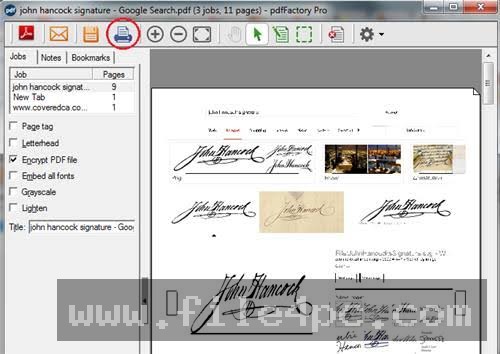
Clicking print opens the dedicated preview window rather than generating a physical document immediately. If you have additional files to convert, you can open them in other programs and print them to the same virtual driver. The software appends each print job sequentially into a single document buffer.
Within the preview interface, you can inspect each page, crop unwanted margins, adjust color output, add security parameters, or apply watermarks. Once the document appears exactly as required, you can click the save button to generate the final file, send it directly through your default email client, or forward the job to a physical printer on your network.
Your May Also Like :: GoodSync PC Software - File4PC
Benefits and Limitations
Weighing the functional benefits against system restrictions provides a balanced view of the application's overall value.
Benefits
The most prominent advantage is speed and convenience. Operating at the print level means any application capable of printing can immediately export to PDF without requiring custom software add-ons or plugins. Combining multiple print jobs into a single unified file saves significant time during daily office administration. Furthermore, the lightweight architecture ensures fast processing without consuming excessive system RAM or CPU resources.
Limitations
While the software excels at document generation and light layout adjustments, it is not a full-featured desktop PDF editor. It does not support complex vector graphic manipulation, advanced pre-press color separations, or extensive structural OCR (Optical Character Recognition) editing found in dedicated tools like Adobe Acrobat Pro. Additionally, its user interface retains a classic utility-style aesthetic, which may feel outdated to users accustomed to modern flat design interfaces.
What's New
FinePrint Software maintains an active update schedule for its product lineup. Recent updates in the Version 8 series have focused on enhancing performance, high-DPI display compatibility, and modern operating system integration.
Key recent improvements include:
-
Enhanced processing speeds for high-resolution graphics and complex multi-page print streams.
-
Upgraded user interface scaling for modern high-resolution 4K and multi-monitor setups.
-
Improved font embedding algorithms to ensure precise visual fidelity across different platforms and PDF readers.
-
Updated encryption protocols adhering to current desktop security standards for protected document sharing.
Installation and Setup
Setting up the software on a Windows PC is quick and requires minimal configuration.
You download the executable setup file from the developer or an authorized software repository and run the installer. The setup wizard automatically adds the virtual printer driver to your system's printer inventory and sets up the preview application background service.
After installation, you can open your Windows Settings or Control Panel to set the software as your default system printer if desired. Administrators setting up the application across networked business environments can deploy the workstation installer silently via command-line arguments to standard corporate endpoints.
Tips for Using pdfFactory Pro PC Software
To maximize efficiency, take advantage of the auto-save feature in the program options. Configuring a designated auto-save folder allows you to generate and store files automatically without manually navigating through the file explorer save dialog every time.
Use the thumbnail view in the preview panel to rearrange multi-page documents quickly. Dragging and dropping pages within the thumbnail list is much faster than managing page layouts in separate applications prior to printing.
If you regularly send documents to external clients, configure a default security profile. Setting the application to automatically apply standard encryption or restricted copying permissions on every print job saves steps and protects sensitive company data by default.
Modern Alternatives
Several alternatives exist depending on whether your priority is basic virtual printing or advanced PDF editing.
FinePrint (also by FinePrint Software) is a sister application that focuses strictly on optimizing paper printing rather than PDF generation, offering features like page-budgeting, booklet printing, and double-sided layout management.
CutePDF Writer and Bullzip PDF Printer are free or low-cost virtual printer alternatives. They provide solid basic conversion from print jobs to PDF files but lack the integrated editing, page reordering, form-creation, and overlay features present in the Pro utility.
Adobe Acrobat Pro is the industry standard full-featured PDF editing suite. It offers comprehensive graphic design control, advanced form scripting, document conversion, and cloud collaboration. However, it requires a higher ongoing subscription fee compared to the one-time license model used for virtual printer utilities.
Who Should Use pdfFactory Pro PC Software?
This software is ideal for office workers, legal professionals, accountants, and business managers who frequently combine reports, spreadsheets, and emails into single organized documents. If your daily work involves printing documents to digital files and emailing them to clients, this tool eliminates multiple redundant steps.
However, graphic designers, pre-press technicians, and digital publishers who require precise typographic control, vector art manipulation, or complex PDF standards compliance (such as PDF/X) will be better served by dedicated desktop publishing and vector editing suites.
FAQ
Is pdfFactory Pro PC Software free to use?
The software is distributed under a try-before-you-buy model. The evaluation version is fully functional but places an informational watermark line at the bottom of every generated page. Purchasing a permanent license key removes the watermark line.
Can I combine a Word document and an Excel spreadsheet into one PDF?
Yes. You can print the Word document to the virtual printer driver, leave the preview window open, open your Excel file, and print it to the same driver. Both outputs will merge into a single sequence inside the preview panel.
Does the software work on 64-bit versions of Windows?
Yes, the application fully supports 64-bit architectures across modern Windows operating systems, including Windows 10 and Windows 11, as well as Windows Server environments.
Can I edit the text inside an existing PDF file with this program?
You can add new text notes, headers, footers, or overlays on top of pages. However, it is primarily a print-based document generator rather than an full structural editor for altering existing third-party PDF files.
Conclusion
pdfFactory Pro PC Software remains a practical and dependable desktop utility for streamlining document creation and digital distribution. By integrating directly into the standard Windows printing process, it grants users immediate control over page order, document security, and file layout without forcing them through complicated software menus.
While it is not designed to replace heavy graphic editing applications, its combination of speed, document merging, and low system resource overhead makes it a highly effective addition to any office productivity toolkit. For professionals seeking an efficient method to capture, protect, and assemble print jobs into clean PDF files, it offers a proven solution.


💬 0 Comments
✍ Leave a Comment