
FinePrint PC Software is a specialized print utility and preview tool designed for Windows computers to help users manage, edit, and optimize their printing tasks before physical paper leaves the tray. In many office and home environments, printing documents can lead to wasted paper, misplaced ink, and poorly formatted pages due to unexpected layout issues in native applications. This software acts as an intermediate control layer between any standard application and your physical printer. It is built for anyone who prints frequently and wants granular control over page layout, ink usage, and document organization without modifying the original source files.
Overview
Managing print jobs efficiently has always been a challenge for businesses and individuals trying to cut down on office supply waste. When sending documents directly from web browsers, word processors, or spreadsheet programs, users often encounter awkward page breaks, massive margins, or trailing pages containing only a single line of text. Traditional printer drivers offer very little flexibility once a print command is initiated, leaving users with few options other than wasting paper or manually adjusting document settings across multiple applications.
This utility addresses that challenge by intercepting print jobs before they reach the hardware printer. It presents an interactive workspace where every page can be examined, modified, rearranged, or discarded. Designed specifically for the Windows desktop ecosystem, the application caters to professionals, administrative staff, and home users who handle large volumes of paperwork and want a reliable method to reduce printing costs. Its core philosophy revolves around giving people complete control over their physical output without forcing them to redesign source documents from scratch.
Your May Also Like :: Exacoustics GHOST PC Software
Key Features
The application incorporates a targeted toolset built specifically for document optimization, page manipulation, and print job management.
-
Comprehensive Print Preview: The software displays an exact visual representation of every page in a print job, allowing users to catch formatting errors, alignment issues, and unwanted blank sheets before committing ink to paper.
-
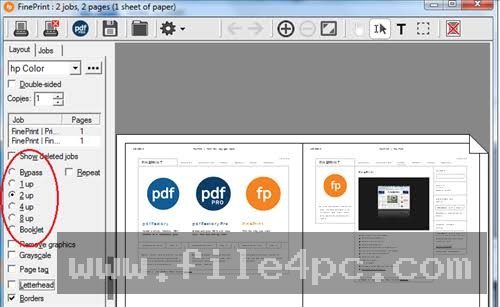
N-Up Sheet Printing: Users can combine two, four, or even eight pages onto a single sheet of physical paper, drastically reducing paper consumption for drafts, reference materials, and large reports.
-
Page Deletion and Rearrangement: Unwanted pages, advertisements on web printouts, or blank trailing sheets can be removed with a single click, and remaining pages can be reordered freely.
-
Electronic Letterheads and Forms: The application allows users to overlay digital letterheads, company logos, or standardized forms onto plain text documents, eliminating the expense of pre-printed stationery.
-
Header and Footers Customization: Automatically add dynamic metadata such as page numbers, creation dates, custom text, and timestamps to the top or bottom margins of any printed document.
-
Job Merging Capabilities: Users can collect print tasks from different software applications into a single unified queue, printing them sequentially as one cohesive document packet.
How FinePrint PC Software Works
Operating the application integrates seamlessly into your daily computer workflow without requiring complex configuration changes in your primary productivity software.
The process begins whenever you choose to print a document from programs like Microsoft Word, Adobe Reader, or a web browser. Instead of selecting your physical hardware printer, you choose the virtual printer driver installed by the software. This action intercepts the print stream and immediately launches the application window instead of sending the job to the paper tray.
Inside the interactive preview interface, you can review the layout, delete redundant pages, or apply multi-page scaling options. You can also add watermarks, adjust margins, or merge additional print jobs into the current session. Once all adjustments are complete, clicking the print button within the utility forwards the finalized data stream to your actual printer. This simple workflow ensures that every sheet of paper is utilized efficiently and eliminates common printing mistakes.
Benefits and Limitations
Benefits
The primary advantage of the application is its measurable impact on paper and ink consumption, leading to reduced operational costs for offices and households. Its ability to edit documents at the final printing stage saves considerable time that would otherwise be spent tweaking source files in various editing programs. Furthermore, the capacity to combine multiple print jobs simplifies complex administrative tasks.
Limitations
The software is restricted entirely to the Windows operating system, meaning users on macOS or Linux cannot utilize its virtual driver features. It also requires a paid commercial license for permanent use after the initial evaluation period. Additionally, the software acts as a pre-processor rather than a direct hardware driver, meaning it still relies on your printer manufacturer's software to complete the physical printing process.
What's New
Development updates focus primarily on maintaining stability across recent Windows operating system updates and ensuring compatibility with modern browser rendering engines and document formats. Recent releases refine memory management routines to handle large multi-page PDF documents smoothly without slowing down system performance.
Routine maintenance updates continue to improve compatibility with modern network-connected printers and secure corporate printing environments, ensuring reliable job interception across diverse hardware setups.
Installation and Setup
Installing the utility requires standard administrator privileges on a Windows computer to ensure the virtual printer driver is registered correctly within the system architecture. Users should always obtain the official installation package directly from the verified developer website to maintain file integrity and device security.
Run the downloaded installation executable and follow the prompts in the setup wizard. During this process, the software automatically installs its virtual printer driver into your Windows system settings. Once the setup completes, no complex configuration is necessary, and the virtual printer becomes immediately available in the print dialog box of all your desktop applications.
Tips for Using FinePrint PC Software
Optimizing your daily document workflows involves adopting a few practical usage habits:
-
Set as Default Printer: If you primarily print drafts, web pages, or multi-page reports, set the virtual driver as your default printer to catch and review jobs automatically.
-
Save Custom Layout Profiles: Create and save specific layout configurations, such as two-page-per-sheet scaling with custom footers, for recurring administrative reports.
-
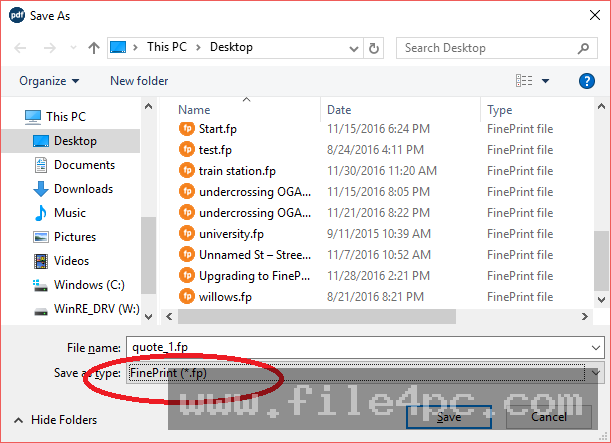
Convert to PDF Format: Utilize the built-in saving tools to export your finalized print streams directly into clean PDF files when digital archiving is preferred over physical paper.
-
Remove Background Graphics: When printing heavy web articles, strip out unnecessary background images and graphics using the editing tools to save substantial amounts of color ink.
Modern Alternatives
Alternative solutions exist for managing print tasks and document output. Adobe Acrobat provides extensive page editing tools for PDF files, though it lacks system-wide print job interception for non-PDF applications. Native Windows print management tools offer basic queue monitoring and cancellation features but do not provide granular page deletion or multi-page layout manipulation. Dedicated PDF creator utilities allow users to save print streams to digital files, but they rarely include the advanced imposition and editing capabilities found in specialized print utilities.
Who Should Use FinePrint PC Software?
This application is well-suited for office workers, students, researchers, and small business owners who handle high volumes of documentation and want to minimize paper and ink expenses. It is particularly helpful for individuals who frequently print web pages, financial reports, or multi-page documents that often suffer from poor default formatting.
Conversely, casual computer users who rarely print physical documents or rely entirely on mobile devices will find little practical need for a desktop print utility. Similarly, enterprise environments utilizing centralized print management servers may rely on network-level policies rather than individual client-side utilities.
FAQ
Does FinePrint work with all physical printer brands?
Yes, the software functions independently of specific printer hardware by acting as a pre-processor before sending the finalized job to any local or network printer installed on Windows.
Can I remove blank pages automatically?
Yes, the application includes tools to detect and delete redundant or blank pages that often appear at the end of web printouts or exported reports.
Is the software compatible with Windows 11?
Yes, modern versions of the application fully support current Windows desktop environments, including both Windows 10 and Windows 11.
Can I combine documents from different programs?
Yes, you can collect print tasks from multiple separate applications into a single unified queue before printing them together as one document.
Conclusion
FinePrint PC Software offers a practical, efficient way for Windows users to control paper and ink consumption through advanced print preview and editing tools. By streamlining document formatting right before printing, it saves both time and material resources.
Evaluating your daily printing volume and document layout needs will help determine whether this utility fits your workflow. For anyone looking to bring order and efficiency to everyday document printing, it serves as a reliable addition to the Windows environment.

💬 0 Comments
✍ Leave a Comment