

Shutter Pro PC Software is a versatile task scheduling, PC power management, and desktop automation utility developed by den4b. Built specifically for Microsoft Windows environments, it allows users to trigger automated system actions based on a wide range of real-time computer events, timers, hardware thresholds, and network conditions. Instead of relying on rigid, basic shutdown timers, this program monitors system parameters such as CPU load, memory thresholds, process activity, network traffic, battery level, or user inactivity to execute specific tasks automatically.
Operating as a lightweight background process with minimal resource consumption, the application eliminates the need for complex scripting when setting up computer power schedules or event-driven tasks. It serves system administrators, night-time downloaders, content creators rendering large video files, and everyday PC users who want their computer to log off, hibernate, run a program, or shut down once a specific background task finishes.
The developer den4b actively maintains the software across its Version 4.x releases (including version 4.9), offering continuous optimizations for Windows operating systems ranging from legacy releases up through modern 64-bit Windows 10 and Windows 11 systems.
Key Features
The application incorporates a flexible suite of event triggers, action execution options, and remote management modules.
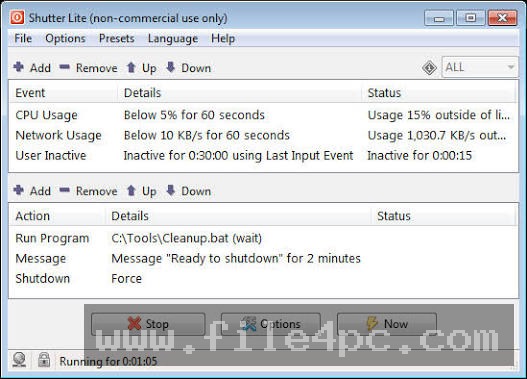
Extensive Event Monitoring Triggers The utility monitors dozens of distinct system events before activating a programmed response. Key triggers include:
-
Timer and Countdown: Triggers actions at a specific time of day or after a set countdown duration.
-
System Resource Thresholds: Monitors CPU usage, memory allocation, and battery power levels.
-
Network & Disk Activity: Tracks network usage speeds or disk read/write throughput (e.g., triggering a shutdown when active downloads drop below a specified kilobyte threshold).
Your May Also Like :: Aescripts Glaze 2026 For PC Download
-
Process and Window Monitoring: Detects when a specific application starts, closes, freezes, or disappears from the screen.
-
User Inactivity & Ping: Tracks idle keyboard/mouse time or pings a remote server IP address to confirm network availability.
Diverse Action Execution Engine Once an event or combination of events is triggered, the program executes one or more assigned actions. Supported actions include system power commands (Shutdown, Reboot, Log Off, Sleep, Hibernate, Lock Workstation, Turn Off Monitor), playing custom audio alarms, closing specific application windows, terminating background processes, or executing custom batch files (.bat / .exe).
Multi-Condition Rules and Event Logic Users can construct complex conditional workflows by combining multiple events using logical operators (such as ALL conditions met or ANY condition met). For example, you can set the system to shut down only if CPU usage stays below 5% for ten minutes and a specific video rendering application has closed.
Embedded Web Interface and Remote Execution The utility features a built-in HTTP server module that enables remote monitoring and control over a local area network or the internet. Through a secure password-protected web interface, users can inspect live computer statistics (uptime, running processes, active desktop screenshots) and execute system commands remotely from a smartphone or secondary PC.
Command-Line Options and Desktop ShortcutsPower users can save custom presets as configuration files (.spr) or create desktop shortcuts to execute specific action routines with a single click. Full command-line interface support allows seamless integration into third-party scripts or administrative deployment tools.
How Shutter Pro PC Software Works
The operational workflow follows a simple, logical sequence from event selection and action binding to active background monitoring.
To begin, launch the application desktop window. In the main interface, navigate to the Events panel and select your primary monitoring condition (for instance, choosing User Inactive or Process Stops). Define your specific parameters, such as designating 30 minutes of mouse inactivity or selecting render.exe as the target process.
Next, move to the Actions section and select the task you want the software to perform when the event criteria are fulfilled (such as choosing Shutdown or Play Sound). You can configure optional user warnings, displaying a countdown pop-up window that gives you time to cancel the action if you are sitting at your desk.
Finally, click the Start button. The application minimizes to the system tray, running silently in the background while polling your system's hardware sensors and operating system hooks. Once the monitored condition is met, the software triggers the chosen action immediately.
Benefits and Limitations
Weighing the software's functional strengths against its practical boundaries helps determine if it fits your desktop automation needs.
Benefits
The most significant advantage is granular control over PC power management. Unlike standard Windows power settings, which only offer static timers, this tool adapts dynamically to real-time system activity like CPU rendering or network downloads. The application installer is lightweight (under 4 MB), consumes negligible RAM, and offers a portable version that runs directly from a USB flash drive without altering system files. Furthermore, the included web interface provides convenient remote monitoring capabilities.
Limitations
The primary restriction is that setting up advanced multi-event logic rules requires a basic understanding of Windows processes and network parameters. Setting improper network usage thresholds or process rules can result in an unexpected system shutdown while you are away from your PC. Additionally, while the web interface is functional and lightweight, its design focuses strictly on utility rather than modern graphical polish.
What's New
The developer den4b maintains a steady update schedule, focusing on network sensor accuracy, Windows API compatibility, and automation stability.
Key recent updates in the Version 4.9 release series include:
-
Rebuilt Network Usage monitoring algorithms centered around modern Windows APIs to improve tracking accuracy on machines running continuously for weeks or months.
-
Improved event averaging algorithms and refined port-checking reliability.
-
High-DPI screen scaling adjustments for clear display on 4K desktop setups.
-
General stability fixes for preset file loading and command-line execution parameters.
Installation and Setup
Getting the utility ready on a Windows machine involves a minimal setup process.
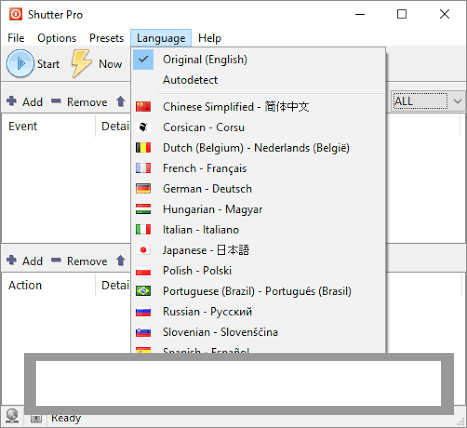
You download the official setup executable (Shutter_Setup.exe) or the portable ZIP package directly from the official den4b portal. If using the installer, run the setup wizard, select your preferred interface language, and complete the installation.
If you prefer a zero-footprint option, download the portable edition, extract the folder to a local drive or technician USB stick, and run Shutter.exe directly. The software runs instantly without installing background services or writing unnecessary registry entries.
Tips for Using Shutter Pro PC Software
Always enable the Visual Warning / On-Screen Countdown option when setting up automatic shutdown or reboot actions. Displaying a 30-second warning dialog with an Abort button prevents losing unsaved work if you return to your computer right as a scheduled event triggers.
If you use the software to turn off your computer after a large file download finishes, combine a Network Usage event with a short Countdown Timer. Setting a 5-minute buffer ensures a brief pause in network traffic does not cause a premature shutdown.
Secure the built-in Web Interface with a strong username and password before enabling remote access over local networks. Disabling administrative execution rights for unauthenticated web sessions prevents unauthorized users on your local network from executing system power commands.
Modern Alternatives
Depending on whether you need simple power timers or complex macro execution, several alternative Windows utilities exist.
Wise Auto Shutdown is a popular, user-friendly shutdown utility for Windows. It provides straightforward countdowns and daily schedules for logging off, sleeping, or shutting down PCs. However, it lacks the advanced resource-monitoring triggers (such as CPU, process, or network activity) found in den4b's software.
Airytec Switch Off is a lightweight system shutdown tool that includes a web interface for remote mobile control. It offers basic time and idle triggers, though its event logic options are simpler compared to Shutter Pro's multi-condition setup.
AutoIt and AutoHotkey are powerful open-source scripting languages for Windows automation. While they can perform any system monitoring or shutdown task imaginable, they require writing custom code scripts rather than using a graphical rule designer.
Who Should Use Shutter Pro PC Software?
This software is ideal for power users, video editors, 3D render artists, gamers, and IT technicians who need an intelligent, event-driven task scheduler for Windows. If you want your computer to turn off automatically after rendering a project, finishing a large network file transfer, or becoming idle late at night, it offers a complete feature set.
However, users seeking simple, one-click shutdown timers without complex event rules may prefer basic tools like Wise Auto Shutdown or native Windows command-line shutdown scripts instead.
FAQ
Is Shutter Pro PC Software free or paid?
den4b offers a free edition (Shutter Lite) for basic scheduling, as well as a commercial Pro version that unlocks unrestricted multi-event combinations, extended web interface options, and commercial usage rights.
Can the software shut down my PC when a download finishes?
Yes. By setting a Network Usage event trigger, you can configure the program to execute a shutdown action whenever incoming network download speeds drop below a specified threshold for a set period.
Does the software work on Windows 11?
Yes. The software is tested and fully compatible with 32-bit and 64-bit editions of Windows 11, Windows 10, Windows 8.1, and Windows 7.
Can I control my computer remotely using this software?
Yes. Enabling the built-in Web Interface allows you to log into your computer from a web browser on another PC or mobile device to view system statistics, take desktop screenshots, and trigger actions remotely.
Conclusion
Shutter Pro PC Software provides a practical, highly flexible desktop automation environment for managing system power states and event-driven actions on Windows PCs. By pairing diverse system sensors—such as CPU load, network traffic, process states, and idle timers—with configurable actions, it eliminates the guesswork of fixed shutdown timers.
While configuring multi-condition rules requires brief setup care, its minimal system footprint, portable version, and built-in web interface make it an outstanding tool for desktop management. For anyone needing a reliable, automated system monitor that responds intelligently to real-time PC activity, it offers an authoritative solution.
💬 0 Comments
✍ Leave a Comment