

RPCS3 PC Software is a free, open-source Sony PlayStation 3 emulator and debugger built for Windows, Linux, macOS, and FreeBSD operating systems. Created by developers DH and Hykem in 2011, the project has grown into an exceptionally capable software environment capable of running thousands of commercial PS3 titles on personal computers. Because the PlayStation 3 relied on a complex, highly specialized Cell Broadband Engine architecture, translating those instructions to standard x86-64 desktop processors was historically considered one of the most difficult challenges in game preservation. The software solves this by re-compiling Cell processor code into native PC execution threads in real time.
Operating locally on modern desktop and laptop hardware, the emulator gives gamers, archivists, and hardware enthusiasts a way to preserve, play, and enhance classical PS3 titles without relying on aging console hardware. Beyond basic game replication, it allows users to render titles at native 4K resolutions, apply high-frame-rate patches, utilize custom anti-aliasing filters, and connect modern USB game controllers like the DualSense, DualShock 4, or Xbox Wireless Controllers.
An international team of open-source contributors actively maintains the application under the GNU General Public License (GPLv2). Nightly rolling releases deliver continuous improvements to game compatibility lists, Vulkan graphics pipeline performance, and CPU thread scheduling.
Key Features
The application incorporates a rich suite of hardware emulation components, graphics scalers, and custom game patches.
Cell Processor Emulation Engine The core engine emulates the PS3's PowerPC-based Power Processing Element (PPE) alongside its six accessible Synergistic Processing Elements (SPEs). By utilizing LLVM-based Just-In-Time (JIT) re-compilers for both PPU and SPU instruction sets, the software translates complex console commands into multi-threaded x86-64 instructions.
Vulkan and OpenGL Graphics Renderers While the emulator includes legacy OpenGL support, its primary graphics pipeline relies on Vulkan. The Vulkan backend provides low-level GPU access, significantly reducing CPU overhead during heavy graphical rendering.
Your May Also Like :: Revo Registry Cleaner Free PC Software
High-Resolution Rendering and Aspect Ratio Scaling Original PS3 games typically rendered at 720p or 1080p resolutions. The emulator allows users to upscale internal rendering resolutions up to 4K or 8K while applying anisotropic filtering and custom post-processing shaders to sharpen textures on modern high-refresh-rate monitors.
Game Patches and Unlockable Frame Rates An integrated Patch Manager gives users access to community-created game modifications directly within the interface. These patches enable features like unlocking 60 FPS or 120 FPS target frame rates, disabling motion blur, modifying field-of-view (FOV) sliders, and fixing visual bugs present in original console releases.
Native Controller Support and Motion Sensing The software includes a robust Input/Output configuration panel (Pad Manager) that supports XInput, DirectInput, DualSense, DualShock 4, and Evdev controllers. It emulates pressure-sensitive buttons and motion-sensing gyroscopes, ensuring that titles requiring Sixaxis tilt controls function properly.
RPCS3 Save State and Trophy Management The emulator provides localized save file management and emulates the native PS3 XrossMediaBar (XMB) trophy notification system. Users can track unlocked achievements locally across their entire game library.
How RPCS3 PC Software Works
The operational workflow transitions sequentially from system firmware installation and game dumping to hardware configuration and game launching.
To start, you download the standalone executable package. Because the software does not include proprietary Sony system software due to copyright protections, you must download the official PlayStation 3 System Software Update file (PS3UPDAT.PUP) directly from Sony's servers. Inside the emulator, select Install Firmware from the File menu to install the official system libraries.
Next, you add your legally obtained PS3 games. Games can be dumped from original PlayStation 3 Blu-ray discs using compatible PC Blu-ray drives or transferred from a jailbroken PS3 console. You add your game directory to the main library view, where the emulator reads disc IDs and categorizes your titles.
Before launching a game, you configure your performance profiles. You select Vulkan as your graphics renderer, set your target display resolution, and map your game controller inputs in the Pad Manager. When you launch a title for the first time, the LLVM compiler generates cache files (PPU and SPU caches). While this initial cache compilation takes a few moments, subsequent game launches load rapidly, delivering smooth gameplay directly to your desktop.
Benefits and Limitations
Weighing the emulator's technical capabilities against its steep hardware requirements helps clarify its operational scope.
Benefits
The most significant benefit is preservation and visual enhancement. Games that were previously locked to 720p resolution at unstable 30 FPS frame rates on original console hardware can run at crisp 4K resolution at 60 FPS or higher on capable desktop PCs. The software is completely free, open-source, and portable, requiring no installation into system registries. Furthermore, the developer community maintains an active compatibility database that transparently tracks playable games.
Limitations
The primary restriction is system resource consumption. Emulating the Cell Broadband Engine demands heavy CPU processing power, particularly favoring multi-core CPUs with high single-thread instructions per clock (IPC) and AVX-512 instruction support. Budget laptop processors or older dual-core CPUs will struggle to maintain playable frame rates in demanding titles. Additionally, while over 70% of the PS3 library is categorized as fully playable, a small percentage of complex games still experience audio stuttering, graphical glitches, or performance drops.
What's New
Development follows a continuous, nightly rolling release model where code commits are merged daily to improve performance and compatibility.
Key verified focus areas in ongoing development releases include:
-
LLVM Compiler Upgrades: Ongoing optimizations to SPU cache generation that reduce initial shader compiling stutters during gameplay.
-
AVX-512 Performance Optimizations: Refined instruction set usage for modern Intel and AMD processors, yielding higher frame rates in demanding AAA titles.
-
Savestate System Refinements: Continued improvements to save-state stability across complex multi-threaded games.
-
Vulkan Pipeline Improvements: Enhanced memory allocation handling to prevent VRAM memory leaks during extended gaming sessions.
Installation and Setup
Getting the emulator running on a PC involves a simple setup process.
-
Download the official portable compressed archive (
.7zor.tar.gz) directly from the official RPCS3 website. -
Extract the archive into a dedicated folder on an SSD (Solid State Drive) with ample free storage space.
-
Download the official PS3 firmware file (
PS3UPDAT.PUP) from Sony's support website. -
Open the emulator executable, click File > Install Firmware, and select the downloaded firmware file.
-
Navigate to Config > Controllers to configure your connected gamepad.
-
Add your legally dumped game folders by clicking File > Add Games.
Important Storage Note: Always place your emulator folder and game library on a high-speed NVMe or SATA SSD. Running games from a traditional mechanical hard drive can cause severe audio stuttering and long shader compilation loads.
Tips for Using RPCS3 PC Software
Enable Vulkan as your default graphics renderer in the configuration menu. Vulkan provides significantly better frame rate stability and lower CPU overhead compared to OpenGL on almost all modern graphics cards.
Check the official online RPCS3 Compatibility List before tweaking game settings. The database provides recommended per-game configuration settings (such as adjusting SPU Block Size or enabling Write Color Buffers) tailored to specific titles.
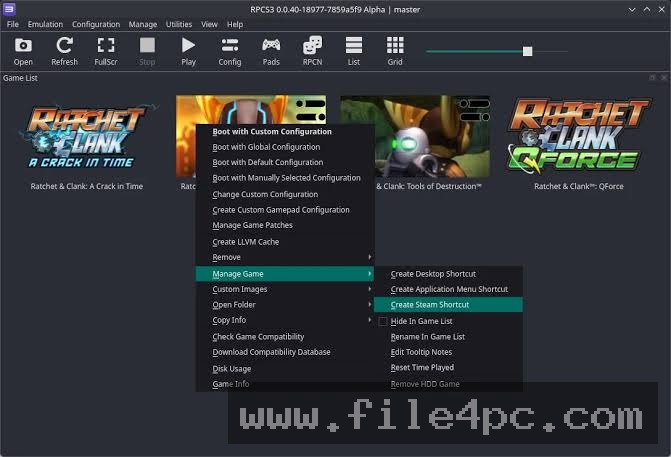
Utilize the built-in Patch Manager. Right-clicking a game title and selecting Manage Game Patches allows you to download and activate verified community patches that disable motion blur, fix camera sensitivity, or unlock higher target frame rates.
Modern Alternatives
Depending on which video game console library you intend to emulate, several mature alternatives exist.
PCSX2 is the premier open-source PlayStation 2 emulator for Windows, Linux, and macOS. It features high compatibility across thousands of PS2 titles, low hardware requirements, and an intuitive modern interface.
Xenia is an open-source Xbox 360 emulator for Windows. While it targets the same console generation as the PS3, Xenia uses a different emulation architecture designed specifically for Microsoft's Xbox 360 hardware pipeline.
Dolphin Emulator is a highly optimized, open-source emulator for Nintendo GameCube and Wii games. It offers exceptional performance across low-end hardware, netplay multiplayer, and high-definition texture replacement options.
Who Should Use RPCS3 PC Software?
This software is ideal for video game archivists, emulation enthusiasts, and PC gamers who want to replay classical PlayStation 3 games at enhanced resolutions and frame rates. If you possess modern desktop hardware featuring a multi-core processor and a dedicated graphics card, it delivers an outstanding platform to experience the PS3 generation.
However, users with entry-level laptops, older dual-core CPUs, or integrated graphics will find demanding 3D games difficult to run smoothly, and may prefer sticking to 5th or 6th generation console emulators instead.
FAQ
Is RPCS3 PC Software free to use?
Yes. The emulator is completely free and open-source software released under the GNU General Public License (GPLv2).
Is emulating PS3 games legal?
Emulation software itself is completely legal. However, users must supply their own legally obtained PS3 firmware files and game dumps from original physical media or consoles they own.
What hardware is required to run the emulator smoothly?
A modern 6-core or 8-core CPU (such as an AMD Ryzen 5000/7000/9000 series or Intel 12th/13th/14th Gen processor) paired with a Vulkan-compatible graphics card and 16 GB of RAM is recommended for optimal performance.
Can I play online with original PlayStation Network (PSN) servers?
No. The emulator cannot connect to official Sony PlayStation Network servers. However, community-driven RPCN server options exist for select titles that support private network play.
Conclusion
RPCS3 PC Software stands as a remarkable triumph in open-source software engineering, proving that the complex Cell architecture of the PlayStation 3 can be emulated successfully on desktop PCs. By combining LLVM JIT compilers, Vulkan graphics rendering, and community patch management, it preserves an entire era of gaming history for modern displays.
While smooth performance requires relatively modern multi-core PC hardware, its open-source transparency, continuous development updates, and rich feature set make it an essential tool for emulation enthusiasts. For anyone seeking to experience classic PS3 titles at high resolutions and frame rates, it provides an exceptional desktop platform.

💬 0 Comments
✍ Leave a Comment