

Ruby Programming Language PC Software is a dynamic, open-source, object-oriented programming environment designed by Yukihiro "Matz" Matsumoto in the mid-1990s. Built around the philosophy of developer happiness and human-friendly syntax, it balances functional programming paradigms with an imperative, purely object-oriented core. In Ruby, every data value is treated as an object, including primitive integers, strings, and booleans. This consistency allows developers to write clean, concise, and expressive code for web development, system scripting, data processing, and automation utilities.
Operating locally across desktop and server operating systems, the software provides an interpreted runtime environment alongside an interactive command-line shell (IRB) and a package manager known as RubyGems. It serves full-stack web developers, devops engineers, software archivists, and computational researchers. While most famously recognized as the foundation for the Ruby on Rails web framework, the environment also powers automation tools like Chef and Puppet, static site generators like Jekyll, and various desktop developer utilities.
An international open-source core team actively maintains the language platform, releasing major updates annually. The environment receives continuous performance optimizations through YJIT (a Just-In-Time compiler), memory footprint reductions, and concurrency improvements via Ractor and Fiber schedulers across modern 64-bit Windows, macOS, and Linux systems.
Your May Also Like :: RPCS3 PC Software
Key Features
The programming environment incorporates a rich set of runtime components, object-oriented abstractions, and developer tools.
Pure Object-Oriented Architecture Everything in the environment is an object with instance variables and methods. Unlike languages that distinguish between primitive data types and reference objects, Ruby treats numbers, strings, and symbols uniformly. Developers can call methods directly on numeric literals or dynamically extend core system classes.
Dynamic Typing and Duck Typing Variables in the runtime do not require explicit type declarations. The execution engine evaluates types dynamically at runtime based on object capabilities rather than rigid class inheritance structures (a practice commonly referred to as duck typing). This flexibility speeds up rapid prototyping and reduces boilerplate code.
Comprehensive Package Management (RubyGems and Bundler) The environment includes RubyGems, a built-in package management system that simplifies installing and managing third-party libraries (gems). Paired with Bundler, developers can declare exact project dependencies in a Gemfile, ensuring reproducible software execution across different developer workstations and production servers.
Interactive Ruby Shell (IRB) The runtime distribution includes IRB, an interactive command-line REPL (Read-Eval-Print Loop) interface. Developers can test code snippets, inspect live object variables, debug algorithms, and experiment with class methods directly in the terminal without compiling temporary source files.
YJIT Just-In-Time Compiler Modern releases include YJIT, a high-performance in-process Just-In-Time compiler built inside the CRuby (MRI) interpreter. YJIT dynamically translates frequently executed bytecode into native CPU instructions, significantly boosting execution speed for web applications and heavy computational tasks.
Built-In Concurrency Abstractions (Fibers and Ractor) To handle modern multi-core processor architectures, the runtime includes Fibers for lightweight cooperative concurrency and Ractor for parallel thread execution without shared-mutable-state lock bottlenecks.
How Ruby Programming Language PC Software Works
The operational process transitions from writing readable source code to executing bytecode inside the Ruby virtual machine.
To begin, you create a plain text file containing your source code using an IDE or code editor (such as Visual Studio Code or RubyMine) and save it with a .rb file extension. You can also test individual syntax statements live inside the terminal by launching irb.
When you execute your code via the command line (for example, typing ruby script.rb), the CRuby interpreter initializes. The parser converts your human-readable syntax into an Abstract Syntax Tree (AST), which is then compiled into intermediate YARV (Yet Another Ruby VM) bytecode instructions.
Finally, the YARV virtual machine executes the bytecode. If YJIT is enabled, hot paths in your code are compiled on the fly into native x86-64 or ARM machine instructions for fast CPU execution. The interpreter manages system memory automatically via an internal garbage collector, handling memory allocation and reclaiming unused objects in the background.
Benefits and Limitations
Evaluating the programming platform requires balancing its developer-friendly syntax against its runtime performance characteristics.
Benefits
The primary advantage is programmer productivity and code readability. The intuitive syntax reads almost like natural English, allowing developers to write fewer lines of code compared to verbose compiled languages. The massive RubyGems ecosystem provides over 170,000 ready-to-use libraries for web development, database access, and encryption. Furthermore, the software is completely free, open-source, and backed by a global developer community.
Limitations
The primary restriction is raw execution speed when compared to low-level compiled languages like C, C++, or Rust. Because it is an interpreted, dynamically typed language, heavy numeric calculations or real-time graphics rendering run slower than compiled native binaries. Additionally, while Windows installation is straightforward via RubyInstaller, native performance and library compilation are historically more optimized on Unix-like environments such as Linux and macOS.
What's New
The core development team maintains a structured release schedule, traditionally deploying major feature updates every December.
Key verified focus areas in recent major release branches include:
-
YJIT Performance Enhancements: Expanded instruction coverage and reduced memory usage when running large-scale web frameworks and background jobs.
-
Refined Garbage Collection: Introduction of modular garbage collection configurations and memory compaction tools to lower memory fragmentation.
-
Core Syntax and Type Profiling: Continued refinements to RBS (type signature language) and Steep, allowing developers to add optional static type checking to large codebases without changing runtime syntax.
-
Improved Windows Engine Stability: Enhanced MSYS2 toolchain integration within RubyInstaller for smoother native C-extension compilation on Windows 10 and 11.
Installation and Setup
Setting up the development runtime on a Windows PC is a straightforward process.
-
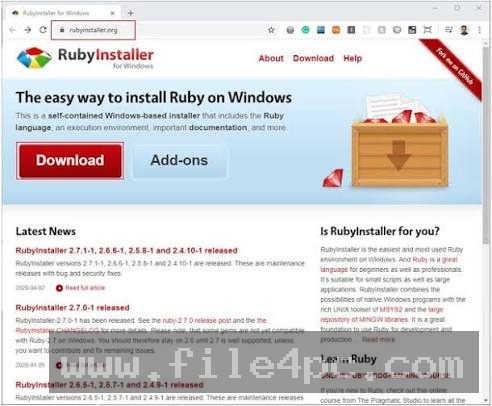
Visit the official RubyInstaller for Windows portal (
rubyinstaller.org) or the main language website (ruby-lang.org). -
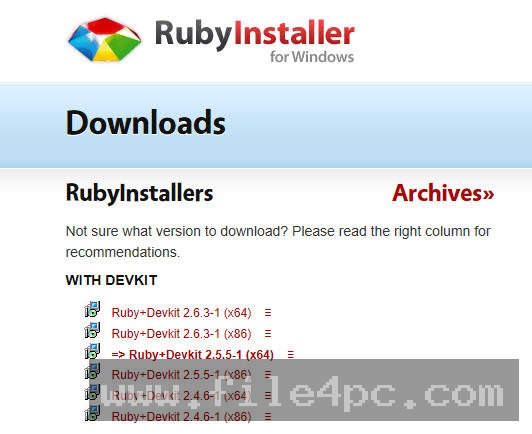
Download the recommended Ruby+Devkit installer package for your operating system architecture (typically 64-bit x64). The Devkit includes MSYS2 build tools needed to compile C-based gems.
-
Run the installer wizard, accept the license terms, and check the box to add executable paths to your Windows System PATH environment variable.
-
Complete the installation and allow the MSYS2 setup tool to finish installing base compiler headers.
-
Open your Command Prompt or PowerShell terminal and type
ruby -vto confirm the active interpreter version.
For Linux and macOS users, installing via version managers like rbenv, rvm, or asdf is recommended to switch easily between different project runtime versions.
Tips for Using Ruby Programming Language PC Software
Utilize Bundler to manage project dependencies from day one. Running bundle init creates a standard Gemfile that keeps your project libraries isolated and prevents version conflicts across different development machines.
Take advantage of the Interactive Ruby Shell (irb) for rapid testing. Placing binding.irb directly inside your source code creates a live breakpoint during execution, allowing you to inspect local variables and test logic mid-run.
Enable YJIT for production servers and memory-intensive scripts. Adding the --yjit flag when launching the runtime environment can improve performance for web applications with minimal configuration effort.
Modern Alternatives
Depending on whether your project prioritizes statistical computing, high-concurrency network services, or rapid web development, several alternative languages exist.
Python is a popular dynamically typed language widely used in data science, artificial intelligence, machine learning, and general scripting. While its syntax is similarly clear, Python offers a larger collection of specialized libraries for scientific computing compared to Ruby.
Node.js (JavaScript / TypeScript) is a lightweight server-side runtime powered by V8. It excels at asynchronous, event-driven network applications and real-time streaming services, utilizing a single language across both frontend and backend web stacks.
Elixir is a functional, concurrent language that runs on the BEAM virtual machine (Erlang). Featuring a syntax heavily inspired by Ruby, Elixir is designed for fault-tolerant, high-concurrency systems requiring low latency.
Who Should Use Ruby Programming Language PC Software?
This software environment is ideal for web developers, DevOps engineers, automation specialists, and students who want a readable, highly expressive programming language for building web applications, command-line utilities, and web scrapers. If you value code elegance, developer productivity, and access to a mature open-source library ecosystem, it provides a functional platform.
However, developers building real-time 3D game engines, low-level embedded hardware firmware, or high-frequency trading algorithms will be better served by low-level compiled languages like C++, Rust, or Go.
FAQ
Is Ruby Programming Language PC Software free?
Yes. The language environment, runtime interpreter, and official package managers are 100% free and open-source under dual BSD and custom Ruby licenses.
What is the difference between Ruby and Ruby on Rails?
Ruby is the underlying open-source programming language, whereas Ruby on Rails (Rails) is a specific web application framework written in Ruby to simplify building full-stack websites and APIs.
Can I run Ruby natively on Windows 11?
Yes. Using RubyInstaller for Windows allows you to run the interpreter natively on Windows 10 and 11. Alternatively, developers can run it inside the Windows Subsystem for Linux (WSL).
Do I need a compiled IDE to write Ruby code?
No. Because it is an interpreted language, you can write source code in any standard text editor (such as VS Code, Notepad++, or Vim) and execute it directly via your terminal.
Conclusion
Ruby Programming Language PC Software remains an influential, expressive, and versatile development environment across the modern software landscape. By prioritizing human-friendly syntax, true object-oriented design, and an extensive library ecosystem, it simplifies complex application logic for developers worldwide.
While it may not match low-level compiled languages in raw execution speed, ongoing runtime innovations like YJIT performance improvements and concurrency refinements keep it well-suited for modern web and automation workloads. For anyone seeking a productive, enjoyable language to build software tools and web services, it offers a practical development platform.

💬 0 Comments
✍ Leave a Comment