

ScanScore Professional PC Software is an advanced Optical Music Recognition (OMR) application developed by the ScanScore team to digitize printed, written, or digital sheet music into editable, playable score formats. While entry-level tiers like ScanScore Melody and ScanScore Ensemble restrict scanning to single staves or small four-staff groups, the Professional edition provides full support for complex, unlimited-staff arrangements. This makes it an essential tool for orchestral conductors, band directors, choir masters, arrangers, and music educators who regularly convert physical scores or PDF downloads into digital notation.
Operating locally on Windows desktops and laptops, the application bridges the gap between static paper sheet music and modern Digital Audio Workstations (DAWs) or notation editors. Instead of spending hours re-entering complex orchestral parts into programs like Sibelius, Dorico, or MuseScore manually, musicians can scan physical scores, correct minor OMR inaccuracies within a side-by-side editing interface, and export the output as standard MusicXML or MIDI files.
The development team actively maintains the desktop application across its 3.x release series (such as ScanScore 3.5), continuously refining its core neural recognition algorithms, expanding layout manipulation tools, and streamlining multi-page PDF import functionality.
Key Features
The application incorporates a comprehensive set of music scanning, playback, transposition, and file conversion capabilities tailored for large-scale musical works.
Unlimited Staff System RecognitionThe defining capability of the Professional tier is its ability to recognize an unlimited number of staves per system. Whether processing a simple lead sheet, a multi-part SATB choir arrangement, or an entire symphonic score with dozens of instrumental lines, the scanning engine reads all parallel staves simultaneously.
Your May Also Like :: RPCS3 PC Software
Flexible Document Capture and PDF ImportThe software accepts inputs from multiple sources. Users can capture sheet music directly using traditional flatbed USB scanners, import digital PDF documents (such as public domain scores downloaded from IMSLP), load graphic image files (PNG, JPEG, TIFF), or snap photos using the companion ScanScore Capture mobile app.
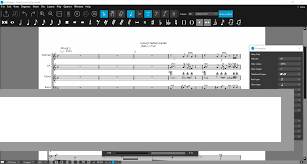
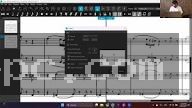
Dual-Window Correction and Verification Workspace To make editing OMR errors straightforward, the software uses a side-by-side split view. The original scanned image appears on one side while the digitized, editable notation appears on the other. Discrepancies in pitch, rhythm, rests, or dynamics are highlighted visually, allowing users to correct notes quickly using intuitive toolbars and property menus.
Interactive MIDI Playback EngineA built-in synthesizer engine allows musicians to listen to the digitized score immediately after scanning. Users can play back the entire score, solo specific instrumental lines to check for scanning mistakes, or adjust playback tempos to assist in vocal and instrumental practice sessions.
Full Score and Staff TranspositionTransposing parts for different instruments is simple. Users can transpose an entire score, specific staves, or selected passages into a different key with a few clicks, making it easy to adapt piano parts for B-flat or E-flat transposing instruments like trumpets, saxophones, or clarinets.
Universal MusicXML and MIDI ExportTo integrate seamlessly into existing digital music workflows, the software exports converted sheet music to open formats like MusicXML and MIDI. This allows users to import digitized scores directly into major music notation suites like MuseScore, Dorico, Sibelius, Finale, Notion, or Capella for advanced layout formatting and publishing.
How ScanScore Professional PC Software Works
The workflow moves sequentially from document capture and OMR analysis to side-by-side error correction and file export.
To begin, you open the application and choose your preferred import method. You can load a local PDF score, import an image file, scan a physical page using a connected flatbed scanner, or sync a photograph taken with a smartphone camera.
Next, the OMR recognition algorithm processes the image. It analyzes staff lines, clefs, key signatures, time signatures, note heads, stems, rests, accidentals, dynamics, and lyric text. Once processed, the interface opens the dual correction view, placing your original document alongside the freshly rendered digital notation.
You then review the digitized score. Click the Play button to listen for rhythmic or melodic errors caused by smudged ink or faded paper notes. If you find a wrong note or missing measure line, use the toolbar selection tools or key shortcuts to adjust pitches, insert missing rests, or tweak dynamics.
Finally, once the score matches the original, select your export format. You can print the score directly, export a MIDI file for playback, or save a MusicXML file to open inside your main music notation program.
Benefits and Limitations
Understanding both the functional strengths and operational limits of the software helps clarify its role in a digital music workflow.
Benefits
The primary advantage is massive time savings. Digitizing a 20-page full-orchestra piece manually can take days, whereas scanning and verifying the score takes a fraction of that time. The dual-window correction system makes finding recognition errors intuitive, while the unlimited staff capacity of the Professional edition handles large ensemble arrangements without artificial limits. Additionally, its flexible MusicXML export ensures compatibility with nearly every major notation software package available.
Limitations
The main limitation lies in the inherent nature of Optical Music Recognition technology. While the software handles clean printed scores and crisp digital PDFs accurately, low-resolution scans, heavily smudged historical prints, or handwritten musical manuscripts can produce higher error rates that require manual correction. Furthermore, the software is designed specifically as a music scanning, transposing, and transcription tool rather than a full-fledged engraving and composition suite.
What's New
The development team updates the scanning engine regularly to improve character recognition accuracy, user interface responsiveness, and export capabilities.
Key developments in recent releases (such as the Version 3.5 series) include:
-
Upgraded OMR Recognition Engine: Enhanced detection algorithms for improved accuracy when reading complex polyphonic passages, text lyrics, and chords.
-
Advanced Score Mode Editing: Expanded layout manipulation options that allow users to add new instruments, rearrange staves, and customize bar lines directly within the app.
-
Refined Property Menus: Streamlined sidebar panels for faster editing of note attributes, articulations, and key signatures.
-
Improved Mobile Sync Pipeline: Faster image transfer and processing when importing sheet music captured with the ScanScore Capture mobile app.
Installation and Setup
Setting up the application on a Windows PC is straightforward.
Download the setup installer directly from the official website. Run the setup package (ScanScoreSetup.exe), review the software terms, and complete the installation wizard.
Setup Note: To enable PDF document reading, the application may require installing Ghostscript (an open-source interpreter for PDF files) during or after the main installation process.
Once installed, enter your license key to activate the software. All purchase licenses are valid for 1 year (365 days) from activation, with no forced automatic renewal billing.
Tips for Using ScanScore Professional PC Software
Prioritize high-resolution, high-contrast inputs. When scanning physical sheet music, set your flatbed scanner resolution to 300 DPI or higher in black-and-white (grayscale) mode to give the OMR engine clean lines to analyze.
Always use the playback feature before exporting. Listening to the generated MIDI sound while watching the scrolling staff is the fastest way to catch misplaced accidentals or incorrect rest durations.
Focus on fixing structural errors (such as incorrect time signatures, missing measure lines, or wrong clefs) first. Fixing structural settings at the system level automatically aligns the notes correctly before you begin adjusting individual pitch positions.
Modern Alternatives
Depending on your budget, platform requirements, and specific notation ecosystem, several alternative music scanning tools exist.
Photoscore & NotateMe Ultimate (by Neuratron) is an established commercial music scanning application. It offers advanced OMR recognition, handwritten music input capabilities, and tight integration with Avid Sibelius. However, its standalone professional tier carries a higher purchase price.
SmartScore 64 Professional (by Musitek) is another long-standing OMR desktop suite built for scanning multi-staff scores, recognizing lyrics, and transposing parts. It includes extensive built-in notation editing, though its interface features a steeper learning curve.
Audiveris is a free, open-source Optical Music Recognition application. While it provides functional MusicXML conversion capabilities without licensing fees, its user interface and error correction tools are less refined than commercial alternatives.
Who Should Use ScanScore Professional PC Software?
This software is designed specifically for professional musicians, choir directors, orchestra conductors, band leaders, arrangers, and music educators who handle large, multi-staff musical works. If you regularly need to digitize full scores, transpose parts for different instruments, or convert PDF sheet music into editable MusicXML files, the Professional edition provides the staff capacity and tools necessary for the job.
However, hobbyists, solo instrumentalists, or lead-sheet performers who only need to scan single-staff melodies or simple four-part vocal arrangements will find the lower-tier Melody or Ensemble editions more cost-effective for their needs.
FAQ
Is ScanScore Professional PC Software available as a perpetual license?
Current official distributions offer 1-year licenses valid for 365 days from activation. The license does not auto-renew automatically, and purchases are backed by a 30-day money-back guarantee.
Can the software read handwritten musical scores?
The OMR recognition engine is optimized primarily for printed, engraved, and digital sheet music. While it can occasionally read extremely neat manuscript writing, heavily stylized or messy handwritten scores will produce high error rates.
What file formats can I export from the software?
You can export digitized music as MusicXML files (compatible with almost all music notation editors), standard MIDI files, audio files, or printable PDF documents.
Which operating systems are supported?
The application runs natively on Microsoft Windows (Windows 8, Windows 10, and Windows 11 64-bit) as well as Apple macOS (macOS 10.12 Sierra or higher).
Conclusion
ScanScore Professional PC Software provides a practical, efficient platform for digitizing, editing, and transposing sheet music on Windows computers. By pairing neural optical music recognition with an unlimited staff capacity, side-by-side editing workspace, and interactive MIDI playback, it eliminates the tedious task of manual score re-entry.
While users must account for occasional manual corrections on low-quality scans, its universal MusicXML export options and intuitive layout tools make it an invaluable utility for ensemble directors and arrangers. For musicians seeking to bring complex physical sheet music into the digital age, it offers a powerful workspace.
💬 0 Comments
✍ Leave a Comment