

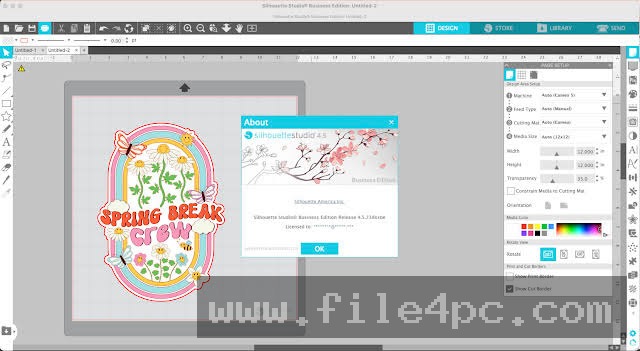
Silhouette Studio Business Edition PC Software is the top-tier paid upgrade tier for Silhouette America's vector design and digital cutting platform. Built specifically for commercial crafters, apparel decorators, sign makers, and small production businesses, it unlocks the complete feature set of the Silhouette Studio suite. While the entry-level version handles basic vector manipulation for individual cutting machines, the Business Edition expands these capabilities into a multi-device production hub. It enables commercial users to import industry-standard vector formats, automate design layouts, and drive multiple cutting plotters simultaneously from a single computer workstation.
The application operates locally on Windows and macOS desktops, maintaining a local database of artwork, cut settings, and material profiles while offering optional cloud synchronization through Silhouette Account services. It connects directly to Silhouette cutting hardware, including the Cameo, Portrait, Curio, and AutoSheet Feeder series, as well as selected third-party flatbed plotters. By bridging the gap between graphic design software and automated physical cutting equipment, it provides a self-contained workflow for managing custom vinyl decals, heat-transfer apparel, cardstock packaging, and sticker production.
Silhouette America actively maintains the application, issuing regular software builds that resolve firmware communications, optimize nesting performance, and introduce expanded vector file support across modern desktop operating systems.
Your May Also Like :: GoodSync PC Software - File4PC
Key Features
The Business Edition unlocks high-level commercial utilities that streamline high-volume manufacturing and complex vector editing.
Multi-Machine Support and Concurrent Cutting A primary distinction of the Business Edition is its ability to send cut jobs to multiple cutting machines at the same time. Rather than waiting for a single plot operation to finish before sending the next file, you can operate several Silhouette Cameo or Portrait units concurrently from one master interface, drastically increasing hourly shop throughput.
Advanced Vector File Import and Export Unlike the free Basic Edition, which restricts file handling primarily to proprietary software formats and basic raster images, the Business Edition grants full import and export support for industry-standard vector formats. Users can import and export SVG, EPS, and PDF files, allowing seamless interoperability with Adobe Illustrator, CorelDRAW, and Inkscape without relying on online conversion utilities.
Automated Material Nesting Material waste directly impacts profitability in small-scale manufacturing. The integrated Nesting feature automatically calculates the spatial boundaries of multiple vector shapes and arranges them tightly on the digital cutting mat. This maximizes material usage across vinyl rolls, heat-transfer sheets, and specialty cardstock.
Automatic Weed Line Generation Removing excess vinyl or heat-transfer material around intricate designs can consume hours of manual labor. The Weed Line tool automatically places horizontal, vertical, or boundary cut lines around vector paths. These auxiliary cut lines split large waste areas into smaller, manageable sections, making the weeding process significantly faster.
Font Creation and Digital Design Tools The software includes specialized design utilities like the Font Creation wizard, which allows creators to draw, digitize, and compile custom vector typefaces directly within the software. Additionally, advanced rhinestone alignment, puzzle generator algorithms, and multi-layer weeding controls give designers creative flexibility for custom apparel and merchandise.
How Silhouette Studio Business Edition PC Software Works
The operational model moves from digital vector preparation to physical cutting execution through an intuitive visual workspace.
To begin, you create or import your vector artwork into the primary design area. You can draw shapes using native Bezier pen tools or import SVG files created in external vector programs. Once the artwork is placed on the virtual cutting mat, you adjust scale, position, and orientation to match your real-world media dimensions.
Next, you apply automated layout tools. If you are preparing a multi-piece order, you open the Nesting panel to let the software automatically arrange parts for minimal waste. You then enable automatic weed lines to ensure easy excess material removal post-cut. If you are printing stickers, you enable registration marks, send the document to your desktop printer first, and then load the printed page into your cutting plotter.
Finally, you switch to the Send panel. Here, you define material profiles, blade depth settings, force levels, and pass counts. The software previews the active cut lines in red. When settings are confirmed, you select your connected cutting machine—or assign different parts of the job across multiple connected devices—and initiate the cut job.
Benefits and Limitations
Evaluating the application requires balancing its commercial efficiency features against system overhead and hardware dependencies.
Benefits
The most significant benefit is the one-time license upgrade model. Purchasing a Business Edition edition key permanently unlocks all high-tier features on up to three personal computers without requiring a recurring monthly subscription. Native support for SVG, EPS, and PDF file import allows professional designers to remain in their preferred design environments like Adobe Illustrator while utilizing Silhouette Studio purely as a cutting production controller. Furthermore, concurrent multi-machine driving provides genuine scaling capabilities for growing craft businesses.
Limitations
The main limitation relates to software performance when handling exceptionally heavy vector files. Complex design layouts with thousands of vector nodes or high-density rhinestone patterns can cause visible interface slowdowns, requiring a computer with a fast processor and ample RAM. Additionally, while the software supports SVG/EPS files natively, certain advanced Illustrator gradient meshes or complex transparency effects must be flattened or simplified before importing to ensure accurate line rendering.
What's New
Silhouette America maintains a consistent software release path, with recent Version 4.5 and 4.6 updates focusing on cutting engine accuracy, auto-sheet feeder integration, and 64-bit stability.
Key recent improvements include:
-
Enhanced AutoSheet Feeder support, enabling automated multi-page sticker and cardstock batch production.
-
Optimized Nesting algorithm speeds, reducing calculation times when arranging complex vector shapes.
-
Improved SVG and PDF import rendering engines to maintain precise line weights and path closures from third-party design apps.
-
Modernized 64-bit architecture optimizations for high-DPI Windows and macOS display scaling.
Installation and Setup
Upgrading to the Business Edition follows a straightforward digital registration process.
First, you download and install the standard, free version of Silhouette Studio from the official Silhouette America website. The software executable contains all feature tiers built into a single program file.
To unlock the Business Edition capabilities, you launch the application, navigate to the Help menu, and select Apply Upgrade Key. Enter your 16-digit digital license key along with your registered Silhouette account email and password. The software validates the license online and immediately unlocks all Business Edition features without requiring a separate download or application reinstallation.
Tips for Using Silhouette Studio Business Edition PC Software
Take advantage of the Matrix Copy feature when producing large runs of identical decals or labels. Combining Matrix Copy with automated Nesting ensures that duplicate designs fill every square inch of your vinyl roll without overlapping.
Utilize the Media Layout View when working with roll feeders or large-format media. Setting exact roll lengths in the Page Setup panel prevents your cutting plotter from attempting cuts beyond your loaded material boundaries.
Save your custom material settings as named presets. If you frequently cut specific third-party vinyls or heavy glitter cardstocks, creating custom profiles for force, speed, and blade depth saves setup time during future production runs.
Modern Alternatives
Depending on whether your workflow prioritizes broad machine brand compatibility or single-ecosystem design, several alternatives exist.
Sure Cuts A Lot (SCAL) is a popular third-party vector cutting software application. It supports a wide range of vinyl plotters and cutting machines across different brands, offering strong vector manipulation and font tracing features. However, it requires a separate software purchase and lacks native integration with Silhouette-specific accessories like the AutoSheet Feeder.
Cricut Design Space is the native software platform for Cricut cutting machines. It features a simplified, beginner-friendly interface but relies heavily on cloud connectivity and mandatory internet access. Unlike Silhouette Studio Business Edition, Cricut Design Space does not offer local offline SVG exports or multi-machine concurrent cutting controls.
CorelDRAW Graphics Suite with CutStudio Plugins serves industrial sign-making shops using high-end Roland or Graphtec plotters. It offers unmatched vector design capabilities but costs significantly more and lacks the entry-level accessibility of Silhouette's ecosystem.
Who Should Use Silhouette Studio Business Edition PC Software?
This software is designed specifically for small business owners, commercial crafters, sticker shop operators, and apparel decorators who utilize Silhouette cutting hardware for revenue generation. If you require SVG/PDF vector imports, run multiple cutting plotters, or need automated weed lines and nesting to save material costs, the Business Edition delivers essential operational tools.
However, casual hobbyists who only cut simple paper crafts occasionally on a single machine will likely find the free Basic Edition or low-cost Designer Edition tiers sufficient for their needs without upgrading to the full business suite.
FAQ
Is Silhouette Studio Business Edition a monthly subscription?
No. The upgrade is purchased as a permanent, one-time license key. Once activated, you own the Business Edition features permanently without ongoing monthly fees.
How many computers can I activate with a single Business Edition key?
A single Business Edition license key can be registered and activated on up to three personal computers simultaneously under the same user account.
Can I export SVG files from Silhouette Studio Business Edition?
Yes. Unlike the Basic and Designer tiers, the Business Edition allows you to export your custom designs directly as SVG, PDF, or JPEG files for use in other vector editors or third-party applications.
Do I need to buy the lower upgrade tiers before buying Business Edition?
No. You can upgrade directly from the free Basic Edition to the Business Edition in a single step using a standard Basic-to-Business license key.
Conclusion
Silhouette Studio Business Edition PC Software transforms standard desktop cutting plotters into a streamlined commercial manufacturing system. By unlocking full vector import/export capabilities, automated material nesting, weed line generation, and concurrent multi-machine operation, it eliminates the operational bottlenecks common in small-scale vinyl and craft production.
While processing heavy vector artwork requires adequate computer hardware, the software's one-time purchase model and independence from cloud subscriptions make it an exceptionally cost-effective investment for growing craft businesses. For creators who demand full control over their production workflow and material efficiency, it provides a comprehensive software workspace.


💬 0 Comments
✍ Leave a Comment