

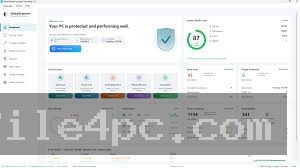
SharpScanner PC Software is a specialized PC security and system health monitoring application published by Spaqi Consulting L.L.C. on the Microsoft Store. Designed explicitly for modern Windows desktops, it acts as a centralized dashboard to track real-time hardware performance, perform security vulnerability audits, detect tracking software, and clear out unwanted background risks. Instead of overwhelming non-technical users with obscure command-line menus or dense registry keys, the software presents a simplified, health-graded overview of your PC's operational status alongside one-click automated fixes.
Operating as a sandboxed Windows Store application, the utility runs entirely on local hardware, ensuring that internal diagnostic scans, system metadata, and personal data files remain strictly on your device without cloud transmission. It is aimed at home users, small office workers, and non-technical computer owners who need a clean, straightforward utility to check active background programs, evaluate overall system security, and keep Windows running smoothly without installing heavy, invasive security suites.
The application is actively maintained by Spaqi Consulting L.L.C., receiving regular updates through the Microsoft Store ecosystem that expand multi-language options, refine vulnerability scanning rules, and optimize dashboard responsiveness across modern Windows builds.
Key Features
The application incorporates a structured toolkit focused on local diagnostic scanning, task visibility, and lightweight security maintenance.
Real-Time System Performance Dashboard
The main interface features dynamic visual charts monitoring core hardware components in real time. Users can track active CPU usage, RAM allocation, storage disk activity, and network throughput at a glance. This helps quickly identify whether an unresponsive system is caused by spikes in memory consumption or unexpected disk usage.
Your May Also Like :: Duplicate Finder Professional PC Software
Application Vulnerability & Process Audit
The scanner inspects installed desktop applications and active background processes for known vulnerabilities. It highlights unsigned executables, software running from unknown sources, and outdated programs. By bringing attention to unverified processes, it prevents hidden background adware or suspicious utilities from running unnoticed.
Integrated Threat & Tracking Cleanup
The software includes automated routines to inspect and clear tracking cookies, spyware artifacts, and web browser privacy residues. Additionally, it integrates directly with native Windows security engines (such as the Microsoft Malicious Software Removal Tool) to trigger progress-tracked malware scans and present clear, consolidated results.
Security Health Grade & Trend Tracking
To simplify diagnostic data, the software calculates a single, easy-to-read health score for the system. It tracks this Security Score Trend over time, showing whether performance and security have improved following maintenance actions.
One-Click Security Reports
Users can generate exportable security and hardware reports with a single click. These reports provide a summary of system hardware specifications, OS build details, hardware network adapters, system uptime, and active vulnerability flags—making it simple to share diagnostic data with an IT support specialist.
How SharpScanner PC Software Works
The operational model relies on native Windows APIs and local system queries to deliver real-time performance telemetry and system health audits.
Upon launching the application from the Start Menu or Microsoft Store library, you are greeted by a tabbed workspace showing your PC's immediate overall security grade and real-time usage graphs. You can navigate through structured tabs designated for performance metrics, active process checks, security scans, and hardware information.
To evaluate your system, you select the primary scan option. The software systematically reviews running background tasks, inspects installed software directories for unverified entries, checks for privacy-tracking cookie build-ups, and queries internal Windows security tools.
Once the scan finishes, the application highlights weak points or vulnerabilities on screen. Users can review each flagged item individually or apply one-click automated fixes to close identified security gaps, clear tracking files, or terminate untrusted processes.
Benefits and Limitations
Understanding both functional advantages and operational boundaries helps determine if this utility fits your system maintenance needs.
Benefits
The most significant advantage is simplicity and privacy. Because the application is distributed through the Microsoft Store and executes all operations locally on your hardware, your system information never leaves your PC. The clean visual layout and one-click health repairs make system maintenance accessible to casual users who avoid complex administrative tools. Furthermore, its lightweight background footprint ensures it does not hog CPU or RAM resources while running real-time charts.
Limitations
The main limitation is that it is designed primarily as a diagnostic and lightweight cleanup utility rather than a full-scale real-time antivirus replacement. It relies on identifying process trust states and invoking underlying Windows security tools rather than operating a dedicated kernel-level firewall or heuristic malware engine. Additionally, availability is restricted strictly to modern Windows systems, requiring Windows 10 (version 17763.0) or Windows 11.
What's New
Spaqi Consulting L.L.C. keeps the utility updated via Microsoft Store release builds. Recent updates focused on user interface modernizations, scan accuracy, and expanded multi-language capabilities.
Key recent improvements include:
-
Completely redesigned user interface with modern dark/light themes and updated visual dialogs.
-
Addition of the Security Score Trend tracker to observe PC health over time.
-
One-click exportable diagnostic security reports for easy sharing.
-
Expanded native localization support for six major languages: English, Spanish, German, French, Portuguese, and Simplified Chinese.
-
Smarter Background Guardian mechanics and improved vulnerability scan speed.
Installation and Setup
Getting the application onto your system is straightforward and managed securely through official Windows channels.
Open the Microsoft Store on your Windows PC, search for the official application published by Spaqi Consulting L.L.C., and click Get or Install. The Store automatically downloads the verified package and registers it with your system apps.
Because the utility is installed through the app sandbox, it requires no complex setup wizards, driver setups, or system reboots. Launching the app from your Start menu instantly brings up the primary dashboard, where you can immediately initiate your first diagnostic scan.
Tips for Using SharpScanner PC Software
Check the active process tab regularly if you notice fans spinning up or unexpected system sluggishness. The software highlights unsigned or non-standard executables, making it simple to spot unverified programs consuming background resources.
Generate an exportable security report right after completing an automated cleanup. Saving this file locally gives you a baseline hardware and software inventory that can be useful for comparison if system issues arise later.
Pair the application with standard Windows Defender updates. Keeping your primary operating system definitions updated ensures that the software's underlying malware scan integrations deliver the most accurate protection checks.
Modern Alternatives
Depending on whether your objective is deep malware removal, administrative task monitoring, or full hardware optimization, several alternative tools exist.
Microsoft Sysinternals Process Explorer is an advanced, free administrative utility. It provides deep inspection of active process trees, loaded DLLs, and system handles, making it ideal for IT professionals. However, its complex interface lacks the visual charts, health grades, and simple one-click fixes found in user-friendly store utilities.
Malwarebytes is a dedicated anti-malware and security suite. It offers powerful real-time web protection and active behavioral threat remediation. While it excels at deep malware removal, it operates under a paid subscription model for real-time features and includes heavier system background services.
CCleaner is a widely known system optimization and registry cleanup tool. It provides deep junk file removal and startup management, but its broader third-party installer ecosystem requires careful navigation during setup compared to sandboxed Store applications.
Who Should Use SharpScanner PC Software?
This utility is well-suited for everyday Windows 10 and 11 users who want an accessible, visually clear tool to monitor system resources, check process safety, and perform basic security maintenance without navigating complex system settings. It is particularly helpful for non-technical users who value local data privacy and straightforward, single-click health scores.
However, sysadmins requiring deep kernel-level debugging, handle tracing, or advanced enterprise network deployment should rely on dedicated administrative suites like Microsoft Sysinternals or enterprise endpoint management platforms instead.
FAQ
Is SharpScanner PC Software free to download?
The application is available as a free download on the Microsoft Store, offering core hardware tracking, system information summaries, and basic scanning features.
Does my personal diagnostic data get sent to external servers?
No. All scanning operations, process checks, and hardware telemetry run locally on your PC. Your diagnostic information and files never leave your personal computer.
What operating systems are supported?
The software requires a PC running Windows 10 (version 17763.0 or higher) or Windows 11. It is compatible with 64-bit system architectures.
Can this application replace my main antivirus program?
No. While it integrates with Windows security tools to perform malware removal scans and check application trust states, it is designed as a diagnostic dashboard and health monitor rather than a full real-time kernel antivirus suite.
Conclusion
SharpScanner PC Software offers a practical, privacy-focused solution for monitoring hardware health and evaluating software vulnerabilities on modern Windows systems. By combining real-time resource tracking with straightforward process trust auditing and one-click maintenance, it translates technical operating system metrics into clear, actionable advice.
While advanced sysadmins may still require deep administrative tools for low-level debugging, the app's sandboxed store architecture, local processing, and clean layout make it a useful utility for everyday users. For anyone seeking a fast, accessible way to check background activity and keep their Windows PC running safely, it provides a well-organized workspace.


💬 0 Comments
✍ Leave a Comment