
WListDB PC Software is a specialized Windows utility created by developer Nir Sofer (NirSoft) that reads and exports Windows Error Reporting (WER) history stored locally on a computer. Whenever an application crashes, hangs, or encounters a system fault, Windows often records diagnostic details in its built-in error reporting database. IT support technicians, software developers, power users, and PC troubleshooters use a tool like this to inspect past crash logs without manually digging through hidden system directories.
Published by NirSoft as freeware, WListDB runs cleanly on Windows operating systems without requiring a heavy background service or complex installation wizard. Because NirSoft tools focus on lightweight, single-purpose system inspection, the utility stays small and direct while reading local Windows diagnostic files.
Seeing which executable crashed, when the event occurred, and what fault module triggered it helps narrow down stubborn software conflicts. Still, because WListDB simply displays existing Windows Error Reporting records rather than repairing system files or drivers automatically, its usefulness depends on whether Windows Error Reporting is enabled and holding historical entries on your PC.
Key Features
Rather than bundling unrelated system cleaners or real-time monitors, WListDB PC Software centers on reading, filtering, and exporting Windows Error Reporting records. Below are its main confirmed features and why each one matters during troubleshooting.
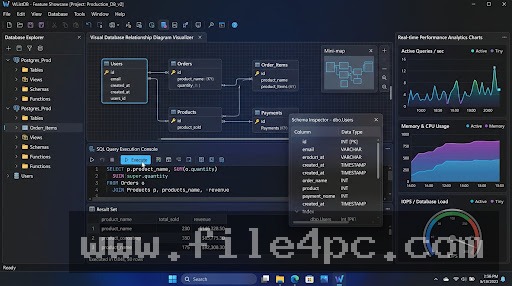
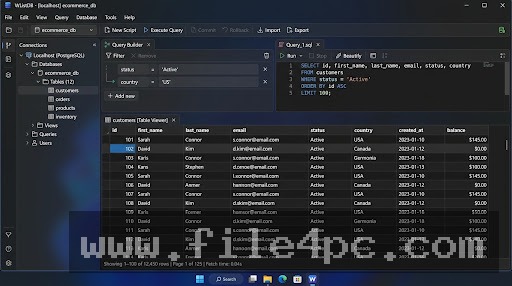
Direct Reading of Local Windows Error Reporting Records WListDB scans the local Windows Error Reporting storage folders on your PC and lists recorded crash and hang entries in a clean table view. Having every recorded event gathered into one table saves you from browsing buried ProgramData or AppData report folders manually.
Detailed Fault and Module Columns For each entry, the table displays useful diagnostic columns such as the event date and time, application name, application path, fault module name, exception code, and report status. Seeing the exact .exe or .dll file tied to a crash makes it much easier to tell whether a problem comes from a specific program, plugin, or graphics driver.
Your May Also Like :: WinCam PC Software
Flexible Exporting to Text, CSV, HTML, and XML Like other NirSoft inspection utilities, WListDB lets you select one or more rows and export them to plain text, tab-delimited files, .csv, .html, or .xml reports. Exporting crash logs makes sharing diagnostic details with a developer, IT colleague, or support forum fast and neat.
Portable Execution and Command-Line Support The utility runs directly from a compact standalone executable without modifying system registries or installing background services, and it supports command-line switches for automated report generation. Portable operation lets technicians run it straight from a troubleshooting USB drive on client computers.
How WListDB PC Software Works
To use WListDB PC Software, you need a Windows PC (such as Windows 10 or Windows 11), the extracted NirSoft executable matching your system architecture (x64 or x86), and local Windows Error Reporting records generated by past application or system events.
Start by extracting the downloaded .zip archive into a folder and launching WListDB.exe. Upon opening, the program automatically reads the default Windows Error Reporting folders for your system and populates the main list window.
From the main table, you can sort columns by timestamp or application name, inspect the lower pane for full raw report details, and filter or search for a specific program. If you need to analyze records from another drive or user profile, you can point the tool to an external Windows installation path through its advanced options.
As your final result, you get an organized diagnostic timeline of application crashes and hangs that you can review on screen or export into a structured report file.
System and privacy warning: Windows Error Reporting logs contain file paths, program names, and local system diagnostic details, so review exported HTML or CSV reports before sharing them publicly online. Also, running the utility with administrator privileges may be needed to read system-wide error reports stored outside your individual user account folder.
Benefits and Limitations
Evaluating WListDB PC Software objectively means looking at its speed and portability alongside the boundaries of Windows Error Reporting itself.
Benefits
Lightweight design and zero cost are major advantages. The entire download takes well under a megabyte, requires no installation, leaves no clutter behind, and is completely freeware from NirSoft.
Clear visibility into historical crashes is equally helpful. Even when a program closed silently days earlier without showing a detailed error box, WListDB can often surface the underlying fault module and exception code if Windows logged the event.
Limitations
It only shows events that Windows Error Reporting actually recorded. If Windows Error Reporting is disabled on a machine, if disk cleanup tools wiped old report folders, or if a crash happened before Windows could write a report, the list will appear empty or incomplete.
In addition, WListDB is strictly a diagnostic viewer rather than a repair tool. It tells you what crashed and which module was involved, so you still need to update drivers, reinstall the affected software, or investigate the root cause yourself.
What's New
NirSoft utilities follow a stable, targeted maintenance model where updates are released when Windows builds change or new columns and fixes are needed, rather than on a rigid monthly schedule. Because exact minor release dates for WListDB should always be checked directly on NirSoft's official tool page, verify the version number and changelog listed on nirsoft.net when downloading.
If no recent changelog entry appears on the official page, that simply reflects that the utility already performs its focused Windows Error Reporting lookup task without requiring frequent interface overhauls.
Installation and Setup
Before running WListDB PC Software, save any open work and decide whether you want to inspect only your current user profile's crash reports or system-wide logs (which require running as administrator). Running a portable NirSoft viewer does not alter system settings, though some antivirus scanners occasionally flag compact system-inspection utilities until verified.
-
Download the official
.ziparchive directly from NirSoft's official website (nirsoft.net) rather than unverified third-party mirrors. -
Extract the archive into a dedicated folder on your PC or USB toolkit.
-
Right-click
WListDB.exeand choose Run as administrator if you want full access to system-level Windows Error Reporting directories. -
Wait a moment for the main table to load your recorded Windows Error Reporting entries.
-
Click any entry to inspect its full details in the bottom pane or use File > Save Selected Items to export a report.
Download safety warning: Always obtain NirSoft utilities directly from nirsoft.net. Avoid modified executables, repackaged installers, or suspicious mirrors, which can introduce malware or compromise your computer.
Tips for Using WListDB PC Software
Run the 64-bit build (x64) on 64-bit Windows PCs and launch it as administrator when troubleshooting system-wide crashes. Reading system-level report folders ensures you do not miss errors logged outside your standard user profile.
Sort by the Date/Time column right after a program freezes or closes unexpectedly. Seeing the newest entry at the top immediately highlights the exact fault module and exception code tied to that failure.
Use the Advanced Options dialog (F9) when inspecting an offline Windows drive or backup folder. Pointing WListDB to an external ProgramData or Users directory lets you diagnose a PC that no longer boots normally.
Modern Alternatives
If you need broader system event logs, blue-screen dump analysis, or built-in Windows diagnostics, several related tools serve overlapping troubleshooting roles.
Windows Event Viewer comes built into every Windows installation and logs application, system, and security events in detail. It covers far more than application crash reports without needing extra downloads, though its interface is heavier and slower to filter than a dedicated table viewer.
NirSoft AppCrashView is another free NirSoft utility focused specifically on reading .wer crash report files generated by Windows Error Reporting. Users often pair or compare it with WListDB depending on which Windows build and report format they are inspecting.
NirSoft BlueScreenView inspects Windows minidump (.dmp) files created after Blue Screen of Death (BSOD) kernel crashes rather than user-mode application crashes. When a PC reboots with a stop error instead of a single app closing, minidump analysis is the appropriate companion step.
Who Should Use WListDB PC Software?
WListDB PC Software is well suited for IT technicians, helpdesk staff, software testers, and curious Windows users who want a fast, portable way to check application crash history and fault modules on a PC. If you frequently troubleshoot stubborn desktop apps and prefer lightweight tools over bulky suites, it fits right into a diagnostic USB toolkit.
You may not need it if your computer runs without application crashes, if Windows Error Reporting is turned off on your system, or if you are troubleshooting full-system blue screens that require minidump analysis instead.
FAQ
What is WListDB PC Software used for?
It reads and displays local Windows Error Reporting (WER) records on a Windows PC so you can see which applications crashed or hung, when it happened, and which module was involved.
Is WListDB PC Software free?
Yes, NirSoft distributes WListDB as freeware for personal and professional troubleshooting use.
Does WListDB require installation?
No, it is a portable Windows utility distributed in a .zip archive that runs directly from WListDB.exe after extraction.
Why does WListDB show an empty list on my PC?
If Windows Error Reporting is disabled, if no application crashes have been logged yet, or if disk cleanup utilities cleared old report folders, no entries will appear.
Conclusion
WListDB PC Software gives Windows users and technicians a compact, portable way to inspect local Windows Error Reporting records, pinpoint fault modules, and export crash summaries in standard formats. Because it relies on existing diagnostic logs saved by Windows, running it with administrator rights when needed and pairing it with official Microsoft documentation on error codes makes troubleshooting much clearer.
If you are diagnosing recurring app crashes on a Windows PC and want a fast, zero-install log viewer, WListDB is a practical tool to keep handy. If you need full kernel BSOD dump analysis or automated driver and system repair, a different utility will match your needs better.
💬 0 Comments
✍ Leave a Comment