
Wondershare PDFelement Professional PC Software is a desktop PDF editing and document management application developed by Wondershare for Windows computers, giving users tools to edit text and images inside PDFs, convert files, run optical character recognition (OCR), build fillable forms, and protect sensitive documents. Instead of relying on basic PDF viewers that only let you read or add sticky notes, the Professional edition brings document creation, batch processing, redaction, and form tools into a familiar ribbon-style desktop workspace. Office teams, legal and administrative staff, educators, students, and small business owners frequently use it to handle contracts, scanned paperwork, reports, and digital forms on Windows.
Maintained actively by Wondershare, PDFelement continues to receive regular feature and stability updates across its desktop releases (spanning the PDFelement 11 and 12 generations on Windows, with exact minor build numbers updating frequently on Wondershare's official release notes). It is commercial software offered with a free trial (which places watermarks on saved documents) alongside paid subscription and perpetual license plans, while optional AI add-ons or cloud storage tiers carry separate usage or plan terms.
Working with PDFs directly on a PC saves time when you need to fix a typo in a finalized contract, turn a scanned paper packet into searchable text, or merge dozens of files before sending them to a client. Still, because licensing tiers, OCR packages, and AI credit limits vary by plan, knowing how the Professional edition behaves before buying helps you choose the right setup.
Your May Also Like :: Visual C++ Redistributable Runtimes PC Software
Key Features
Wondershare PDFelement Professional PC Software bundles core PDF editing with advanced document tools that distinguish the Professional tier from basic readers and standard editors. Below are its main confirmed features and why each one matters in day-to-day document work.
Direct PDF Text, Image, and Page Editing You can edit existing paragraphs, adjust fonts and alignment, swap or resize embedded images, and reorder, insert, split, or extract pages inside a PDF. Direct editing matters because you can update a finished PDF layout without hunting down the original Word or design source file.
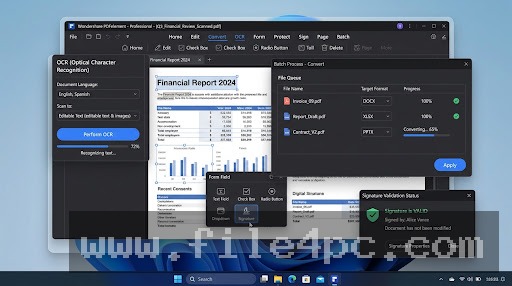
Optical Character Recognition (OCR) for Scanned PDFs The Professional edition includes Optical Character Recognition (OCR) that converts scanned paper documents and image-based PDFs into searchable and editable text across multiple languages. Having reliable OCR saves hours of manual retyping when working with photographed receipts, archived records, or scanned agreements.
Multi-Format File Conversion and Creation PDFelement converts PDFs to and from Microsoft Word, Excel, PowerPoint, plain text, HTML, and common image formats (such as JPG and PNG), while preserving tables and page formatting as closely as possible. Two-way conversion makes it straightforward to pull data into spreadsheets or turn office drafts into shareable PDFs.
Interactive Form Creation and Data Extraction Users can create fillable PDF forms with text fields, checkboxes, radio buttons, drop-down lists, and digital signature fields, as well as recognize form fields automatically or export collected form responses to CSV/Excel. Automated form tools simplify collecting client intake sheets, surveys, and internal approvals.
Document Security, Redaction, and Batch Processing The Professional tier supports password encryption, permission restrictions, digital signatures, permanent text or area redaction, Bates numbering, and batch actions (such as batch conversion, watermarking, or OCR across multiple files). Permanent redaction and batch tools are especially valuable when preparing confidential records or large document sets for external sharing.
How Wondershare PDFelement Professional PC Software Works
Getting started with Wondershare PDFelement Professional PC Software requires a supported Windows PC (such as Windows 10 or Windows 11), an internet connection for downloading the installer, signing in with a Wondershare ID, and activating your license or trial, plus optional add-on downloads such as the OCR component.
Once you launch the application, the home screen lets you open an existing PDF, create a new PDF from a file or scanner, combine files, or launch a batch task. Opening a document loads a ribbon toolbar organized by task, including Edit, Comment, Convert, Page, Form, Protect, and Tools.
When you open a scanned PDF, PDFelement detects that the page contains images rather than selectable text and prompts you to run OCR. After selecting your document language and page range, the software processes the pages so you can search, copy, or edit the text directly.
When your edits, signatures, or redactions are complete, you save the updated .pdf file or export it into an Office or image format on your computer.
Document and data warning: Always save a backup copy of your original PDF before applying permanent redaction, flattening form fields, or running batch overwrites. Once redaction is saved, blacked-out text and metadata are permanently stripped from that copy and cannot be undone later.
Benefits and Limitations
Evaluating Wondershare PDFelement Professional PC Software fairly means weighing its accessible ribbon layout and broad Professional toolset against licensing and subscription details.
Benefits
An approachable, Office-style interface is one of its strongest points. Users familiar with Microsoft Word or Excel ribbons can usually locate text editing, page organization, and conversion tools without steep training.
Including OCR, batch processing, form recognition, and permanent redaction in the Professional edition also makes it capable enough for legal, administrative, and business workflows at a lower entry cost than several enterprise PDF suites.
Limitations
Trial restrictions and add-on licensing require careful attention. The free trial adds a visible watermark to edited or converted files, and certain cloud storage capacities or AI assistant features rely on separate credits or subscription tiers even if you purchase a perpetual desktop license.
In addition, a perpetual license covers a specific major release generation rather than guaranteeing free upgrades to future major version numbers indefinitely, and complex multi-column magazine or CAD layouts can still show minor spacing shifts when converted to Word or Excel.
What's New
Wondershare continues to update PDFelement actively on Windows, shipping ongoing releases across its modern desktop generations (including the PDFelement 11 and 12 series). Recent development has focused on faster rendering of large PDFs, refined OCR accuracy, expanded AI-assisted document tools (such as summarizing, translating, proofreading, and chatting with PDFs), cloud synchronization improvements, and UI polish for Windows 11.
Because exact minor version numbers and AI feature availability update frequently on Wondershare's official changelog, check pdf.wondershare.com for the current build notes and license breakdown before purchasing.
Installation and Setup
Before installing Wondershare PDFelement Professional PC Software, save any open documents and close other PDF viewers or Office apps if you plan to enable browser PDF plugins or Office add-ins during setup. Installing the desktop suite adds file associations and optional virtual print drivers for creating PDFs from other Windows apps.
-
Download the official Windows installer directly from Wondershare's official PDFelement website (
pdf.wondershare.com) rather than third-party download portals. -
Run the setup executable, review the installation folder and optional PDF file association settings, and complete the installation wizard.
-
Launch PDFelement and sign in with your Wondershare ID to activate your free trial or paid Professional license.
-
When prompted on your first scanned document, allow PDFelement to download and install the official OCR module if it is not already bundled in your installer build.
-
Open a sample copy of a PDF file to test text editing, conversion, and saving before working on critical originals.
Download safety warning: Always download PDFelement from Wondershare's official portal. Avoid cracked versions, keygens, or modified installers from unofficial mirrors, which frequently contain malware, compromise personal documents, and break official updates.
Tips for Using Wondershare PDFelement Professional PC Software
Duplicate important PDFs before using Mark for Redaction and Apply Redactions. Because redaction permanently removes underlying text and graphics, keeping an untouched archive copy protects you if you accidentally redact the wrong line.
Use Batch Process when converting, watermarking, or running OCR across dozens of client files at once. Running a single batch job saves repetitive clicks and applies consistent settings across every file in the queue.
Set your exact OCR language(s) before scanning a document. Narrowing the OCR language selection to the actual language printed on the page improves character accuracy and speeds up recognition.
Check Line Mode versus Paragraph Mode while editing PDF text. Switching between line-by-line edits and reflowable paragraph blocks helps prevent awkward line wraps when replacing a few words inside a tightly formatted form or table.
Modern Alternatives
Depending on your budget, operating system, and whether you need OCR and redaction, several well-known PDF editors offer different trade-offs.
Adobe Acrobat Pro is the industry-standard commercial PDF suite for Windows and macOS. It offers deep preflight, accessibility, e-signature, and enterprise collaboration tools, though it is sold exclusively through ongoing subscriptions at a higher recurring cost.
Foxit PDF Editor is a commercial desktop PDF suite for Windows and macOS featuring a ribbon interface, OCR, form design, and redaction. Users often compare its speed, perpetual versus subscription options, and interface layout directly against PDFelement.
PDF-XChange Editor is a Windows-focused PDF viewer and editor known for granular annotation, OCR, and fast performance on older or modest hardware. It offers a capable free tier with paid licenses unlocking advanced editing and redaction features.
LibreOffice Draw is a free, open-source office suite component available across Windows, macOS, and Linux that can open and make basic edits to simple PDFs. While free and open source, it lacks dedicated PDF redaction, Bates numbering, and specialized PDF form workflows.
Who Should Use Wondershare PDFelement Professional PC Software?
Wondershare PDFelement Professional PC Software is a strong match for Windows users, small businesses, legal or administrative offices, researchers, and students who regularly edit PDFs, convert scanned documents with OCR, build fillable forms, or redact confidential records. If you want a structured, approachable interface without paying top-tier enterprise subscription prices, the Professional edition fits well.
You do not need the Professional edition if you only read PDFs, fill out occasional forms, or merge a couple of pages once a month, since built-in browser PDF viewers or lighter free tools handle basic viewing without license costs.
FAQ
What is Wondershare PDFelement Professional PC Software used for?
It is used on Windows PCs to edit text and images inside PDFs, convert PDFs to and from Office formats, run OCR on scanned files, create fillable forms, and redact or protect documents.
Is Wondershare PDFelement Professional free?
Wondershare offers a free trial so you can test the interface and features, though saving or exporting files in the trial adds a watermark unless you activate a paid license.
Does the Professional edition include OCR and redaction?
Yes, Optical Character Recognition (OCR) for scanned PDFs, permanent redaction, Bates numbering, and batch processing are included in the Professional tier.
What is the difference between a perpetual license and a subscription?
A perpetual license lets you use the purchased major version indefinitely with a one-time payment, whereas a subscription provides ongoing access and major version upgrades while the plan remains active.
Conclusion
Wondershare PDFelement Professional PC Software brings text and image editing, multi-language OCR, Office file conversion, fillable forms, and permanent redaction together in a structured Windows desktop application. Being clear on trial watermarks, perpetual versus subscription terms, and backup habits before redacting files ensures a smooth experience.
If your daily work on Windows involves editing PDFs, digitizing scanned paperwork, or preparing confidential forms, PDFelement Professional is a practical option worth evaluating through its official trial. If you only need basic PDF reading or light annotations, a built-in browser viewer or free lightweight tool will cover your needs without extra cost.


💬 0 Comments
✍ Leave a Comment