
WizTree PC Software is a Windows disk space analyzer developed by Antibody Software that scans storage drives and reveals which folders and files occupy the most room. When a hard drive or SSD suddenly fills up and Windows File Explorer makes it slow to check folder sizes one by one, a dedicated storage analyzer gives you an immediate breakdown of what is taking up space. Home PC users, gamers managing massive game folders, content creators handling large media files, and IT administrators auditing storage drives all use it to track down space hogs quickly.
Maintained actively by Antibody Software, WizTree reached version 4.33 on September 16, 2026, with official support across Windows desktop releases (including Windows 10, Windows 11, and Windows ARM via Prism Emulation). It is free for personal use on home computers, while commercial or business environments require a paid supporter code or enterprise license.
Pinpointing where gigabytes have disappeared saves hours of manual folder digging. Still, because WizTree gives you direct visibility into system directories and lets you delete or rename files on the spot, knowing how its scanning engine and cleanup actions work keeps your files safe.
Your May Also Like :: Windows Calculator Installer PC Software
Key Features
WizTree focuses on rapid drive indexing, clear visual breakdowns, and flexible file search rather than automated "junk cleaning" guesswork. Below are its main confirmed features and why each one matters in day-to-day storage management.
Direct NTFS Master File Table (MFT) ScanningOn NTFS-formatted drives, WizTree reads the drive's Master File Table directly instead of crawling every subfolder through standard Windows file APIs. Reading the MFT directly matters because a large drive with hundreds of thousands of files finishes scanning in seconds rather than several minutes.
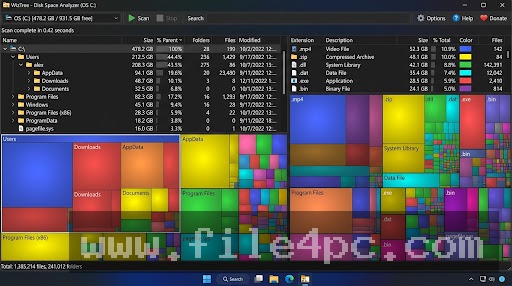
Folder Tree View and Visual TreemapResults appear both in a sortable folder hierarchy ordered by allocated size and in a color-coded visual treemap where block sizes correspond to file sizes. Combining a structured tree list with a visual treemap lets you spot oversized video files, old game archives, or bloated cache folders at a glance.
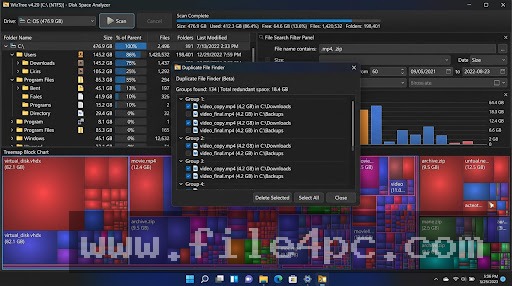
Fast File Search, Size Filters, and Duplicate Detection The File View tab lets you search across an entire scanned drive by file name, extension, wildcards, or size and date filters (such as locating folders over a specific size), alongside duplicate file detection options. Filtering across an entire volume makes it straightforward to list all .iso, .mp4, or log files sorted from largest to smallest.
CSV and TSV Import and ExportYou can export complete scan results to .csv or .tsv files and re-import them later into WizTree. Exporting snapshots of a drive's layout lets you compare storage usage over time or inspect a drive report exported from another computer.
Support for Non-NTFS Drives, Mobile Devices, and Portable ExecutionBeyond NTFS volumes, WizTree scans FAT/FAT32/exFAT drives, network folders, and connected MTP/PTP devices like smartphones and cameras, and it is offered in both an installer and a portable zip build. Broad drive support and a portable option mean you can inspect external USB drives or run the tool from a flash drive without installing anything.
How WizTree PC Software Works
Getting started with WizTree requires a Windows PC, administrator privileges when scanning local NTFS drives directly via the Master File Table, and the target local drive, external storage device, or network folder you want to inspect.
Once you open WizTree, select a drive letter or folder from the drop-down menu at the top left and click Scan. For local NTFS drives, WizTree reads the MFT and populates the Tree View, File View, and lower Treemap pane almost immediately.
From there, you can expand folders in the tree, click blocks in the treemap to jump straight to large files, or switch to the File View tab to filter by extension, minimum size, or modification date. You can also open a selected item in Windows Explorer, rename files or folders (added in version 4.29), or export the scan to CSV.
As your end result, you get a complete, size-sorted map of everything stored on the drive so you can decide what to archive, move, or remove.
Data loss and system warning: WizTree displays critical Windows system folders (such as Windows, Program Files, and AppData) alongside your personal files. Deleting or renaming system files, application runtimes, or active virtual disk images can break Windows or installed programs, and duplicate detection should always be reviewed carefully before deleting files.
Benefits and Limitations
Evaluating WizTree PC Software fairly means balancing its scanning speed and detailed reporting against platform and licensing boundaries.
Benefits
Scanning speed on NTFS drives is its standout advantage. Because it reads the Master File Table directly, even multi-terabyte drives with dense folder structures finish analyzing much faster than traditional folder-by-folder crawlers.
Low system footprint and flexible packaging also make it convenient. The application takes roughly 10 MB of disk space, includes both 32-bit and 64-bit binaries, offers a portable version, and runs free of charge for personal home use.
Limitations
Speed drops noticeably on non-NTFS volumes and network shares. Because FAT32, exFAT, MTP devices, and mapped network drives do not provide a local NTFS Master File Table, WizTree falls back to standard directory traversal, which takes longer on large remote shares.
Licensing and interface density are also worth noting. Personal home use is free, whereas business and commercial use requires purchasing a supporter/commercial license. In addition, WizTree is an analysis tool rather than a one-click automatic cleaner, so beginners still have to decide which files are safe to remove.
What's New
Antibody Software has kept WizTree actively updated through 2026, releasing WizTree 4.33 on September 16, 2026.
Confirmed updates across the 2026 release cycle include:
-
WizTree 4.33 (September 16, 2026): Added CSV import and export compatibility with the new macOS edition (WizTreeMac for macOS 12 or later, handling macOS
/root paths and escaped double quotes in file names), updated translations across languages, and fixed copy/cut behavior inside the file-renaming text box. -
WizTree 4.32 (August 5, 2026): Confirmed official support on Windows ARM devices via Prism Emulation, enabled recalculation when filtering complete imported CSV files, fixed date filter bugs, improved ReactOS classic theme detection and Linux path slash conversion on CSV import, and added command-line relative path support (
.and..). -
WizTree 4.31 & 4.29 (March 2026): Added inline file and folder renaming (
F2), introducedCtrl+Hto toggle the top header area for extra display room, fixed taskbar initialization exceptions on certain systems, and resolved an edge-case security issue with trailing spaces in file names.
Installation and Setup
Before installing WizTree PC Software, save any open work and decide whether you prefer the standard Windows installer or the portable zip package. Installing the desktop app adds an optional Windows Explorer context-menu entry ("Scan with WizTree") and requires administrator rights when scanning NTFS drives directly.
-
Download the official installer (
wiztree_4_33_setup.exe) or portable archive (wiztree_4_33_portable.zip) directly from Antibody Software's official site (diskanalyzer.com) or install via Windows Package Manager (winget install -e --id AntibodySoftware.WizTree). -
If using the installer, run the setup executable and follow the prompts (you do not need to uninstall an older version first when upgrading).
-
If using the portable build, extract the zip archive into a dedicated folder and run
WizTree64.exeon 64-bit Windows (orWizTree.exeon 32-bit systems). -
Approve the Windows User Account Control (UAC) prompt so WizTree can read the NTFS Master File Table directly.
-
Select your main drive (such as
C:) and click Scan to inspect your storage layout.
Download safety warning: Always download WizTree from diskanalyzer.com or official package channels like winget. Avoid cracked copies, modified executables, or unofficial mirrors, which can carry malware or compromise your system.
Tips for Using WizTree PC Software
Use the File View tab with size filters when hunting specific types of clutter. Typing =folder >1g or filtering by extensions like *.iso or *.zip isolates large items immediately without clicking down ten subfolder levels.
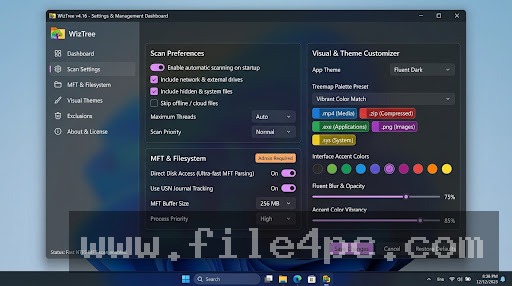
Adjust font size on the fly by holding Ctrl and scrolling your mouse wheel up or down, or press Ctrl+H to hide the top header bar when working on a smaller laptop screen.
Export a CSV snapshot before doing a major drive cleanup. Having a saved CSV record of what existed on the drive before you deleted old folders makes it easy to check what was removed later if you wonder where a file went.
Check allocated size alongside file size when dealing with compressed folders or sparse files. WizTree displays both actual file size and allocated disk space, helping clarify why certain system or VM files report different numbers.
Modern Alternatives
Depending on your operating system, open-source preferences, and workflow, several other disk space analyzers are widely used.
WinDirStat is a free, open-source disk usage viewer for Windows (licensed under GPL v2) that displays a directory tree, extension list, and treemap. Its visual layout closely resembles WizTree, though traditional directory scanning is slower on large NTFS drives than direct MFT reading unless newer MFT options are configured.
TreeSize Free by JAM Software is a Windows disk space manager that shows folder sizes in a tree view and integrates with Windows Explorer. Like WizTree, it scans NTFS drives quickly, while offering a different interface layout and feature split between its free and paid editions.
WizTreeMac is Antibody Software's companion release introduced in September 2026 for macOS 12 or later. It brings WizTree's storage analysis and CSV compatibility to Mac users, whereas the classic Windows edition remains tailored to Windows filesystems.
Who Should Use WizTree PC Software?
WizTree PC Software is an ideal fit for home Windows users, gamers, creators, and technicians who want a fast, lightweight tool to see exactly what is consuming space on local NTFS drives or external USB storage. If you prefer inspecting files yourself and making deliberate cleanup decisions rather than trusting automated registry or junk cleaners, its speed and filtering options work well.
On the other hand, look elsewhere if you want a one-click automatic cleanup utility that deletes temporary files without manual review, or if you need a free license for commercial corporate workstations without purchasing a business license.
FAQ
How does WizTree scan drives so quickly?
On NTFS-formatted drives, WizTree reads the drive's Master File Table (MFT) directly from disk instead of querying every folder one by one through standard Windows APIs.
Is WizTree free for everyone?
WizTree is free for personal use on home computers, while commercial and business use requires purchasing a supporter code or enterprise license from Antibody Software.
What is the latest verified version of WizTree?
Antibody Software released WizTree 4.33 on September 16, 2026, adding CSV compatibility with WizTreeMac along with translation and bug fixes.
Can WizTree scan external drives and smartphones?
Yes, in addition to local NTFS drives, WizTree can scan FAT, FAT32, and exFAT drives, network shares, and USB-connected MTP/PTP devices such as smartphones and digital cameras.
Conclusion
WizTree PC Software gives Windows users an exceptionally fast, lightweight disk space analyzer backed by active 2026 updates from Antibody Software, combining direct NTFS Master File Table scanning, a visual treemap, powerful file filters, and CSV export. Because it shows raw file system contents clearly without hiding system folders, taking a moment to verify what a folder belongs to before deleting anything keeps your PC running smoothly.
If you are running low on storage on a personal Windows PC and want a fast, transparent way to find large files and folders, WizTree fits that job cleanly. If you need automated hands-off cleanup or strictly free licensing for commercial office deployments, another solution will match your situation better.
💬 0 Comments
✍ Leave a Comment