

Black NotePad PC Software is a specialized plain text editor designed for Microsoft Windows systems, created to offer a focused writing environment with an emphasis on visual accessibility. Developed by Peter Panisz under WinTools.Info, this application serves as an alternative to the built-in system text editor, catering specifically to users who require high-contrast themes, custom color palettes, and a distraction-free interface. It handles everyday note-taking, script editing, and raw text manipulation while keeping resource consumption to an absolute minimum.
Overview
Managing simple text documents is a daily task for many computer users, ranging from programmers checking code snippets to writers drafting quick reminders. While the default system editor handles basic tasks, it often lacks advanced layout customizations and deep visual tailoring.Black NotePad PC Software bridges this gap by providing an uncluttered workspace built around high-contrast visual choices.
The utility is built with accessibility in mind, helping individuals with moderate to severe visual impairments work more comfortably on modern Windows environments. Operating as a fully portable application developed for Windows 10 and Windows 11, it runs directly from storage drives without modifying system registries or leaving scattered temporary files behind.Its lightweight design ensures that it opens instantly, making it a handy addition to any digital toolkit.
You May Also Like :: AccdbMerge PC Software
Key Features
The primary appeal of this text utility lies in its combination of minimalist design and practical functional enhancements over standard editors. Instead of overwhelming the user with heavy word-processing tools, it focuses on core text manipulation paired with visual ergonomics.
-
High-Contrast Visual Themes: The application provides distinct light and dark layouts with strong contrasting elements, reducing eye strain during long hours of reading or writing.
-
Multi-Tab Document Support: Users can open and edit multiple text files simultaneously within a single window, switching between tabs effortlessly without cluttering the desktop.
-
Complete Portability: The software runs without installation, allowing users to carry it on a USB flash drive and run it on any compatible computer.
-
Advanced Formatting Options: Beyond basic plain text entry, the program includes controls for adjusting fonts, text sizes, and spacing to match individual viewing preferences.
-
Distraction-Free Layout: The streamlined interface removes unnecessary toolbars, letting writers concentrate entirely on their text content.
How Black NotePad PC Software Works
Operating the utility requires very little technical knowledge, making it accessible to both casual users and experienced professionals.
To begin, a user downloads the lightweight executable package from a reputable source or the official developer page. Because the program is portable, there is no traditional installation wizard to navigate. The user simply extracts the archive file into a preferred folder on their local drive or external storage media. Double-clicking the main executable launches the clean workspace immediately.
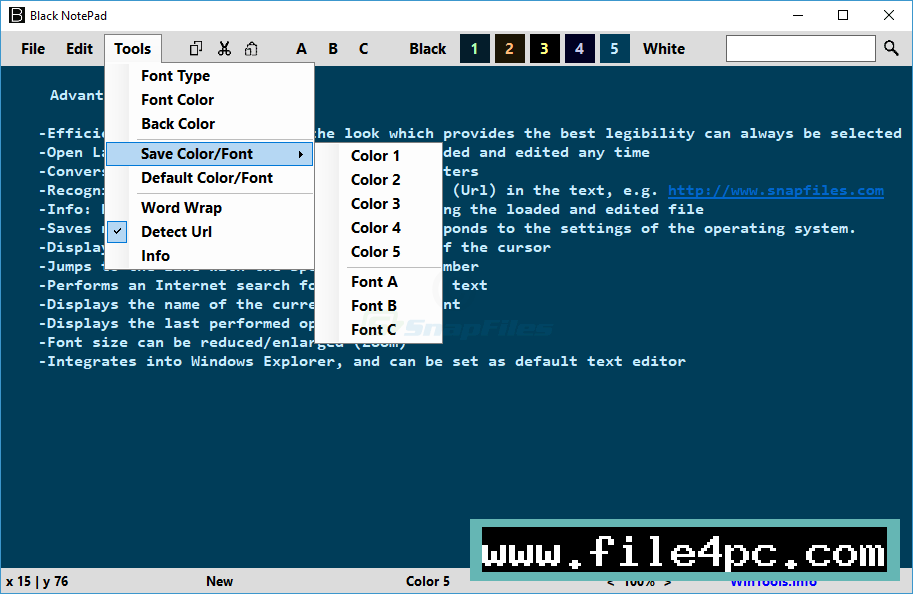
The interface presents a clear writing pane accompanied by a simple menu bar for managing files, adjusting viewing themes, and modifying text attributes. When working on multiple projects, users can open new tabs within the same window to organize different notes or logs. Saving files follows standard system protocols, writing standard plain text formats directly to the chosen storage directory. Because the application stores its configuration settings locally, personal layout preferences remain intact across sessions.
Benefits and Limitations
Benefits
The most prominent advantage of this text editor is its focus on visual clarity and ease of use. The high-contrast color arrangements make text easier to read for individuals experiencing visual fatigue or impairment. Its portable nature ensures that users can maintain a consistent note-taking environment across multiple workstations without leaving installation footprints. Furthermore, the inclusion of multi-tab editing significantly improves productivity compared to opening multiple separate windows.
Limitations
While the application excels at plain text management, it has distinct boundaries. It is not designed to function as a full-featured office suite or a complex integrated development environment.It does not support rich text formatting features like embedded images, advanced tables, or complex typography styles found in traditional word processors. Additionally, users accustomed to advanced code compilation tools or automated syntax highlighting for programming languages will find the feature set too basic for heavy software development tasks.
What's New
Development updates for the application focus on stability, performance refinement, and compatibility adjustments for recent operating system updates. Recent version releases, such as the 3.x series, have concentrated on improving tab management stability and expanding theme customization choices.
Performance tweaks ensure that the executable maintains its rapid startup time and low memory footprint even when handling larger text files. Developers continue to refine the underlying rendering engine to guarantee smooth performance and reliable color contrast across various display resolutions on Windows 10 and Windows 11 hardware.
Installation and Setup
Setting up the software is a quick and clean process due to its portable design. Users should obtain the official package directly from trusted developer channels to ensure file integrity.
After downloading the compressed archive file, extract its contents using standard file extraction tools built into Windows. Place the resulting folder in a convenient location, such as your documents directory or a portable USB drive. Launch the executable file directly from that folder. Because no system files are altered during this process, users should ensure they back up any custom configuration files if they decide to move the program folder to a new storage location.
Tips for Using Black NotePad PC Software
Getting the most out of your text editing workflow involves tailoring the software to your specific habits:
-
Match Themes to Your Environment: Use the quick theme toggle buttons to switch between light and dark modes depending on the ambient lighting of your room to minimize eye strain.
-
Leverage Portable Storage: Keep a copy of the application on a thumb drive along with your important text notes for quick access on public or shared computers.
-
Organize with Tabs: Group related notes into separate tabs within a single application window rather than opening multiple individual instances of the program.
-
Save Frequently: Although the editor is stable, standard data protection habits dictate saving your plain text files regularly during extensive writing sessions.
Modern Alternatives
Several alternative text editors exist for Windows users who need different sets of features. The default Windows Notepad provides a familiar, built-in option for very basic text viewing without requiring external downloads.
For users seeking advanced programming features, Notepad++ offers extensive syntax highlighting, macro recording, and multi-language support. Another option, UltraEdit, caters to enterprise environments requiring heavy file handling and advanced editing capabilities. Choosing between these alternatives depends entirely on whether your primary goal is visual accessibility, basic note-taking, or advanced code editing.
Who Should Use Black NotePad PC Software?
This text editor is well-suited for individuals who value simplicity, speed, and visual comfort above complex formatting tools. It benefits writers, students, and office workers who need a clean space to jot down ideas, review logs, or edit configuration files without distractions.
It is particularly valuable for users with visual sensitivities who find standard bright white text editor backgrounds uncomfortable for extended reading.Conversely, users who require rich text styling, image insertion, or collaborative cloud synchronization will find traditional office applications or cloud-based note tools more appropriate for their workflows.
FAQ
Is Black NotePad compatible with Windows 11?
Yes, the application is fully compatible with both Windows 10 and Windows 11 operating systems.
Does the software require installation?
No, the application is entirely portable and runs directly from its extracted folder without requiring a traditional installation setup.
Can I open multiple documents at the same time?
Yes, the program features multi-tab support, allowing you to open and edit several text files within a single application window.
What file formats does the editor support?
The software is designed primarily for plain text files, focusing on formats like TXT and basic script files.
Conclusion
Black NotePad PC Software offers a clean, accessible, and portable alternative for users seeking a straightforward plain text editor on Windows. By prioritizing high-contrast visual themes and multi-tab functionality without adding unnecessary bloat, it provides a comfortable environment for everyday writing tasks.
Evaluating your specific text editing requirements will help determine if this minimalist utility matches your daily workflow. For anyone wanting a lightweight, distraction-free note-taking companion, this application delivers reliable performance.


💬 0 Comments
✍ Leave a Comment