

Big Z Studios BluPrint PC Software is an audio mixing and reference utility designed for music producers, mixing engineers, and home studio creators who want to build cleaner, more balanced tracks. Operating as a plugin format inside digital audio workstations, it bridges the gap between raw tracking and polished final mixes by offering detailed frequency analysis, professional track referencing, and direct mobile playback testing. Created by Big Z Studios, this application helps producers evaluate how their music translates across different speaker environments without forcing them through tedious export and file-transfer loops.
Overview
Music production involves many technical choices, and achieving a professional mix often requires constant cross-referencing against commercial tracks. When producers want a structured method to evaluate frequency balance, stereo width, and dynamic behavior under the banner of Big Z Studios BluPrint PC Software, they turn to this specialized DAW plugin. It acts as an analytical companion designed to sit on the master or monitor channel of a project, providing real-time visual feedback and workflow enhancements.
The software supports major digital audio workstations running on Windows systems. It is aimed at both independent bedroom producers and seasoned mix engineers who need reliable benchmarks during long mixing sessions. By consolidating multiple diagnostic tools into a single interface, it reduces the need to juggle separate third-party meters, spectrum analyzers, and loudness plugins.
Key Features
The core value of an audio utility rests in its ability to solve everyday production challenges. This tool brings together several essential diagnostic and referencing functions within a single plugin window.
-
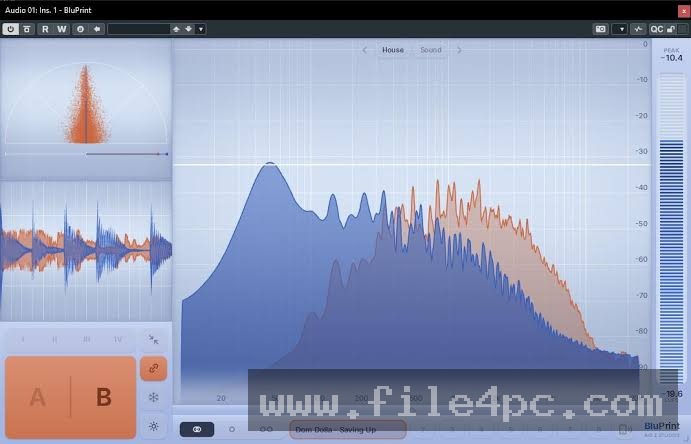
Professional Mix Referencing: Producers can load up to eight reference tracks directly into the plugin. This makes it easy to compare an ongoing project against commercially released songs, set loop points, and perform quick comparisons without cluttering the project timeline.
-
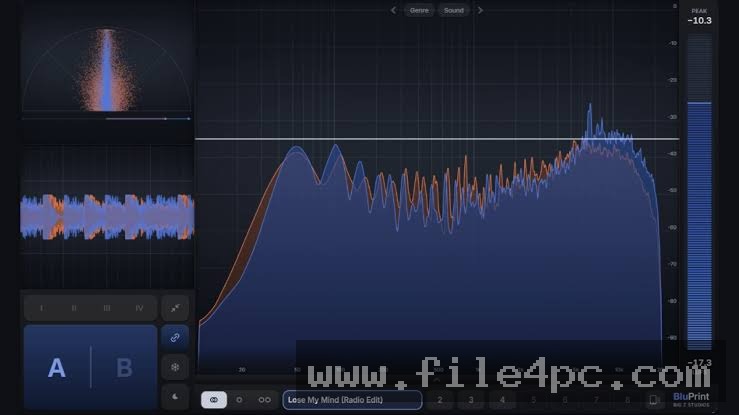
Detailed Frequency Analysis: The built-in analyzer displays the frequency spectrum of your audio in real time. This visual feedback helps identify muddy low-end build-ups, harsh high frequencies, and tonal imbalances that might escape notice during extended listening sessions.
-
Phone Mix Testing Integration: A companion mobile app lets users stream their active DAW mix directly to a smartphone over Wi-Fi. This feature allows creators to check how their tracks sound on standard consumer phone speakers instantly.
-
Oscilloscope and Loudness Data: The application features a waveform oscilloscope to study transient behavior and dynamic peaks over time, alongside accurate loudness meters to monitor perceived volume levels.
-
Stereo Image and Vectorscope: A visual representation of stereo width and phase relationships helps detect phase cancellation issues before a track is exported to mono playback systems.
-
Helpful Placement Guides: Built-in genre presets and target zones offer general benchmarks for where specific elements should sit within a balanced mix hierarchy.
You May Also Like :: AccdbMerge PC Software
How Big Z Studios BluPrint PC Software Works
Setting up and running this utility within a production environment follows a logical workflow designed to integrate smoothly with standard digital audio workstations.
First, the user needs a compatible digital audio workstation installed on a Windows PC, such as Ableton Live, FL Studio, or another major DAW. The plugin is placed directly onto the master or monitor output channel of the mixer. Once active, the user can load reference audio tracks into the plugin interface.
During the mixing process, the producer monitors the visual readouts, checks frequency distributions, and uses the reference tracks to perform instantaneous audio comparisons. If mobile testing is desired, the user activates the streaming function within the plugin and connects via the companion smartphone app on the same network. The final result is a streamlined mixing environment where technical decisions are backed by both objective visual data and real-world playback checks.
Benefits and Limitations
Benefits
The most notable advantage of this software is workflow efficiency. By combining frequency analysis, stereo imaging, and multi-track referencing into one plugin, it reduces screen clutter and speeds up decision-making. The wireless phone streaming feature eliminates the traditional friction of bouncing mixes, transferring files via cloud storage, and opening them on a mobile device. Furthermore, the virtual operation model keeps the DAW project clean without adding unnecessary audio tracks to the timeline.
Limitations
While the software provides helpful analytical depth, it has specific boundaries. As a specialized audio plugin, it requires a functioning digital audio workstation and cannot operate as a standalone application for general audio playback or editing. Additionally, advanced features rely on proper network configuration for mobile streaming, and users must subscribe or purchase a license after the initial trial period expires to maintain full access. It is also important to remember that visual meters serve as guides rather than absolute rules, meaning critical ears remain the primary requirement for successful mixing.
What's New
Audio development updates typically focus on stability, streaming reliability, and hardware compatibility. Recent software releases have introduced optimizations for local network communication, including automatic connection fallbacks via USB cable to ensure uninterrupted mobile streaming sessions.
Developers have also updated the live metering synchronization between the desktop plugin and mobile companion apps, ensuring smoother visual feedback. Performance refinements reduce overall CPU consumption, allowing producers to keep the plugin active on heavy master channels without experiencing performance spikes or audio dropouts during playback.
Installation and Setup
Installing audio plugins on a Windows PC requires careful attention to directory structures and host application compatibility. Users should obtain the software installer exclusively from the official developer website to ensure file integrity.
Run the installer executable and select the appropriate plugin formats, such as VST3, that correspond to your installed digital audio workstation. Once installation completes, open your DAW and rescan your plugin library so the host application recognizes the new entry. Before launching heavy sessions, ensure your computer meets standard audio production requirements and that your firewall settings do not block local network communication if you plan to use the mobile streaming companion feature.
Tips for Using Big Z Studios BluPrint PC Software
Getting the most out of an analytical audio tool involves establishing consistent habits during your mixing sessions:
-
Calibrate Reference Levels: Ensure that imported reference tracks are gain-matched to your current working mix level before performing A/B comparisons to prevent false conclusions about loudness.
-
Use Visuals as Confirmation: Let your ears make the primary artistic decisions while using the frequency analyzer and oscilloscope to confirm or investigate specific technical concerns.
-
Test Multiple Devices: While the phone streaming feature is useful for consumer playback checks, cycle through different output devices like headphones and studio monitors to ensure balanced translation.
-
Organize Genre Presets: Save custom target zones and placement presets that match your specific musical style to speed up future mixing projects.
Modern Alternatives
Producers looking for audio analysis and mix referencing utilities can find several alternative plugins on the market. Tools like Metric AB offer comprehensive track referencing capabilities with flexible switching options, while plugins such as Voxengo SPAN provide detailed frequency spectrum analysis. Other master bus utilities focus on loudness compliance and stereo image verification.
Unlike general spectrum analyzers, this software integrates direct mobile streaming capabilities and multi-track referencing into a single streamlined workflow. Alternative options may excel at individual analytical tasks, but choosing between them depends on whether you prefer an all-in-one referencing suite or specialized standalone meters.
Who Should Use Big Z Studios BluPrint PC Software?
This utility is well-suited for music producers, mix engineers, and bedroom artists who want to improve the translation and technical quality of their mixes. It benefits creators who struggle with low-end balance, muddy frequencies, or translating studio work onto mobile devices.
Casual listeners or hobbyists who do not mix music will not find practical use for a DAW analysis plugin. Similarly, producers who rely entirely on traditional hardware setups or separate modular analysis tools may not require a software-based master bus utility.
FAQ
What digital audio workstations are compatible with the plugin?
The plugin supports all major digital audio workstations that accept standard plugin formats on Windows systems, including Ableton Live, FL Studio, and Logic.
Do I need an internet connection to use the mobile streaming feature?
The mobile streaming feature requires both your PC and your smartphone to be connected to the same local network or Wi-Fi environment to transmit audio wirelessly.
Can the plugin alter the actual audio of my mix?
The plugin is designed for analysis, referencing, and monitoring purposes. It does not alter your audio signal unless you intentionally insert other processing tools alongside it.
How many reference tracks can I load at once?
You can load up to eight reference tracks simultaneously within the plugin, allowing for quick comparisons against multiple commercial songs.
Conclusion
Big Z Studios BluPrint PC Software offers a practical combination of mix referencing, frequency analysis, and mobile playback tools designed to simplify the music production workflow. By consolidating essential diagnostic meters into a single DAW plugin, it helps producers make informed decisions about balance and translation.
Evaluating your specific mixing workflow and hardware setup will help determine whether this analytical utility fits your production needs.
💬 0 Comments
✍ Leave a Comment